
Introduction
Reading long PDF documents can take hours, whether you’re studying for an exam, reviewing research papers, analyzing business reports, or simply trying to understand an eBook. Finding the most important information quickly has become a challenge for students, researchers, professionals, and everyday users alike.
This is where an AI PDF summarizer can make a real difference. Instead of reading hundreds of pages manually, modern AI tools can summarize PDF documents in seconds, highlight key insights, answer questions about the content, and even explain difficult concepts in simple language. The right tool can save hours of work while helping you understand information more efficiently.
However, not every AI PDF summarizer delivers the same level of accuracy or features. Some are built specifically for academic research, while others focus on business documents, productivity, or general document analysis. Choosing the wrong tool can result in inaccurate summaries, missing context, or limited functionality.
To help you make an informed decision, we evaluated some of the most popular AI PDF summarizer tools available today. Our comparison focuses on summary quality, ease of use, supported file types, AI capabilities, pricing, value for money, and the type of user each tool is best suited for.
By the end of this guide, you’ll know which best AI PDF summarizer tools deserve your attention, whether you’re looking for a free solution, a research assistant, or a professional document analysis tool.
Choosing the right AI PDF summarizer depends on the type of documents you work with. While some tools excel at summarizing academic research papers, others are better suited for business reports, textbooks, legal documents, or everyday PDFs.
Table of Contents
Who Should Read This Guide?
This guide is written for anyone who wants to save time while understanding lengthy documents more effectively, including:
Students
If you regularly study from lecture notes, textbooks, assignments, or PDF study material, an AI PDF summarizer can help you review important concepts much faster. Many tools can also explain difficult topics in simpler language and answer questions about the document.
Researchers
Researchers often spend hours reading journal articles, scientific papers, and technical reports. AI-powered summarizers can quickly identify key findings, methodologies, and conclusions, making literature reviews significantly more efficient.
Business Professionals
Business reports, financial statements, proposals, contracts, and meeting documents can be lengthy. AI summarization tools help professionals identify the most important information without reading every page in detail.
Content Creators and Writers
Writers, bloggers, marketers, and content creators frequently collect information from multiple PDF sources. AI tools simplify the research process by extracting key insights and reducing reading time.
Everyday Users
Even if you’re not a student or researcher, AI PDF summarizers can help you understand manuals, eBooks, government documents, legal paperwork, and other long PDFs quickly and efficiently.
Regardless of your profession, choosing the right AI tool can save hours of reading while improving productivity and helping you focus on the information that matters most.
At a Glance: Best AI PDF Summarizer Tools
If you’re short on time, here’s a quick overview of our top recommendations.
| Looking For | Our Recommendation |
| 🏆 Best Overall | NotebookLM |
| 💰 Best Free Tool | NotebookLM |
| 🎓 Best for Students | QuillBot |
| 🔬 Best for Researchers | SciSpace |
| 💼 Best for Business | Adobe Acrobat AI Assistant |
| 🤖 Best AI Assistant | ChatGPT |
| 📄 Best PDF Editor with AI | UPDF AI |
| ⚡ Best for Quick Summaries | Smallpdf AI |
Every tool included in this guide has been selected based on its usability, AI capabilities, overall value, and suitability for different types of users. In the following sections, we’ll examine each option in detail to help you choose the one that best fits your needs.
How We Evaluated These AI PDF Summarizer Tools
With dozens of AI-powered PDF summarization tools available today, choosing the right one can be challenging. While many platforms promise fast and accurate summaries, their performance, features, and overall value vary significantly. Some tools are designed for academic research, while others focus on productivity, business documents, or general-purpose AI assistance.
To ensure this guide provides meaningful recommendations, we evaluated each tool using practical criteria that matter to real users rather than relying solely on marketing claims.
Summary Accuracy
The primary purpose of an AI PDF summarizer is to produce clear, accurate, and concise summaries without losing the original meaning of the document. We considered how well each tool identifies key ideas, preserves important context, and explains complex information in a readable format.
Ease of Use
An effective AI tool should be simple enough for anyone to use. We looked at the overall user experience, including document upload, navigation, response speed, and how quickly users can obtain useful summaries without unnecessary complexity.
AI Features
Modern AI PDF tools offer much more than basic summarization. We evaluated additional capabilities such as:
- Asking questions about uploaded PDFs
- Explaining difficult concepts
- Extracting important insights
- Generating study notes
- Supporting multiple document formats
- Interactive conversations with PDF content
These features can significantly improve productivity depending on your workflow.
Pricing and Value for Money
Cost plays an important role when selecting an AI tool. We compared free plans, subscription pricing, feature limitations, and the overall value offered by each platform to help readers determine whether a premium plan is worthwhile.
Supported File Types
Many users work with different document formats beyond PDFs. We considered whether each platform supports additional file types such as Word documents, PowerPoint presentations, text files, and research papers, making them more versatile for everyday use.
Privacy and Security
Uploading sensitive documents requires trust. We reviewed whether the platforms provide clear privacy information and suitable security measures for handling uploaded files. Users working with confidential business documents or personal information should always review a provider’s privacy policy before uploading important files.
Best Use Cases
Instead of declaring a single winner for everyone, we identified which tool performs best for different audiences, including:
- Students
- Researchers
- Business professionals
- Writers and content creators
- Everyday users
This approach ensures that our recommendations are practical and relevant, regardless of your specific needs.
Our Evaluation Process
Rather than focusing on one feature alone, we assessed each tool based on its overall usefulness, reliability, ease of use, pricing, and the value it offers to different types of users. This balanced approach allows us to recommend the right AI PDF summarizer for a variety of real-world situations instead of promoting a one-size-fits-all solution.
1. NotebookLM — Best Overall AI PDF Summarizer
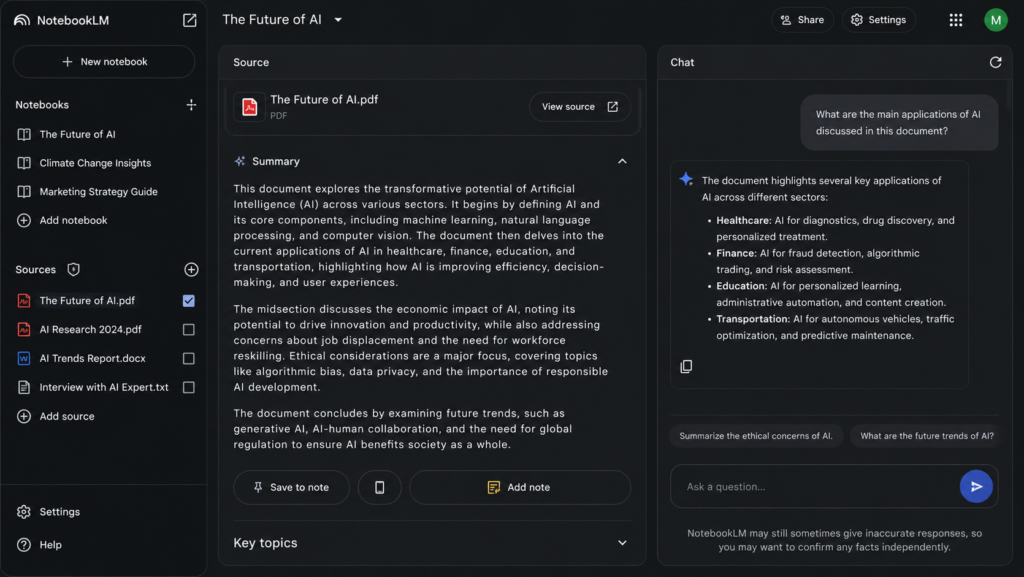
NotebookLM has quickly become one of the most powerful AI tools for understanding and summarizing PDF documents. Developed by Google, it is designed to help users interact with their own sources rather than simply generating generic AI responses. Instead of providing answers based only on general knowledge, NotebookLM analyzes the documents you upload and generates summaries, explanations, study notes, and answers based on those specific sources.
This approach makes it particularly valuable for students preparing for exams, researchers reviewing academic papers, and professionals working with reports or technical documentation. Because its responses are grounded in your uploaded files, it reduces the risk of irrelevant or fabricated information that can sometimes occur with general-purpose AI assistants.
One of NotebookLM’s biggest strengths is its ability to work with multiple documents simultaneously. You can upload several PDFs, Google Docs, or text files into a single notebook and ask questions across all of them. This makes it much easier to compare information, identify common themes, and gather insights from multiple sources without switching between documents.
Another standout feature is that NotebookLM often points you back to the relevant part of the original source. Instead of simply providing an answer, it helps you verify where the information came from, which is especially useful for academic research and professional work.
Key Features
- Summarizes long PDF documents in seconds.
- Allows you to ask questions about uploaded PDFs.
- Supports multiple sources within a single notebook.
- Generates study guides, FAQs, timelines, and briefing documents.
- Provides source-grounded responses with references to your uploaded content.
- Integrates smoothly with the Google ecosystem.
Pros
- Excellent summary quality with strong contextual understanding.
- Easy-to-use interface suitable for beginners.
- Ideal for academic research and large document collections.
- Can analyze multiple documents together.
- Free to use for many users.
Cons
- Works best within Google’s ecosystem.
- Some advanced features and availability may vary by region or account.
- Requires an internet connection.
Pricing
NotebookLM offers a free experience for many users with supported Google accounts. Feature availability and limits may change over time, so always check Google’s official documentation for the latest details.
Official Website: NotebookLM
Best For
NotebookLM is an excellent choice for:
- University students
- Researchers
- Teachers
- Business analysts
- Consultants
- Anyone who regularly reads lengthy PDF documents
Our Verdict
If you’re looking for the best AI PDF summarizer overall, NotebookLM is currently one of the strongest choices available. Its ability to summarize documents accurately, answer questions based on your own sources, and work across multiple PDFs makes it far more than a simple summarization tool. For most users, it delivers the best combination of accuracy, usability, and productivity.
Overall Rating: ⭐ 9.8/10
2. ChatGPT — Best AI Assistant for Summarizing PDFs
Best For: Everyday users, professionals, content creators, and students who want an AI assistant that can summarize, explain, and analyze PDF documents.
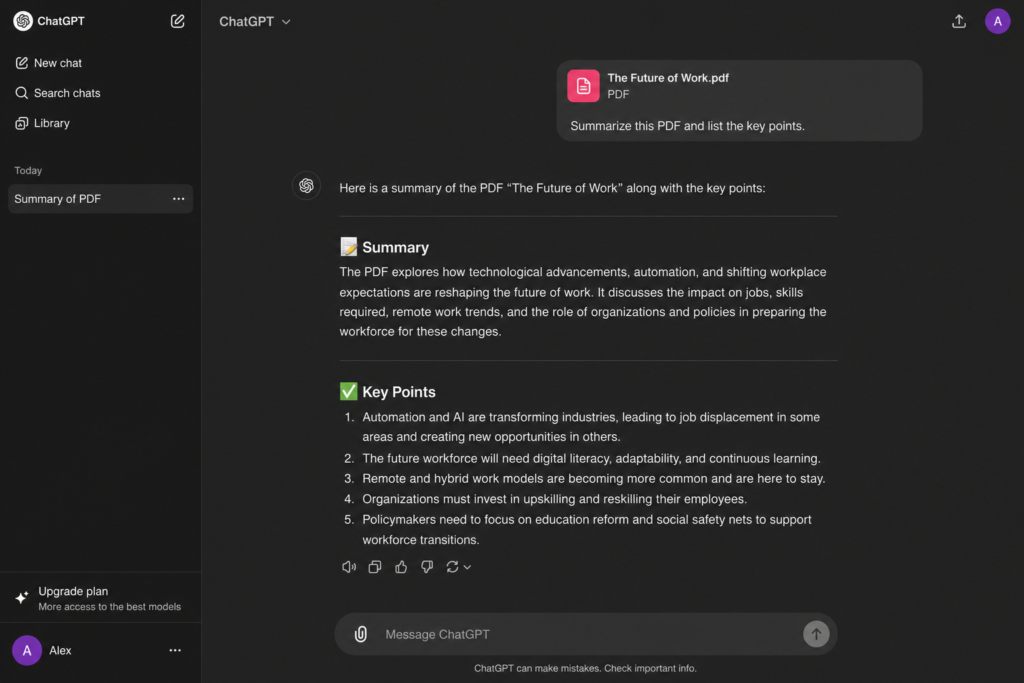
ChatGPT has become one of the world’s most widely used AI assistants, and its ability to summarize PDF documents makes it a powerful productivity tool. Unlike dedicated PDF summarizers, ChatGPT offers much more than simple summaries. It can explain complex concepts, answer follow-up questions, rewrite sections in simpler language, extract key points, generate study notes, and even help users create reports based on uploaded documents.
One of ChatGPT’s biggest strengths is its conversational approach. Instead of receiving a static summary, you can continue asking questions until you fully understand the content. Whether you’re reviewing a research paper, a business proposal, an eBook, or lecture notes, ChatGPT allows you to explore the document interactively.
For students, this means turning lengthy textbooks into concise study notes and practice questions. Researchers can quickly identify important findings from academic papers, while business professionals can summarize reports, meeting documents, and contracts without spending hours reading every page.
The quality of summaries largely depends on the AI model being used and the clarity of the uploaded document. For well-formatted PDFs, ChatGPT generally produces accurate, well-organized summaries while maintaining the context of the original content.
Key Features
- Upload and summarize PDF documents.
- Ask unlimited follow-up questions about uploaded files.
- Explain difficult concepts in simple language.
- Generate study notes, outlines, and action points.
- Rewrite content for different audiences.
- Translate sections into multiple languages.
- Assist with research, writing, and brainstorming.
Pros
- Excellent conversational AI experience.
- Produces clear and easy-to-understand summaries.
- Supports interactive document analysis.
- Helps with writing, research, coding, and productivity beyond PDF summarization.
- Continuously improving with new AI capabilities.
Cons
- Some advanced document features require a paid subscription.
- Performance may vary depending on document quality and complexity.
- Free-tier limits may apply during periods of high demand.
Pricing
ChatGPT offers a free plan with useful capabilities, while paid plans provide access to more advanced AI models, higher usage limits, and additional features. Pricing and plan details may change over time, so always check the official OpenAI website for the latest information.
Official Website: ChatGPT
Best For
ChatGPT is ideal for:
- Students
- Researchers
- Writers and bloggers
- Business professionals
- Freelancers
- Anyone looking for an all-purpose AI assistant
Our Verdict
If you want more than just a PDF summarizer, ChatGPT is one of the best AI tools available. Its ability to summarize documents, answer detailed questions, simplify complex topics, and assist with a wide range of productivity tasks makes it an outstanding all-around AI assistant. While dedicated tools such as NotebookLM may provide stronger source-grounded document analysis, ChatGPT remains an excellent choice for users who need flexibility beyond summarization.
Overall Rating: ⭐ 9.6/10
3. SciSpace — Best AI PDF Summarizer for Research Papers
Best For: Researchers, university students, academics, and anyone working with scientific literature.
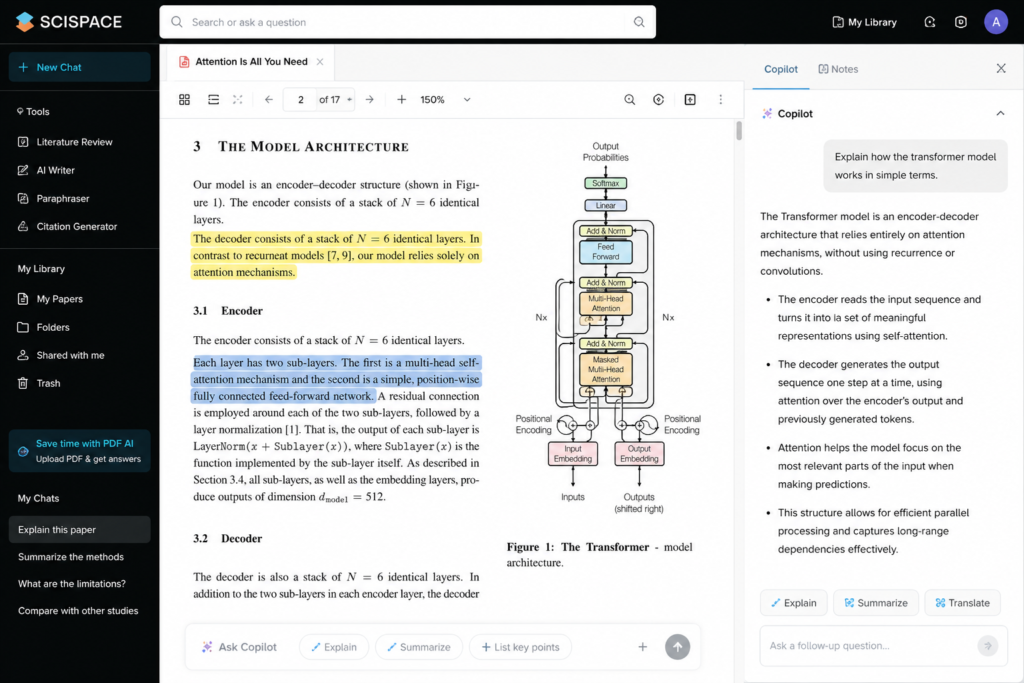
If your primary goal is to understand research papers rather than general PDF documents, SciSpace is one of the best AI tools available. Unlike general-purpose AI assistants, SciSpace is specifically designed for academic research. It helps users summarize scientific papers, explain technical concepts, define unfamiliar terms, and answer questions based on peer-reviewed research.
Reading research papers can be challenging because they often contain complex terminology, statistical analysis, and technical language. SciSpace simplifies this process by allowing you to upload a research paper and interact with it through a conversational interface. Instead of reading every section line by line, you can ask direct questions such as “What is the main finding?”, “Explain this methodology in simple words,” or “Summarize the conclusion.”
One of SciSpace’s biggest advantages is its focus on evidence-based responses. Rather than generating broad summaries, it points users toward the relevant sections of the paper, making it easier to verify information. This feature is particularly valuable for researchers and graduate students who need to maintain academic accuracy.
SciSpace also supports literature reviews by helping users compare research findings across multiple papers. This can significantly reduce the time spent reviewing large volumes of academic literature while improving understanding of complex subjects.
Key Features
- AI-powered summaries for research papers and academic PDFs.
- Ask questions directly about uploaded scientific documents.
- Explains technical concepts in simple language.
- Highlights important findings and conclusions.
- Supports literature review and academic research workflows.
- References relevant sections from uploaded documents.
- Search and discover scientific publications.
Pros
- Designed specifically for academic research.
- Excellent at simplifying complex scientific language.
- Helps users understand research methodologies and findings.
- Interactive question-and-answer experience.
- Saves significant time during literature reviews.
Cons
- Primarily focused on academic content rather than general PDFs.
- Some advanced research features require a paid subscription.
- May not be the best choice for business reports or everyday documents.
Pricing
SciSpace offers a free plan with useful research capabilities, while premium plans unlock additional AI features, higher usage limits, and more advanced research tools. Pricing may change over time, so always check the official SciSpace website for the latest information.
Official Website: SciSpace
Best For
SciSpace is an excellent choice for:
- University students
- Master’s and PhD researchers
- Professors and educators
- Scientists
- Medical professionals
- Anyone reading academic journals or research papers regularly
Our Verdict
For academic research, SciSpace is one of the strongest AI-powered PDF tools available today. Its ability to summarize research papers, explain technical concepts, and provide source-focused answers makes it an outstanding companion for students and researchers. While it is more specialized than NotebookLM or ChatGPT, its research-first approach gives it a clear advantage when working with scientific literature.
Overall Rating: ⭐ 9.5/10
4. QuillBot — Best AI PDF Summarizer for Students
Best For: Students, educators, writers, and anyone looking for quick, easy-to-read summaries of academic or general documents.
QuillBot has earned a strong reputation as one of the most popular AI writing assistants, largely because of its powerful paraphrasing tool. Over the years, however, it has expanded into a broader productivity platform that includes grammar checking, citation generation, translation, plagiarism detection, and an AI-powered summarizer. For students who regularly work with lecture notes, textbooks, assignments, and research papers, QuillBot offers a practical way to reduce reading time while maintaining the essential meaning of the original content.
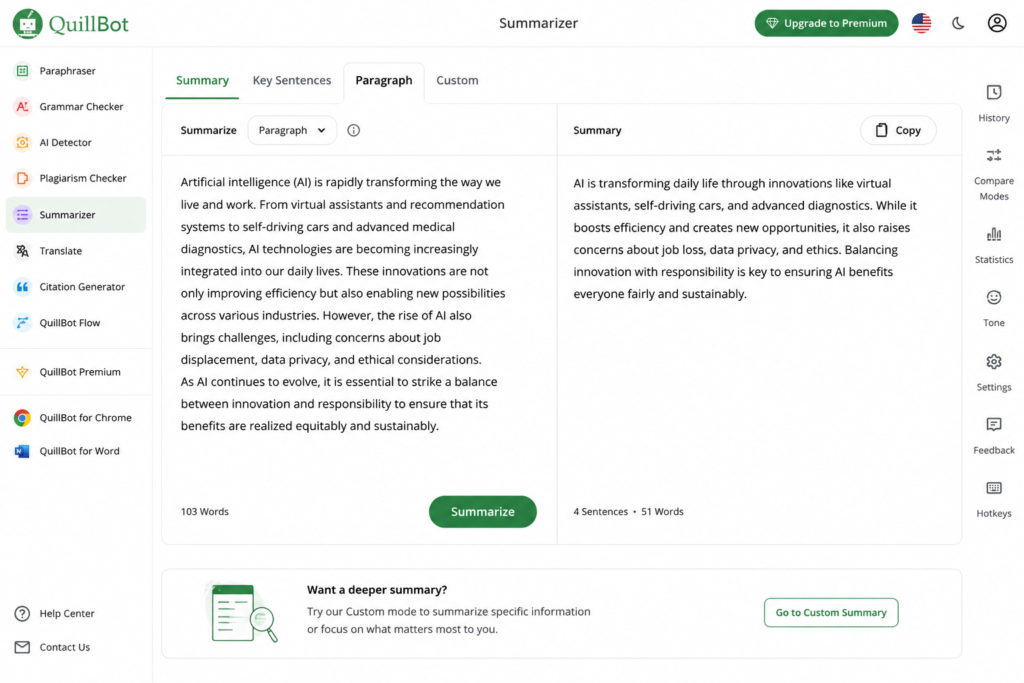
Unlike some AI tools that focus on conversational document analysis, QuillBot emphasizes creating concise and readable summaries. Users can quickly shorten lengthy articles, reports, or PDFs into key points that are easier to review before exams, presentations, or meetings. This makes it particularly useful for learners who need to revise large amounts of information within a limited time.
Another advantage of QuillBot is its simple interface. Uploading or pasting content requires very little effort, making it accessible even for users who have never worked with AI tools before. The platform also integrates well with common writing workflows, allowing students and professionals to move between summarizing, paraphrasing, and grammar correction without switching between multiple applications.
While QuillBot is highly effective for general summarization and study purposes, it is not designed to provide the same level of interactive document analysis found in tools such as NotebookLM or ChatGPT. Instead, its strength lies in helping users understand information faster and improve their own writing.
Key Features
- AI-powered text and PDF summarization.
- Adjustable summary length based on your needs.
- Paragraph and key-sentence summary modes.
- Integrated paraphrasing tool.
- Grammar checker and writing suggestions.
- Citation generator for academic writing.
- Browser extensions and Microsoft Word integration.
Pros
- Extremely beginner-friendly interface.
- Produces clear and readable summaries.
- Excellent companion for studying and revision.
- Includes multiple writing tools in one platform.
- Works well for academic and general-purpose content.
Cons
- Less interactive than AI assistants like ChatGPT.
- Advanced features require a premium subscription.
- Best suited for text summarization rather than deep document conversations.
Pricing
QuillBot offers a free plan with limited daily usage and core summarization features. Premium plans unlock unlimited usage, additional writing modes, faster processing, and access to the platform’s complete suite of AI writing tools. Since pricing may change, check QuillBot’s official website for the latest subscription details.
Official Website: QuillBot
Best For
QuillBot is an excellent choice for:
- High school and university students
- Teachers and educators
- Essay writers
- Bloggers and content creators
- Professionals who need concise document summaries
Our Verdict
If your primary goal is to study more efficiently or summarize long reading material quickly, QuillBot remains one of the best AI tools available. Its combination of summarization, paraphrasing, grammar checking, and citation support makes it especially valuable for students. Although it doesn’t offer the advanced conversational document analysis available in NotebookLM or ChatGPT, it excels as an easy-to-use academic productivity tool.
Overall Rating: ⭐ 9.3/10
5. Adobe Acrobat AI Assistant — Best AI PDF Summarizer for Business & Professional Documents
Best For: Business professionals, legal teams, consultants, project managers, and enterprise users who regularly work with lengthy PDF documents.
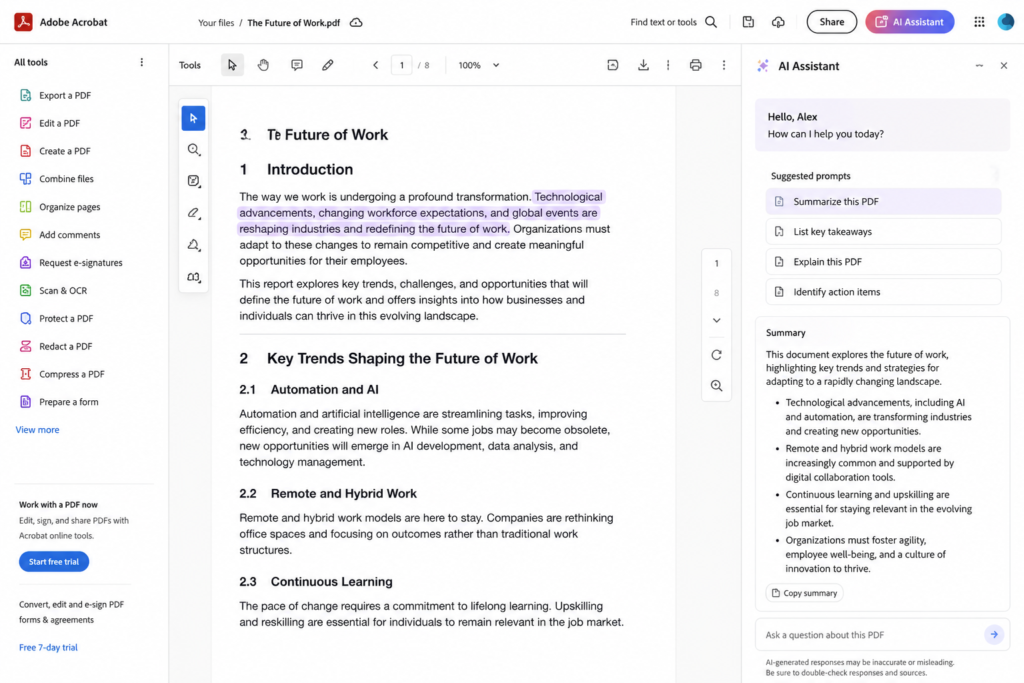
Adobe Acrobat has long been the industry standard for creating, editing, and managing PDF documents. With the introduction of Adobe Acrobat AI Assistant, Adobe has expanded its platform by integrating artificial intelligence that helps users summarize documents, answer questions, explain complex information, and quickly locate important details within lengthy PDFs.
Unlike general AI chatbots, Adobe Acrobat AI Assistant is built directly into one of the world’s most widely used PDF applications. This integration allows users to interact with documents without leaving their existing workflow, making it an attractive solution for professionals who already rely on Adobe Acrobat for everyday document management.
One of the AI Assistant’s biggest strengths is its ability to summarize long reports, contracts, proposals, manuals, financial documents, and presentations while maintaining the overall context of the original file. Instead of manually searching through dozens or even hundreds of pages, users can ask specific questions such as “What are the payment terms?”, “Summarize the executive summary,” or “List the major risks mentioned in this report.” The AI Assistant generates concise responses and directs users to the relevant sections of the document for verification.
For organizations handling large volumes of documentation, this capability can significantly reduce the time spent reviewing files while improving productivity across teams. Legal professionals, financial analysts, HR departments, consultants, and project managers can all benefit from faster document analysis without sacrificing accuracy.
Another advantage is Adobe’s mature PDF ecosystem. Since many businesses already use Acrobat for editing, signing, sharing, and securing PDF files, the AI Assistant becomes a natural extension rather than requiring users to adopt an entirely new platform.
Key Features
- AI-powered summaries for long PDF documents.
- Ask questions directly about uploaded PDFs.
- Generate concise document overviews.
- Quickly locate important sections within reports or contracts.
- Explain complex information in simpler language.
- Integrated directly into Adobe Acrobat.
- Supports collaboration within professional document workflows.
Pros
- Excellent integration with Adobe Acrobat.
- Ideal for business and enterprise environments.
- Accurate summaries for reports, contracts, and manuals.
- Saves significant time when reviewing lengthy documents.
- Trusted PDF platform with advanced editing capabilities.
Cons
- Many AI features require a paid subscription.
- More expensive than several competing AI summarization tools.
- Best suited for users already working within the Adobe ecosystem.
Pricing
Adobe Acrobat AI Assistant is offered as an add-on to eligible Adobe Acrobat plans in many regions. Subscription options, feature availability, and pricing may vary depending on your country and Adobe account. Visit Adobe’s official website for the latest pricing information before purchasing.
Official Website: Adobe Acrobat AI Assistant
Best For
Adobe Acrobat AI Assistant is particularly well suited for:
- Business professionals
- Corporate teams
- Legal professionals
- Financial analysts
- Project managers
- HR departments
- Consultants
- Enterprise users
Our Verdict
If your daily work involves reviewing contracts, reports, proposals, or other professional documents, Adobe Acrobat AI Assistant is one of the strongest AI-powered PDF solutions available. While it may not offer the same conversational flexibility as ChatGPT or the academic focus of SciSpace, its deep integration with Adobe Acrobat makes it an excellent productivity tool for business users who already depend on Adobe’s ecosystem.
Overall Rating: ⭐ 9.2/10
6. UPDF AI — Best Budget-Friendly AI PDF Summarizer
Best For: Students, freelancers, small business owners, and users looking for an affordable all-in-one PDF solution with AI features.
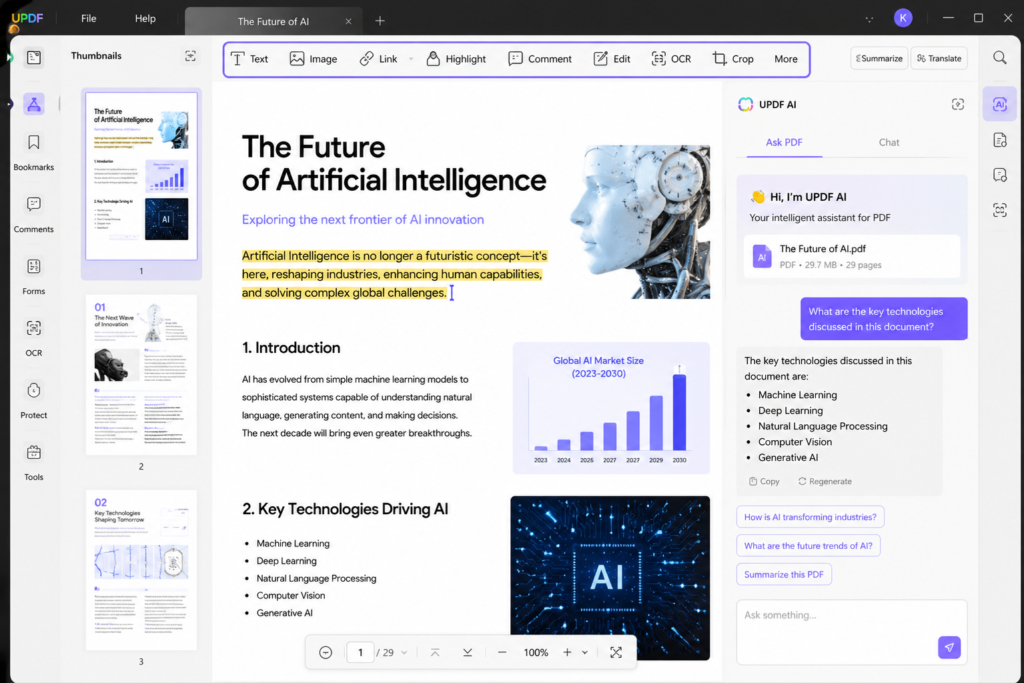
UPDF AI is a newer but increasingly popular PDF platform that combines traditional PDF editing with AI-powered document analysis and summarization. Unlike tools that focus only on AI conversations, UPDF aims to provide a complete PDF workspace where users can read, edit, annotate, convert, and summarize documents in a single application.
This makes it particularly attractive for people who regularly work with PDFs but do not want to pay for a full Adobe Acrobat subscription. Instead of switching between multiple tools, users can upload a PDF, summarize it with AI, make edits, add annotations, and export the final document from the same interface.
One of UPDF AI’s strongest features is its chat-with-PDF capability. After uploading a document, you can ask questions such as “What are the main points?”, “Summarize this section,” or “Explain this in simple language.” The AI generates concise responses based on the document content, helping users understand information more quickly.
UPDF also supports OCR (optical character recognition) for scanned PDFs, making it useful for users dealing with printed documents, invoices, or scanned notes. Combined with editing and annotation tools, it becomes a practical productivity solution rather than just a summarizer.
While it may not have the research-focused depth of SciSpace or the source-grounded analysis of NotebookLM, UPDF offers a strong balance of AI features, PDF editing capabilities, and affordability.
Key Features
- AI-powered PDF summarization
- Chat with uploaded PDF documents
- PDF editing and annotation tools
- OCR support for scanned documents
- File conversion and export options
- Cross-platform support (Windows, Mac, iOS, Android)
- Cloud synchronization features
Pros
- More affordable than many premium PDF suites
- Combines AI and PDF editing in one app
- Easy-to-use interface
- Supports scanned PDFs with OCR
- Good value for students and freelancers
Cons
- AI capabilities are less advanced than some specialized AI platforms
- Premium features require a paid plan
- Smaller ecosystem than Adobe Acrobat
Pricing
UPDF offers a free version with basic functionality, while AI features and advanced PDF tools are available through paid plans. Pricing may change over time, so check the official UPDF website for the latest subscription details before purchasing.
Official Website: UPDF
Best For
UPDF AI is a strong choice for:
- Students
- Freelancers
- Small business owners
- Remote workers
- Users who need both PDF editing and AI summarization
Our Verdict
If you want an AI PDF summarizer that also handles editing, annotations, OCR, and document management, UPDF AI offers excellent value. It may not be the most advanced AI assistant in this list, but its combination of affordability and practical PDF features makes it one of the best budget-friendly options available.
Overall Rating: ⭐ 9.0/10
7. Smallpdf AI — Best for Quick PDF Summaries
Best For: Everyday users, office professionals, freelancers, and anyone who needs fast PDF summaries without a complicated learning curve.
Smallpdf has built a strong reputation as one of the most user-friendly PDF platforms on the web. Originally known for its PDF compression, conversion, and editing tools, the platform has expanded its capabilities by introducing AI-powered features that make understanding lengthy PDF documents faster and easier.
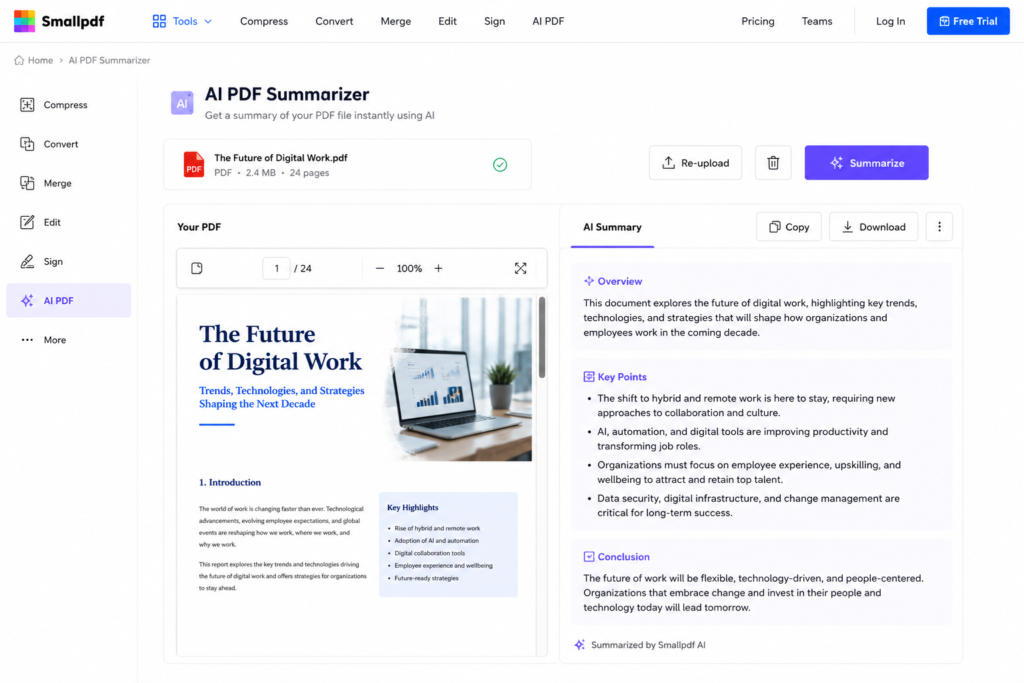
Unlike research-focused AI tools, Smallpdf AI is designed for users who want quick results. Whether you’re reviewing a business report, meeting notes, project documentation, an eBook, or a school assignment, the AI summarizer helps identify the most important information within seconds. Its simple interface allows users to upload a PDF, generate a summary, and continue working without navigating through complex settings or advanced AI prompts.
One of Smallpdf AI’s biggest strengths is accessibility. The platform is web-based, making it easy to use from almost any device with an internet connection. For users who occasionally need AI-powered PDF summaries but don’t require advanced research or enterprise features, Smallpdf offers a straightforward solution that focuses on speed and simplicity.
In addition to summarization, Smallpdf includes a wide range of PDF management tools such as file compression, merging, splitting, conversion, electronic signatures, password protection, and editing. This combination makes it a practical choice for users who want an all-in-one PDF toolkit with AI assistance built in.
Although Smallpdf AI does not provide the same level of conversational document analysis as NotebookLM or ChatGPT, it performs well for everyday summarization tasks and routine office work.
Key Features
- AI-powered PDF summarization.
- Quick extraction of key points from lengthy documents.
- User-friendly interface suitable for beginners.
- PDF editing, merging, splitting, and conversion tools.
- Electronic signature support.
- Cloud-based access across multiple devices.
- Secure document handling with encrypted file transfers.
Pros
- Extremely easy to use.
- Fast AI-generated summaries.
- Excellent collection of PDF management tools.
- Works directly in your web browser.
- Suitable for both personal and business use.
Cons
- AI features are not as advanced as dedicated AI assistants.
- Free plan includes usage limitations.
- Premium subscription required for unrestricted access to advanced features.
Pricing
Smallpdf provides a free plan with limited daily usage, making it suitable for occasional users. Premium plans unlock unlimited document processing, advanced AI features, and access to the complete PDF toolkit. Pricing may change over time, so visit the official Smallpdf website for the latest subscription details.
Official Website: Smallpdf
Best For
Smallpdf AI is ideal for:
- Office professionals
- Small business owners
- Freelancers
- Administrative staff
- Students
- Everyday PDF users
Our Verdict
If your priority is speed and simplicity, Smallpdf AI is an excellent choice. It combines reliable AI-powered PDF summarization with one of the most comprehensive online PDF toolkits available today. While it may not replace advanced research-focused platforms, it offers tremendous value for users who regularly manage PDF documents and need quick, accurate summaries without a steep learning curve.
Overall Rating: ⭐ 8.9/10
Best AI PDF Summarizer Tools Compared (2026)
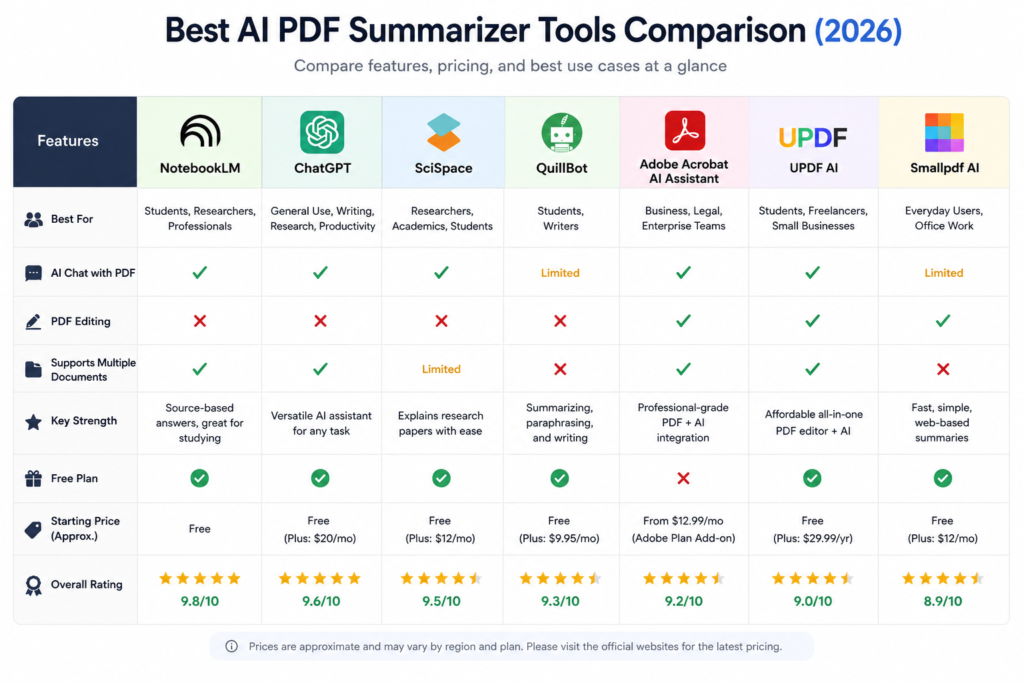
If you’ve read the individual reviews above but are still unsure which AI PDF summarizer is right for you, this comparison table provides a quick overview of the strengths, pricing, and ideal use cases of each tool.
Which AI PDF Summarizer Should You Choose?
The best AI PDF summarizer depends on how you plan to use it. While every tool covered in this guide can summarize PDF documents, each one is designed with a different audience in mind.
Choose NotebookLM if…
- You regularly study from multiple PDFs.
- You want source-based answers instead of generic AI responses.
- You need one of the most accurate AI PDF summarizers available.
- You are a student, researcher, or knowledge worker.
Our Recommendation: ⭐ Best Overall
Choose ChatGPT if…
- You want an AI assistant for more than just PDF summaries.
- You regularly ask follow-up questions about documents.
- You also need help with writing, coding, brainstorming, or productivity.
Our Recommendation: ⭐ Best All-Round AI Assistant
Choose SciSpace if…
- You frequently read scientific papers.
- You’re a university student, researcher, or academic.
- You need explanations of complex research in simple language.
Our Recommendation: ⭐ Best for Research
Choose QuillBot if…
- Your main goal is studying.
- You want concise summaries and paraphrasing tools.
- You write essays, reports, or assignments regularly.
Our Recommendation: ⭐ Best for Students
Choose Adobe Acrobat AI Assistant if…
- Your work involves contracts, reports, legal documents, or financial PDFs.
- Your organization already uses Adobe Acrobat.
- You want AI integrated directly into your professional PDF workflow.
Our Recommendation: ⭐ Best for Business
Choose UPDF AI if…
- You need AI summarization and PDF editing together.
- You want an affordable alternative to Adobe Acrobat.
- You regularly annotate, edit, and convert PDF files.
Our Recommendation: ⭐ Best Budget Option
Choose Smallpdf AI if…
- You only need quick PDF summaries.
- You prefer a simple, beginner-friendly interface.
- You occasionally work with PDF documents.
Our Recommendation: ⭐ Best for Everyday Users
Our Final Recommendation
After comparing all seven tools, NotebookLM stands out as the best overall AI PDF summarizer in 2026. Its source-grounded responses, ability to work with multiple documents, and excellent summary quality make it suitable for almost every type of user.
If you need a more versatile AI assistant that can summarize PDFs while also helping with writing, coding, and research, ChatGPT is an excellent alternative.
For users working primarily with academic literature, SciSpace remains the strongest specialized solution.
If the summary needs to be presented to a class, client or team, our guide to the best AI presentation makers explains which tools can turn source documents and outlines into editable slides.
Frequently Asked Questions (FAQ)
1. What is the best AI PDF summarizer?
The best AI PDF summarizer depends on your specific needs. If you’re looking for the most accurate, source-grounded summaries with support for multiple documents, NotebookLM is our top recommendation. If you want an AI assistant that can also help with writing, coding, and brainstorming, ChatGPT is an excellent choice. Researchers may prefer SciSpace, while students looking for writing assistance can benefit from QuillBot.
2. Can AI summarize large PDF files?
Yes. Most modern AI PDF summarizers can process lengthy documents such as research papers, reports, books, and manuals. However, the maximum file size and page limits vary depending on the platform and whether you’re using a free or paid plan.
3. Are AI PDF summarizers accurate?
Most leading AI PDF summarizers provide highly accurate summaries for well-structured documents. However, no AI tool is perfect. For important academic, legal, financial, or medical documents, you should always verify key information by referring to the original source.
4. Is there a free AI PDF summarizer?
Yes. Several tools offer free plans, including:
- NotebookLM
- ChatGPT
- SciSpace
- QuillBot
- UPDF AI
- Smallpdf AI
Free plans usually include usage limits, while premium subscriptions unlock additional AI capabilities and higher document limits.
5. Which AI PDF summarizer is best for students?
For most students, NotebookLM is the best overall choice because it helps summarize lecture notes, textbooks, and research papers while allowing users to ask questions based on uploaded documents.
If your focus is essay writing and paraphrasing, QuillBot is another excellent option.
6. Which AI PDF summarizer is best for research papers?
If you regularly work with scientific publications and academic journals, SciSpace is one of the strongest choices. It is specifically designed to explain research papers, summarize findings, and simplify complex scientific language.
NotebookLM is also an excellent option for researchers who need to analyze multiple documents simultaneously.
7. Can ChatGPT summarize PDF documents?
Yes. ChatGPT can summarize uploaded PDF documents, answer follow-up questions, explain difficult concepts, generate study notes, and extract key information. Advanced document capabilities may depend on your subscription plan and the features available in your region.
8. Are AI PDF summarizers safe to use?
Most reputable AI platforms use security measures to protect uploaded documents. However, if your PDFs contain confidential business information, legal contracts, financial records, or sensitive personal data, review the provider’s privacy policy before uploading them. Some organizations may have policies restricting the use of third-party AI services for confidential documents.
9. Do AI PDF summarizers work on scanned documents?
Some platforms support scanned PDFs through Optical Character Recognition (OCR). Tools like UPDF AI can recognize text from scanned documents before summarizing the content. The quality of the summary depends on how accurately the OCR converts the scanned text into editable content.
10. Which AI PDF summarizer offers the best value for money?
If you’re looking for the best balance of features and affordability:
- NotebookLM – Best overall value.
- ChatGPT – Best all-purpose AI assistant.
- UPDF AI – Best budget-friendly all-in-one PDF solution.
- Smallpdf AI – Best for occasional users who need quick summaries.
Final Thoughts
Artificial intelligence has transformed the way we read and understand PDF documents. Instead of spending hours going through lengthy reports, textbooks, research papers, or business files, today’s AI-powered tools can summarize complex information in minutes while helping users find answers, clarify difficult concepts, and improve productivity.
Each tool featured in this guide has its own strengths. NotebookLM stands out as the best overall AI PDF summarizer because of its source-based responses and ability to analyze multiple documents together. ChatGPT offers exceptional flexibility for users who need both document analysis and a powerful AI assistant. SciSpace remains the leading choice for academic research, while QuillBot, Adobe Acrobat AI Assistant, UPDF AI, and Smallpdf AI each serve different user needs depending on budget, workflow, and document type.
Before choosing a tool, consider how you plan to use it. A student preparing for exams may prioritize study features, while a business professional may value integration with existing document workflows. Selecting the right AI PDF summarizer can save countless hours and make working with documents significantly more efficient.
If you’re just getting started, NotebookLM is the best place to begin. Its combination of accuracy, ease of use, and source-grounded responses makes it our top recommendation for most users in 2026.
Call to Action
Have you tried any of the AI PDF summarizer tools featured in this guide? We’d love to hear about your experience.
Share your favorite tool in the comments and let us know how it has improved your workflow. If you found this comparison helpful, consider bookmarking this page and sharing it with friends, classmates, or colleagues who regularly work with PDF documents.
Looking for more AI productivity guides? Explore our AI Tools category for in-depth reviews, comparisons, and tutorials to help you work smarter with artificial intelligence.


Nice comparison! The guide is clear and easy to follow. You could also consider adding Undetectable.ai as an option for users looking for fast AI-powered PDF summaries.
Yeah Sure, will use your tool and will update my audience. Thank you!