Freelancing becomes much harder when your work starts living in ten different places.
One client sends requirements by email.
Another sends feedback through WhatsApp.
Your tasks are sitting in a notebook.
Deadlines are in Google Calendar.
Files are scattered across Drive folders.
And somewhere in all of that, you’re trying to remember which client is waiting for a revision.
That’s where project management software becomes useful.
The right tool gives you one place to see what needs to be done, who it’s for, when it’s due, what stage it’s in, and what the client is waiting for.
But freelancers don’t necessarily need the same software as a 200-person company.
A solo designer may need nothing more than a simple Kanban board. A freelance developer might need dependencies, milestones and technical workflows. A small marketing agency may need client access, time tracking, reporting and recurring processes.
So instead of simply listing seven popular project management apps, this guide compares them specifically for freelancers and small client-service businesses.
We’ll look at ClickUp, Trello, Notion, Asana, monday.com, Teamwork.com and Basecamp—and explain who each one is actually best for.
Table of Contents
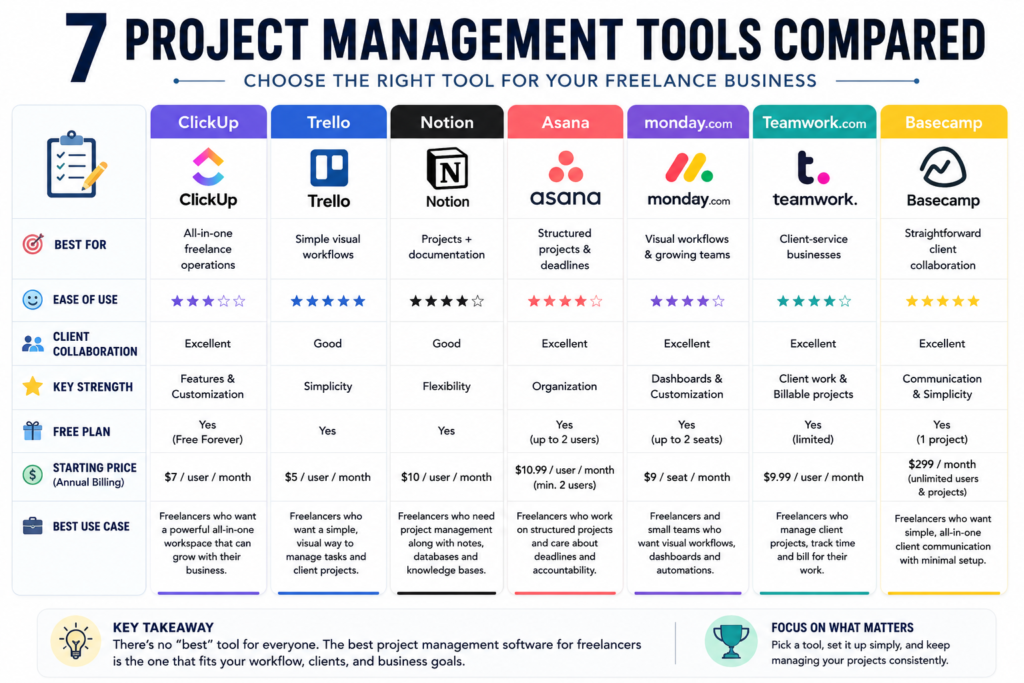
Quick Comparison: The 7 Best Project Management Tools for Freelancers
| Software | Best For | Ease of Use | Client Collaboration | Free Option | Biggest Strength |
|---|---|---|---|---|---|
| ClickUp | All-in-one freelance operations | Medium | Excellent | Yes | Features and customization |
| Trello | Simple visual workflows | Excellent | Good | Yes | Simplicity |
| Notion | Projects + documentation | Good | Good | Yes | Flexibility |
| Asana | Structured project management | Excellent | Excellent | Yes | Organization |
| monday.com | Visual workflows and growing teams | Good | Excellent | Yes | Dashboards and customization |
| Teamwork.com | Client-service businesses | Good | Excellent | Yes | Client work and billable projects |
| Basecamp | Simple client collaboration | Excellent | Excellent | Yes | Communication and simplicity |
The important thing is that more features don’t automatically mean a better tool.
For a freelancer, unnecessary complexity can become its own productivity problem.
What Is Project Management Software for Freelancers?
Project management software helps you organize the work involved in completing a project.
For freelancers, that could mean:
- breaking a website into tasks,
- setting deadlines,
- tracking revisions,
- organizing client feedback,
- storing project information,
- assigning work to contractors,
- tracking project progress,
- monitoring billable time,
- and keeping client communication connected to the project.
For example, imagine you’re a freelance web designer working with three clients.
Without a project management system, you might have:
Client A
- Email requirements
- Google Drive files
- WhatsApp feedback
- Calendar deadline
Client B
- Notion brief
- Email revisions
- Separate invoice spreadsheet
Client C
- Slack messages
- Dropbox files
- Notes in your phone
A project management tool can bring much of this into a structured workflow.
Instead of remembering everything, you can create:
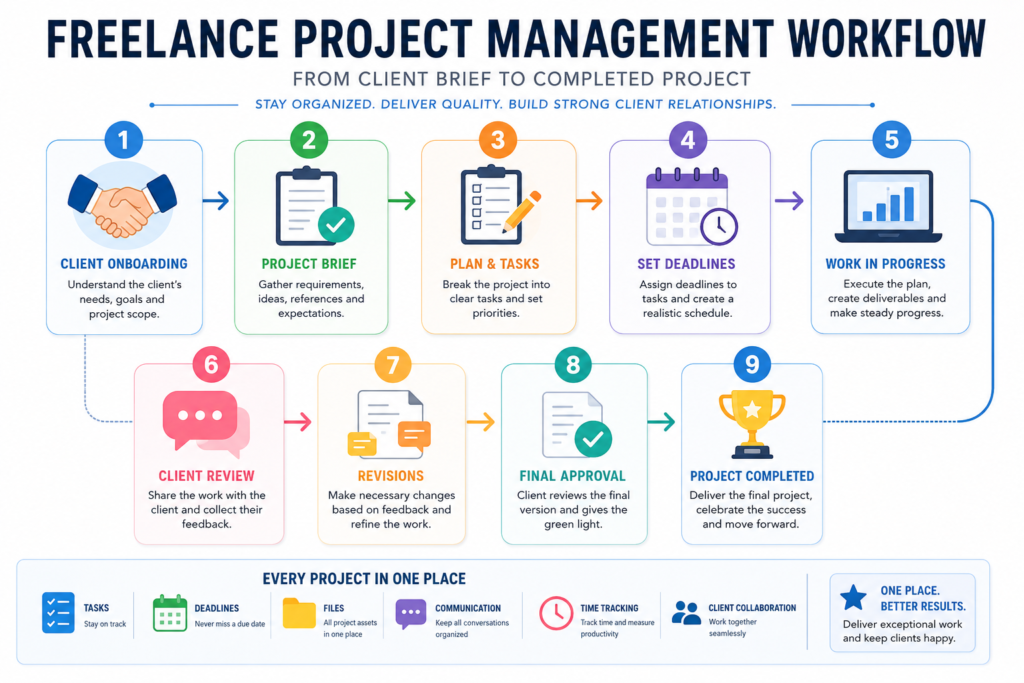
Client → Project → Tasks → Deadlines → Files → Feedback → Completion
That becomes particularly valuable once you’re handling several clients at the same time.
The 7 Best Project Management Software for Freelancers
1. ClickUp — Best Overall for Freelancers
ClickUp is probably the strongest all-around option for freelancers who want more than a simple task list.
ClickUp specifically markets its platform toward freelancers and provides features for managing clients, projects, orders, workflows and collaboration. Its freelancer guidance also recommends using its workspace hierarchy to organize multiple freelance gigs and allowing clients to collaborate through controlled guest access.
Why freelancers may like ClickUp
ClickUp gives you a lot of ways to structure your work.
You can use:
- Lists
- Boards
- Tasks
- Subtasks
- Docs
- Custom fields
- Dashboards
- Calendar views
- Gantt charts
- Time tracking
- Automations
- Forms
- Client guests
Its current free plan includes unlimited tasks and free-plan members, plus Docs, Kanban boards and Calendar view. The Unlimited plan is listed at $7 per user/month when billed annually and adds features including unlimited storage, Gantt charts, native time tracking, integrations and permission-controlled guests.
ClickUp for client work
One of ClickUp’s biggest advantages for freelancers is that you can give clients access to specific parts of a project without necessarily exposing your entire workspace.
ClickUp supports permission-controlled guests and lets freelancers make folders, lists and tasks private. Clients can also interact through comments and shared project areas.
This can be useful for a freelancer who wants a professional client workflow such as:
Client → Project → Brief → Tasks → Review → Approval → Completed
You can also keep internal notes separate from what the client sees.
Where ClickUp can become difficult
The downside is the same thing that makes ClickUp attractive:
There are a lot of features.
If you’re a beginner freelancer who only needs:
To Do → Doing → Done
ClickUp may feel like overkill.
You can spend too much time building the perfect workspace instead of doing client work.
ClickUp is best for
Choose ClickUp if you:
- manage several clients,
- want one central workspace,
- need time tracking,
- want automations,
- collaborate with contractors,
- want client access,
- or expect your freelance business to grow.
Our verdict: Best overall for freelancers who want an all-in-one system.
2. Trello — Best for Simple Visual Project Management
Trello takes a very different approach.
Instead of overwhelming you with dozens of project-management concepts, Trello is built around a visual board system.
You create:
Board → Lists → Cards
For a freelance writer, for example:
Ideas → Writing → Editing → Client Review → Published
Each article becomes a card.
That simplicity is Trello’s biggest advantage.
Trello’s current free plan includes unlimited cards, up to 10 boards per Workspace, due dates, assignees, mobile apps and unlimited Power-Ups per board. Its Standard plan is listed at $5 per user/month when billed annually.
Why Trello works well for freelancers
A freelancer doesn’t always need complicated project management.
If you have five clients and each project contains relatively straightforward tasks, a visual board can give you enough visibility without creating unnecessary administrative work.
For example:
Client Website Board
Backlog
- Homepage copy
- About page
- Contact page
In Progress
- Homepage design
Waiting for Client
- Logo approval
Completed
- Mobile optimization
You can instantly see what is happening.
Trello also supports collaboration and permissions. Its official project guide explains how members can be invited to boards and how permissions can be configured, including options for people who only need to observe a project.
Where Trello falls short
Trello’s simplicity becomes a limitation when your projects become complicated.
If you need:
- detailed dependencies,
- advanced reporting,
- extensive project portfolios,
- complex resource management,
- or sophisticated workflows,
you may eventually outgrow it.
You can extend Trello with Power-Ups and higher plans, but that can reduce the simplicity that attracted you to it in the first place.
Trello is best for
Choose Trello if you:
- work solo,
- prefer visual boards,
- have relatively simple projects,
- want a quick setup,
- or hate complicated productivity software.
Our verdict: Best choice for freelancers who value simplicity above everything else.
3. Notion — Best for Projects + Documentation
Notion is difficult to categorize because it isn’t just a project management tool.
It’s also a workspace for:
- notes,
- documentation,
- databases,
- project information,
- wikis,
- task management,
- meeting notes,
- and internal knowledge.
That’s exactly why it can be so useful for freelancers.
Notion’s current Free plan is $0 for individual use, while Plus is listed at $10 per member/month. Its project and task capabilities include databases, multiple views, subtasks and dependencies.
Why freelancers may choose Notion
Imagine you’re a freelance content strategist.
You could create one client workspace containing:
Client Overview
- Company information
- Brand voice
- Target audience
- Competitors
Projects
- Blog strategy
- Content calendar
- SEO research
Tasks
- Draft article
- Client review
- Revisions
Meeting Notes
- January meeting
- February meeting
Resources
- Brand assets
- Research
- Guidelines
Notion can connect projects, tasks, meeting notes and associated documents through databases and relations.
Its task databases support properties such as status, assignee and due date, while dependencies can connect tasks that need to happen in sequence.
Notion’s biggest advantage
Documentation.
For freelancers who frequently need to refer back to:
- client requirements,
- brand guidelines,
- meeting notes,
- research,
- SOPs,
- content plans,
Notion can keep the information connected to the project instead of scattering it across separate apps.
The downside
Notion is incredibly flexible.
That can become a problem.
You can spend hours creating:
- custom dashboards,
- databases,
- formulas,
- views,
- templates,
- relation systems,
when you could have simply created a basic task list.
The software doesn’t force you into a workflow.
You have to design one.
Notion is best for
Choose Notion if you:
- love organized documentation,
- manage research-heavy projects,
- create content,
- want a client knowledge base,
- need project notes alongside tasks,
- or want to build your own custom system.
Our verdict: Best for freelancers who need project management and documentation in the same workspace.
4. Asana — Best for Structured Project Management
Asana is one of the strongest choices if you want project management to feel structured without building your own system from scratch.
Asana’s project-management system supports tasks, project views, custom fields, status updates, time tracking and collaboration with external partners.
Its current Personal plan is free for up to two users and includes unlimited tasks and projects plus list, board and calendar views. The Starter plan is listed at $10.99 per user/month when billed annually.
Why Asana works for freelancers
Asana is particularly good when projects contain multiple stages and deadlines.
For example, a freelance marketing project might look like:
Research
↓
Strategy
↓
Content Creation
↓
Client Review
↓
Revisions
↓
Approval
↓
Publishing
Each task can have:
- an owner,
- a due date,
- attachments,
- descriptions,
- comments,
- and additional context.
Asana also lets you switch between list, board, calendar, timeline and Gantt-style views without rebuilding the project.
Client collaboration
Asana supports external collaborators, which can be useful if you want clients involved in project work without making them part of your internal organization.
For a freelancer, that can make the client workflow more professional.
Instead of:
“Did you see my email?”
you can have:
Homepage design — Awaiting client approval
The project itself becomes the source of truth.
The biggest limitation for solo freelancers
Asana’s current free plan is quite useful, but its paid structure is more team-oriented.
Asana does not offer a one-user paid subscription; its paid plans have a minimum two-seat requirement.
That matters if you’re a solo freelancer who wants one paid account.
Asana is best for
Choose Asana if you:
- manage structured projects,
- work with clients or contractors,
- care about deadlines,
- need different project views,
- or expect your freelance operation to become a small team.
Our verdict: One of the best choices for freelancers who want structured, professional project management.
5. monday.com — Best for Visual Workflows and Growing Teams
monday.com is another highly visual work-management platform.
Its system revolves around boards, items and customizable columns, allowing freelancers and small teams to build workflows around their particular business.
The current free monday work management plan supports up to two seats and three boards. The Basic plan is listed at $9 per seat/month when billed annually, while Standard is $12 and Pro is $19 under the current pricing shown on monday’s website.
Why monday.com is interesting for freelancers
monday.com can work particularly well if your freelance business is becoming more like a small agency.
You might have:
Lead Pipeline
Active Projects
Content Calendar
Client Approvals
Team Workload
all represented through boards and dashboards.
The Standard plan adds features such as automations, integrations, timeline/Gantt views, calendar views and guest access, while Pro adds time tracking and more advanced workflow capabilities.
Client collaboration
This can be valuable if you regularly work with clients who need visibility into project status.
For example:
| Task | Status | Deadline | Client |
|---|---|---|---|
| Homepage | In progress | Aug 18 | Client A |
| Blog #3 | Review | Aug 20 | Client B |
| Logo concepts | Waiting | Aug 21 | Client C |
The visual nature makes the status of your business easy to understand.
The downside
monday.com can become expensive or unnecessarily complex for a solo freelancer.
Its pricing is seat-based, and the current free plan is limited to two seats.
If you’re managing yourself and two small projects, you may not need everything the platform offers.
monday.com is best for
Choose monday.com if you:
- run multiple client workflows,
- collaborate with other freelancers,
- want dashboards,
- need automations,
- or are moving toward an agency-style operation.
Our verdict: Best for freelancers who are growing into small teams or agencies.
6. Teamwork.com — Best for Client-Service Businesses
Teamwork.com deserves special attention because its positioning is closely aligned with client-service businesses.
Its current pricing page specifically describes the platform around client work, projects and time tracking. The Basics plan is currently listed at $9.99 per user/month when billed annually and includes Gantt, Table, List and Board views plus billable-time tracking.
Its plan comparison also positions the free tier for individuals and small teams, Basics around client collaboration, and higher tiers around budgeting, invoicing, forecasting and profitability.
Why Teamwork.com is relevant to freelancers
Think about the type of freelancer who doesn’t simply complete tasks.
They manage client projects.
For example:
- freelance marketing consultant,
- web development freelancer,
- design studio,
- virtual assistant,
- SEO consultant,
- content agency,
- small creative agency.
These businesses care about more than task completion.
They care about:
Projects + Clients + Time + Profitability
That makes Teamwork.com particularly interesting as a freelancer scales.
Time tracking
If you already track billable hours, this can be useful.
And it creates a natural connection to Article 3, where we discussed time tracking for freelancers.
You can use a project management platform to organize the project and then track the actual time being spent on it.
That gives you better information for future pricing.
The downside
Teamwork.com may be more software than a very small solo freelancer needs.
If you’re only managing two simple projects, Trello or Notion may be easier.
Teamwork.com is best for
Choose it if you:
- work with multiple clients,
- bill by time,
- manage client-service projects,
- work with contractors,
- or are building a small agency.
Our verdict: One of the strongest options for freelancers whose work revolves around client services and billable projects.
7. Basecamp — Best for Straightforward Client Collaboration
Basecamp takes a simpler approach to project management.
Instead of trying to become every possible productivity tool, Basecamp focuses heavily on keeping project communication, tasks, files and schedules together.
Each Basecamp project gets a dedicated project page with tools such as to-dos, message boards, chat, calendars and card tables. It also has a Client mode that lets you control what clients can see.
Why freelancers may like Basecamp
Client communication can become messy surprisingly quickly.
You might have:
- one email conversation,
- another WhatsApp conversation,
- a separate file folder,
- a spreadsheet,
- and a collection of feedback messages.
Basecamp’s approach is essentially:
Put the project in one place.
That makes it attractive for freelancers who value communication and simplicity more than endless customization.
Client mode
This is one of Basecamp’s strongest freelancer-friendly features.
You can invite clients into a project and control which parts they can see.
That can make the client experience cleaner.
Pricing
Basecamp currently offers one project free forever, with up to 20 users and 1 GB of storage. Its Pro Unlimited plan is listed at $299/month when billed annually, with unlimited users and projects.
For a solo freelancer, the free option may be enough to test the workflow.
The full Pro Unlimited plan, however, is much easier to justify for a larger client-service business than for an individual freelancer.
Basecamp is best for
Choose Basecamp if you:
- want simple client collaboration,
- don’t need hundreds of settings,
- prefer communication-centered projects,
- or want clients to have a clean project space.
Our verdict: Best for freelancers who want straightforward client communication without building a complicated productivity system.
ClickUp vs Trello vs Notion vs Asana vs monday.com vs Teamwork vs Basecamp
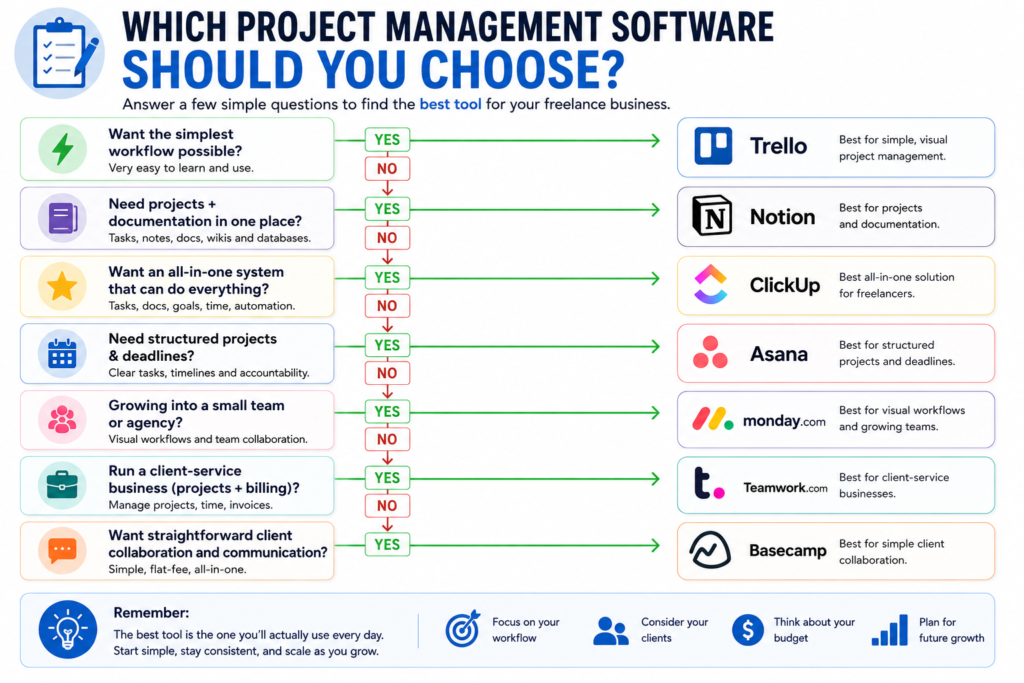
If you’re still unsure, here’s the simpler way to think about them.
Choose ClickUp if you want:
Maximum flexibility
You want tasks, docs, time tracking, dashboards, automations and client collaboration in one system.
Choose Trello if you want:
Minimum complexity
You want to open your project and immediately understand what needs to happen next.
Choose Notion if you want:
Projects + knowledge
Your freelance work involves lots of research, documentation, notes and information.
Choose Asana if you want:
Structure
You care about deadlines, task ownership, project stages and multiple ways of viewing the same work.
Choose monday.com if you want:
Visual business workflows
You’re managing multiple processes and perhaps moving toward a small team.
Choose Teamwork.com if you want:
Client-service management
Your freelance business revolves around billable client projects and eventually profitability.
Choose Basecamp if you want:
Simple client collaboration
You want projects, discussions, files and tasks together without excessive configuration.
Which Project Management Software Is Best for a Solo Freelancer?
If you’re completely solo, don’t automatically choose the tool with the longest feature list.
Ask yourself:
How complicated is my work?
If your answer is:
“I have three clients and mostly need a task board.”
Start with Trello.
If you say:
“I need projects, notes, databases and documentation.”
Try Notion.
If you say:
“I want one powerful system that can grow with my freelance business.”
ClickUp is worth considering.
If you say:
“I manage structured projects with deadlines and client collaboration.”
Asana may be a better fit.
The best project management software for freelancers is the one you’ll actually keep using.
What Is the Best Free Project Management Software for Freelancers?
There isn’t one universal winner.
Best free for simplicity: Trello
Trello’s current free plan is generous for basic visual project management, with unlimited cards and up to 10 boards per Workspace.
Best free for features: ClickUp
ClickUp’s Free Forever plan includes unlimited tasks and members plus Docs, Kanban boards and Calendar view.
Best free for documentation: Notion
Notion’s free plan is particularly attractive for individuals who want to combine projects, databases, notes and documentation.
Best free for a very small team: Asana
Asana Personal currently supports up to two users with unlimited tasks and projects.
The right choice depends on whether your biggest problem is tasks, information, collaboration or complexity.
Do Freelancers Really Need Project Management Software?
Not necessarily.
If you’re handling one small client project at a time, a simple task list may be enough.
But project management software becomes much more valuable when you have:
- several clients,
- overlapping deadlines,
- recurring projects,
- contractors,
- revisions,
- client approvals,
- billable hours,
- or lots of project information.
A good rule is:
If you frequently rely on memory to remember what needs to happen next, your workflow probably needs more structure.
How to Set Up Project Management Software for Freelance Work
You don’t need a complicated system.
Start with five stages:
1. Leads
Potential clients.
2. Upcoming
Projects you’ve agreed to but haven’t started.
3. In Progress
Active work.
4. Waiting for Client
Anything blocked by client feedback or approval.
5. Completed
Finished projects.
Then create a project for each client.
Inside each project, create tasks for the actual deliverables.
For example:
Client: ABC Marketing
Project: Website Redesign
- Gather requirements
- Create sitemap
- Homepage design
- Mobile design
- Client review
- Revisions
- Final approval
- Website launch
Now you have a system that tells you what is happening without requiring you to remember everything.
Project management should begin after the client has approved the scope—not while the project is still uncertain. If you need a cleaner handoff from offer to signed agreement and deposit, compare our best proposal software for freelancers before building the project workspace.
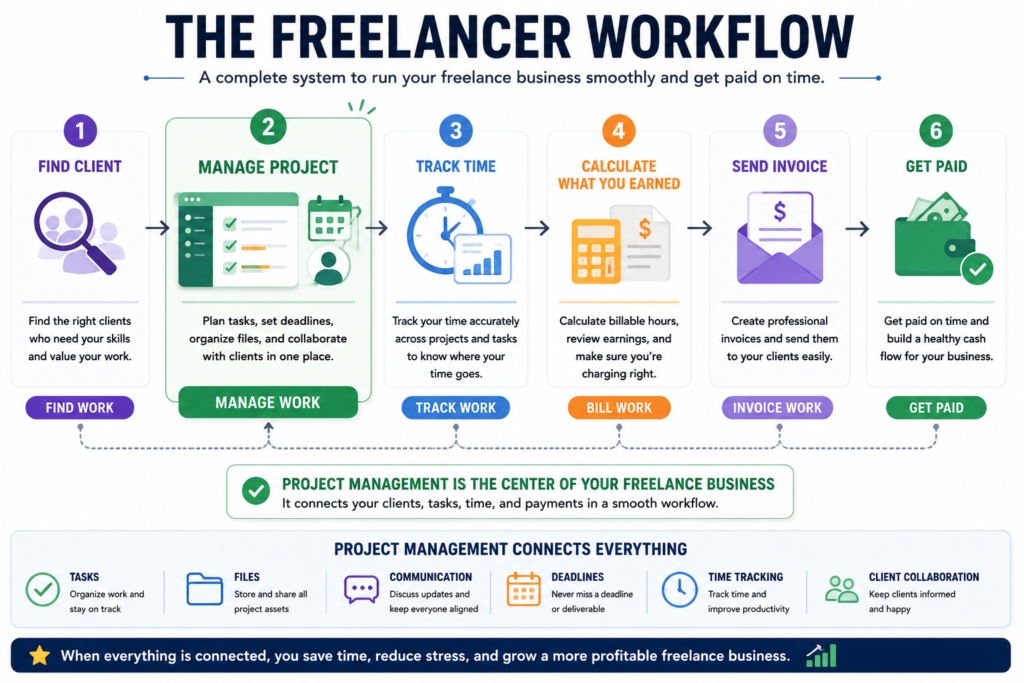
How Project Management Connects With Time Tracking
Project management and time tracking solve different problems.
Project management answers:
What needs to happen?
Time tracking answers:
How long did it take?
That’s why the two tools work well together.
For example, Our Article free time tracking for freelancers focuses on that workflow.
You can naturally connect that workflow:
Project Management
→ tasks and deadlines
Time Tracking
→ hours spent
Pricing
→ what you should charge
Invoicing
→ how you get paid
When you reach that final step, our best invoicing software for freelancers comparison shows which free and paid tools fit hourly, project-based, and recurring billing.
How to Choose Project Management Software for Your Freelance Business
Before paying for anything, answer these eight questions.
1. How many clients do I manage?
One client doesn’t require the same system as ten.
2. Do clients need access?
If yes, prioritize permission controls and external collaboration.
3. Do I bill hourly?
If yes, native time tracking may be valuable.
4. Do I need documentation?
If you constantly store briefs, notes and research, Notion or ClickUp may make more sense.
5. Do I need Gantt charts or dependencies?
If projects contain complex sequences, look at ClickUp or Asana.
6. Do I work with contractors?
You’ll want task assignment, permissions and collaboration.
7. Do I want automation?
ClickUp and monday.com are particularly attractive if you want to automate repetitive workflow steps.
If the automation you need is specifically about deciding when work should happen, our best AI scheduling assistants comparison covers tools that can suggest, optimize, or automatically rebuild your calendar around tasks and meetings.
8. Am I actually going to use it?
This might be the most important question.
A simple system you use every day is better than an incredible system you abandon after two weeks.
Common Project Management Mistakes Freelancers Should Avoid
Using too many tools
You don’t need:
- one task app,
- one project app,
- one notes app,
- one client portal,
- one communication app,
- and three spreadsheets
just because you can connect them.
Start with the minimum system that solves your actual problem.
Creating too many statuses
You don’t need 17 workflow stages.
For many freelancers:
To Do → In Progress → Review → Waiting → Done
is enough.
Giving clients access to everything
Client collaboration doesn’t mean giving clients your entire internal workspace.
Use permissions and client-facing views appropriately.
ClickUp, Asana, Trello and Basecamp all provide different ways to control collaboration or visibility.
Spending more time managing the system than managing the project
This is the biggest danger of powerful software.
If setting up a task takes longer than completing it, your system is working against you.
Final Verdict: What Is the Best Project Management Software for Freelancers?
There isn’t one winner for every freelancer.
But if we narrow the choices by use case, the decision becomes much easier.
🏆 Best overall: ClickUp
Best for freelancers who want a powerful all-in-one workspace with tasks, documentation, time tracking, automation and client collaboration. ClickUp explicitly supports freelancer workflows and client collaboration.
🟢 Best for simplicity: Trello
Best if you want a visual board and don’t want to spend days configuring your productivity system.
📝 Best for documentation: Notion
Best for freelancers who need project management alongside notes, research, databases and documentation.
📊 Best for structured projects: Asana
Best for deadline-heavy projects where tasks, owners, views and project structure matter.
📈 Best for growing freelance teams: monday.com
Best for freelancers who are moving toward multiple workflows, collaborators and agency-style operations.
💼 Best for client-service businesses: Teamwork.com
Best if your freelance work involves client projects, billable time and eventually more sophisticated project and profitability management.
💬 Best for straightforward client collaboration: Basecamp
Best if you want tasks, communication, files and client visibility organized around each project without excessive configuration.
The most important thing is not choosing the software with the most features.
It’s choosing the system that makes your freelance work easier to see, easier to manage and harder to forget.
Start simple.
Create one project.
Add the real tasks.
Give every task a clear deadline.
Keep client feedback attached to the work.
And only add complexity when your business actually needs it.
Frequently Asked Questions
What is the best project management software for freelancers?
ClickUp is our best overall pick because it combines task management, multiple views, documentation, time tracking, automation and client collaboration. However, Trello may be better for simplicity, Notion for documentation, and Asana for structured project management.
What is the best free project management software for freelancers?
ClickUp, Trello, Notion and Asana all have useful free options, but their limits and feature sets differ. ClickUp’s free plan is particularly feature-rich, while Trello is excellent for simple visual workflows.
Can freelancers use project management software with clients?
Yes. Several platforms support external collaboration. ClickUp supports guests and permission controls, Asana supports external partners, Trello supports board collaboration and Basecamp provides client-specific visibility controls.
Do freelancers need paid project management software?
Not necessarily. A free plan can be enough when you’re starting. Upgrade when you actually need features such as advanced automation, additional storage, time tracking, reporting, more complex workflows or larger collaboration limits.
Is Notion a project management tool?
Notion can function as a project management system using task databases, views, relations, subtasks and dependencies. Its strength is that projects can live alongside documentation and other business information.
Is Trello good for freelance work?
Yes, especially for freelancers who prefer simple visual workflows. Trello’s boards, lists and cards make it easy to organize projects and collaborate with clients or other contributors.
Can project management software replace time tracking?
Not always. Some platforms, such as ClickUp and monday.com’s higher tiers, include native time tracking, while others may rely on integrations. Project management and time tracking solve different problems, so many freelancers benefit from using both.
What should a freelance project management workflow look like?
A simple workflow can be:
Lead → Planned → In Progress → Client Review → Waiting → Completed
Then break each client project into specific tasks with deadlines, files and relevant communication.