Freelancing gives you a lot of freedom, but it also comes with a problem that becomes more obvious as your workload grows: it’s surprisingly easy to lose track of your time.
You might spend two hours working on a client’s project, jump into a meeting, answer emails, make a few revisions, and then move on to another client. By the end of the day, you know you’ve been busy—but how much time did you actually spend on each project?
That’s where time tracking software for freelancers can make a real difference.
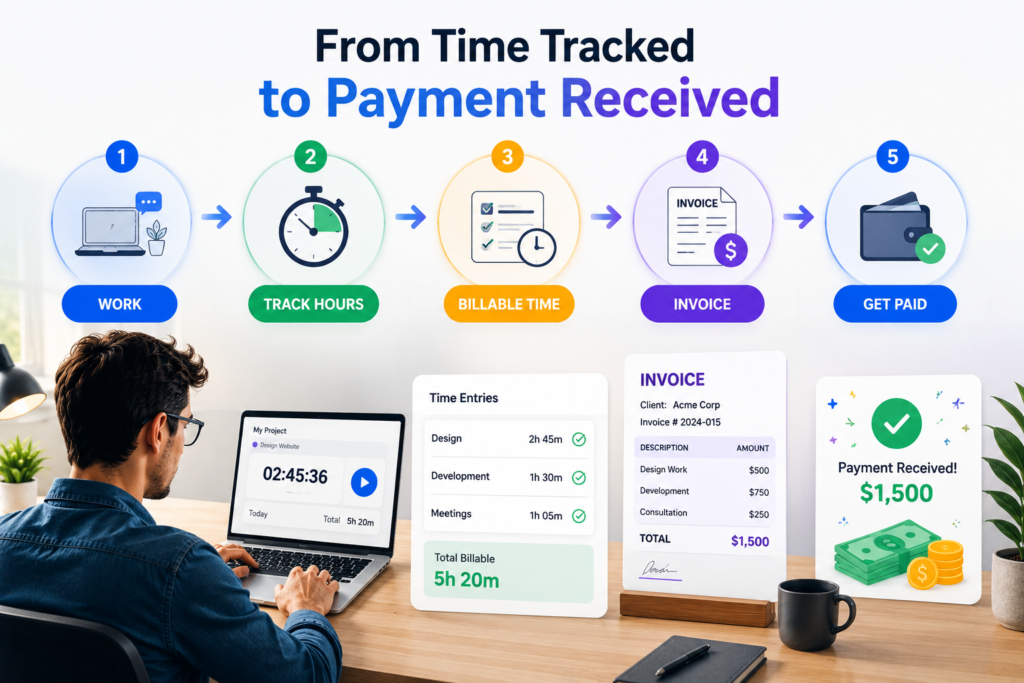
A good time tracker helps you record your working hours against specific clients and projects, separate billable from non-billable work, and understand where your time is going. For freelancers working on fixed-price projects, that information can be just as valuable as it is for someone who charges by the hour. If a project you expected to take 10 hours consistently takes 20, your time records give you something concrete to consider when pricing the next one.
The difficult part is finding a tool that is genuinely useful for free.
Some platforms offer generous free plans for individuals. Others put important features behind paid subscriptions, while some are designed primarily for teams rather than solo freelancers. There are also tools that focus on automation, invoicing, attendance or even giving you complete control through self-hosting.
In this guide, we’re comparing Toggl Track, Jibble, TimeCamp, Clockify, Harvest and Kimai. Instead of simply repeating feature lists, we’ll look at what each tool is actually good at, what its free option can realistically handle, where its limitations appear, and which type of freelancer is likely to benefit most.
The goal is simple: help you find the free time tracking software that fits the way you actually work.
Table of Contents
What Should Freelancers Look for in Time Tracking Software?
1. Simple Time Tracking
The first thing to look for is something that sounds obvious: a timer you will actually use.
If starting a timer takes several clicks or you have to constantly organize complicated settings, you’re likely to stop using it after a few days.
For freelancers, the basics should be quick: start tracking, choose the client or project, stop when you’re finished, and make corrections when you forget to track something.
Toggl Track, for example, supports both real-time and manual time entry across its web, desktop and mobile apps.
2. Client and Project Tracking
A freelancer rarely works for just one person.
Your time tracker should let you separate hours between clients, projects and activities. This becomes particularly important when you charge different rates or manage several projects at once.
It also helps with fixed-price work. If you discover that a $500 project regularly takes twice as long as expected, your time records give you useful information when pricing your next project.
3. Billable Hours and Invoicing
If you charge clients by the hour, billable time tracking is essential.
The software should make it easy to identify which hours can be charged to a client and which hours were spent on administration, learning, marketing or other non-billable work.
Some tools go further and connect tracked hours with invoicing. Jibble, for example, currently supports project and client tracking and can turn tracked time into client invoices.
You don’t necessarily need built-in invoicing if you already use another system. But having accurate billable-hour data can prevent you from accidentally leaving paid work off an invoice.
4. Reports That Tell You Something Useful
A pile of time entries isn’t very helpful if you can’t make sense of them.
Look for reports that let you see:
- Total hours worked
- Billable versus non-billable time
- Time spent per client
- Time spent per project
- Weekly or monthly activity
- Project costs or budgets where supported
This information can reveal problems you might otherwise miss.
You may discover that one client takes up most of your week, that meetings are consuming more time than expected, or that a supposedly profitable project is taking far too many hours.
5. Automation
Manual tracking works well if you remember to use it. That’s the catch.
If you frequently start working and realize an hour later that you never started the timer, automatic tracking can be valuable.
TimeCamp currently offers AI time tracking on its Free plan, alongside unlimited users and projects.
Automation shouldn’t replace your judgment, though. You still want control over which activity becomes an actual time entry, particularly when working with clients.
6. Check the Free Plan Carefully
Finally, don’t choose a tool simply because its website says “Free.”
Look at what that actually includes.
Pay particular attention to:
- Number of users
- Number of projects
- Reports
- Billable rates
- Invoicing
- Integrations
- Automation
- Data exports
- Storage
The differences can be significant. Jibble currently advertises a free plan with unlimited users, while Toggl Track’s Free plan has a limited number of users and reserves features such as billable rates and project estimates for paid plans.
That’s why throughout this comparison we’re looking at the actual usefulness of each free plan, not simply whether a free tier exists.
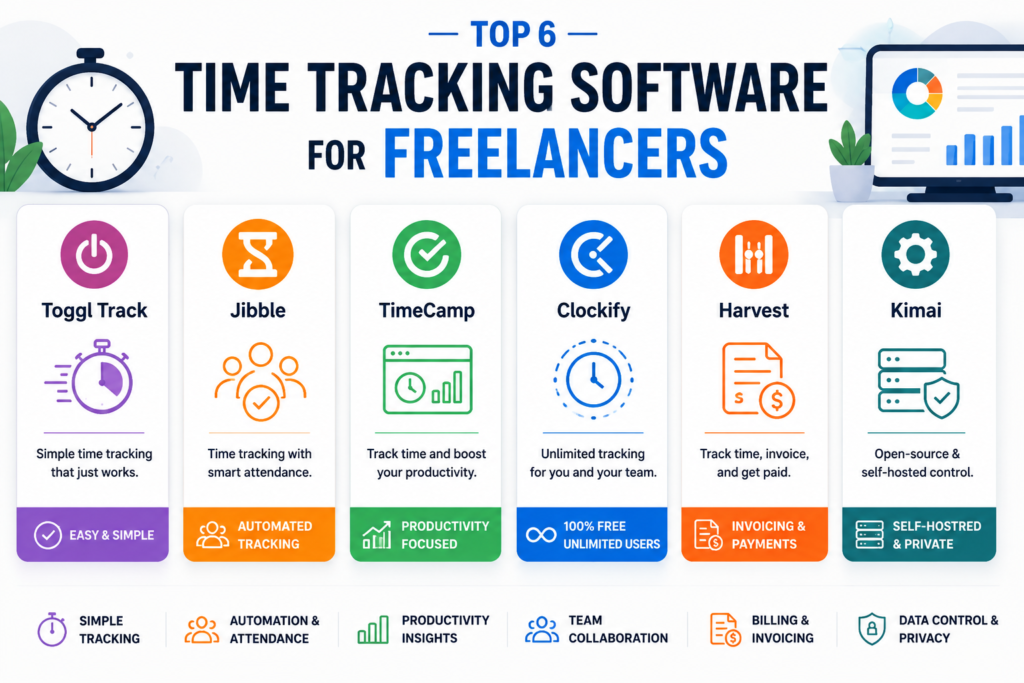
Toggl Track: Best Overall for Solo Freelancers
Best For: Solo freelancers, consultants, designers, developers and other professionals who want simple time tracking without turning it into another administrative task.
⭐⭐⭐⭐⭐ Overall Rating: 4.8/5
Overview
Toggl Track is one of the easiest time tracking apps for freelancers to get started with. Its main strength isn’t an enormous list of complicated features; it’s the fact that tracking time can become a fairly natural part of your working day.
You can track time through the web, desktop and mobile apps, organize work around clients and projects, and use either a timer or manual time entries. It also supports automatic activity tracking through its desktop apps.
For a freelancer who mainly wants to know where their hours are going and how much time they’re spending on each client, that covers most of the essentials.
Key Features
One-Click Time Tracking
Toggl Track lets you start a timer against a client, project or task with a single click. You can also add time manually when you forgot to start the timer or prefer entering your hours afterward.
Billable and Non-Billable Hours
You can distinguish between billable and non-billable work, making it easier to see how much of your working time is actually generating income. Toggl also supports billable rates on its paid Starter plan.
Automatic Activity Tracking
Its desktop application can record active apps and websites locally, then let you decide which activities should become actual time entries. This is useful if you regularly forget to start your timer. Toggl says this activity remains private on your device until you choose to use it as tracked time.
Reports
Toggl Track provides reports that can be filtered by clients, projects, tasks and billability. Reports can also be exported for recordkeeping or sharing with clients.
Free Plan
Toggl Track currently has a $0 Free plan that includes time tracking across web, desktop and mobile, browser integrations, calendar integrations and productivity reports. The Free plan is intended for basic time tracking and productivity insights.
More advanced features—including billable rates, project estimates and alerts—are available on the paid Starter plan.
That distinction matters for freelancers. If you simply want to record your hours, the Free plan is attractive. If you want the software to handle more of your billing and project-management workflow, you’ll eventually need to look at the paid options.
Who Should Choose Toggl Track?
Toggl Track is particularly suitable if you:
- Work independently
- Have several clients or projects
- Want straightforward freelancer time tracking
- Need basic reports
- Often forget to start a timer
- Prefer a clean interface over complicated workforce-management features
It is less compelling if your main requirement is employee attendance, workforce monitoring or a complete invoicing system.
Our Verdict
Toggl Track is our best overall choice for solo freelancers because it makes the basic job—recording and understanding your working time—simple.
Its Free plan is a good starting point for freelancers who need reliable time tracking, while the paid plans provide a path toward more advanced billing and project-management features.
Overall Score: ⭐⭐⭐⭐⭐ 4.8/5
Official external link
Toggl Track: Official Toggl Track website
Jibble: Best Free Option for Teams and Structured Time Tracking
Best For: Freelancers working with teams, agencies, contractors, remote workers, and anyone who wants more than a basic timer.
⭐⭐⭐⭐⭐ Overall Rating: 4.7/5
Overview
Jibble takes a different approach from Toggl Track. While Toggl is primarily about making personal time tracking simple, Jibble puts much more emphasis on time, attendance and workforce management.
That doesn’t make it unsuitable for freelancers. In fact, it can be particularly useful if you’re a freelancer who has started working with contractors or a small remote team and wants everyone tracking time in the same system.
Jibble currently offers a Free plan with unlimited users and core time-tracking and timesheet features.
Key Features
Time and Project Tracking
Jibble lets users track working hours through its web, desktop and mobile apps. You can also organize tracked time around projects and activities, making it possible to see where hours are being spent.
For freelancers, this can work well when you’re managing several client projects or coordinating work with other people.
Timesheets and Reports
Jibble automatically builds timesheets from tracked hours and provides reports that can be exported for recordkeeping or payroll purposes.
This makes it more useful than a simple stopwatch if you need a structured record of working hours.
Attendance and Verification
This is where Jibble really separates itself from many freelancer-focused time trackers.
It offers features such as:
- GPS tracking
- Geofencing
- Face recognition
- Selfie verification
- Kiosk clock-ins
These features are primarily aimed at organizations and teams rather than a solo freelancer.
Invoicing
Jibble can also convert tracked time into client invoices, which can be useful for freelancers who bill according to hours worked.
Free Plan
Jibble’s Free plan is one of its biggest advantages.
The company currently describes it as free forever with unlimited users, with core time tracking and timesheet functionality included.
That makes it particularly interesting for small teams because you’re not immediately paying more simply because another person needs access to the tracker.
Some advanced workforce-management capabilities remain associated with paid plans, so teams should still check the current plan comparison before committing.
Who Should Choose Jibble?
Jibble makes the most sense if you:
- Work with contractors or a small team
- Need attendance as well as project tracking
- Want a generous free plan
- Track remote or field workers
- Need structured timesheets
- Want GPS or verification features
- Need time data that can feed into billing or payroll
For a solo freelancer who simply wants to know how many hours they spent writing, designing or coding, Jibble may offer more management functionality than necessary.
Our Verdict
Jibble is one of the strongest free choices when your freelance work involves other people.
Its unlimited-user Free plan and combination of time tracking, timesheets, project tracking and attendance features give it an advantage over simpler freelancer-focused apps.
Overall Score: ⭐⭐⭐⭐⭐ 4.7/5
Official external link
Jibble: Official Jibble website
TimeCamp: Best for Automatic Time Tracking
Best For: Freelancers and small teams who want to reduce manual time entry and automatically understand where their working hours are going.
⭐⭐⭐⭐⭐ Overall Rating: 4.7/5
Overview
TimeCamp stands out because it focuses heavily on automatic time tracking. Instead of constantly remembering to start and stop a timer, its desktop app can recognize keywords associated with your projects and automatically assign activity to the appropriate task. (TimeCamp)
That makes it particularly interesting for freelancers who regularly forget to track time or switch between several applications while working.
Key Features
Automatic Time Tracking
TimeCamp can monitor activity through its desktop application and match websites and applications to projects using keywords. It can then automatically switch between tasks as your activity changes.
Time and Project Tracking
You can track hours across projects and tasks, maintain timesheets, and use the data to understand how much time different types of work are taking. TimeCamp also supports freelancers who need to track billable hours.
AI Time Tracking
TimeCamp now includes AI time tracking in its Free plan. The company says its AI can suggest tasks, generate descriptions and help fill gaps in timesheets while keeping activity data local and private.
Integrations
TimeCamp connects with popular project-management platforms including Asana, Trello, ClickUp, Monday.com and Jira, which can make it easier to track time without completely changing your existing workflow.
Free Plan
TimeCamp currently offers a Free Forever plan with unlimited users and unlimited projects. It includes time tracking, timesheets, its apps and AI time tracking. (TimeCamp)
However, features such as more advanced billing and profitability functionality are available on paid plans, so freelancers should check the current plan comparison if they need those features.
Who Should Choose TimeCamp?
TimeCamp is a strong choice if you:
- Frequently forget to start timers
- Work across multiple applications
- Want automatic time tracking
- Manage several projects
- Need detailed timesheets
- Want to connect time tracking with project-management tools
If you simply want a very basic manual timer, Toggl Track may feel simpler.
Our Verdict
TimeCamp is one of the most interesting options for freelancers who want time tracking to happen with less manual effort.
Its combination of automatic tracking, unlimited users and projects, and AI-assisted time tracking makes it particularly attractive if manually recording every task is becoming a nuisance.
Overall Score: ⭐⭐⭐⭐⭐ 4.7/5
Official external link
TimeCamp: Official TimeCamp website
Clockify: Best for Freelancers Who Want a Broad Free Time Tracker
Best For: Freelancers, consultants and small teams that want flexible time tracking, timesheets and reporting without paying for basic usage.
⭐⭐⭐⭐⭐ Overall Rating: 4.7/5
Overview
Clockify is one of the more feature-rich options in this comparison. It combines a simple timer with manual timesheets, project tracking, reports, calendar tools and apps for desktop and mobile.
For freelancers, the main attraction is flexibility. You can start a timer when you begin working, add time manually later, organize hours by project and review how much time you’ve actually spent on different clients.
Key Features
Timer and Timesheets
Clockify supports both real-time tracking and manual time entry, so you’re not stuck if you forget to start the timer.
Project and Client Tracking
You can organize tracked time around projects and tasks, making it easier to separate work for different clients.
Reports
Clockify provides summary, detailed and weekly reports, with filters for projects, users and dates. Reports can also be exported in formats such as PDF, Excel and CSV.
Automatic Tracking
Its Auto Tracker can record activity across apps, websites and documents, giving you a timeline of your workday and helping identify gaps in your tracked time.
Free Plan
Clockify currently allows users to track unlimited time for free and says the Free plan supports up to four people.
However, several features that freelancers may specifically want—such as billable rates, invoicing, advanced reporting and additional management tools—are part of paid plans.
So Clockify’s Free plan is excellent for basic time tracking, but don’t assume every billing feature shown on the website is included for free.
Who Should Choose Clockify?
Clockify is a good choice if you:
- Want unlimited basic time tracking
- Work across several clients or projects
- Prefer both timers and manual timesheets
- Need useful reports
- Want desktop and mobile apps
- May eventually need more advanced project or billing features
Our Verdict
Clockify is one of the strongest choices for freelancers who want a generous free time tracker with plenty of room to grow.
Its biggest advantage is the amount of basic tracking and reporting functionality available without paying, while its paid plans provide a path toward more advanced billing and management.
Overall Score: ⭐⭐⭐⭐⭐ 4.7/5
Official external link
Clockify: Official Clockify website
Harvest: Best for Freelancers Who Want Time Tracking and Invoicing Together
Best For: Freelancers, consultants and small service businesses that want to track billable hours and turn that time into client invoices.
⭐⭐⭐⭐⭐ Overall Rating: 4.6/5
Overview
Harvest is slightly different from the other tools we’ve covered. Its main strength isn’t simply tracking time—it’s connecting tracked hours, project budgets, expenses and invoicing in one workflow.
For a freelancer who bills clients based on time, this can remove a lot of repetitive administration. You track your work, mark the relevant hours as billable, and can then use that information when creating an invoice.
If invoicing is becoming more important than time tracking alone, our best invoicing software for freelancers comparison shows how Harvest compares with dedicated free and paid billing tools.
Key Features
Time Tracking
Harvest supports live timers as well as daily and weekly timesheets. You can track time from its browser, desktop and mobile apps.
Billable Hours and Reports
You can separate billable and non-billable time and use reports to see how much time you’re spending across projects and clients.
Invoicing
This is where Harvest really stands out. Tracked billable hours and expenses can be used to create invoices, while Stripe and PayPal integrations can help clients pay online.
Project Budgets
Harvest can compare tracked time against project budgets, helping you see when a project is using more hours than expected.
Free Plan
Harvest currently has a Free plan designed for individual freelancers.
It includes:
- 1 seat
- 2 projects
- Time tracking
- Invoicing
- Expense tracking
- Basic reporting
The Free plan is available for $0, while paid plans remove the project and seat limitations.
The two-project limit is important. If you regularly manage several clients simultaneously, you may outgrow the Free plan fairly quickly.
Who Should Choose Harvest?
Harvest is a strong choice if you:
- Bill clients by the hour
- Need simple invoicing alongside time tracking
- Want to monitor project budgets
- Track client expenses
- Prefer having billing and time tracking in one place
If you only want a simple free timer with unlimited projects, Clockify or another option may be a better fit.
Our Verdict
Harvest is particularly appealing to freelancers who want to connect their working hours directly to billing.
Its Free plan is genuinely useful for a solo freelancer with only a couple of active projects, but the two-project limit can become restrictive as your client list grows.
Overall Score: ⭐⭐⭐⭐⭐ 4.6/5
Official external link
Harvest: Official Harvest website
Kimai: Best for Freelancers Who Want Open-Source and Data Control
Best For: Technical freelancers, agencies and businesses that want open-source time tracking, self-hosting and greater control over their data.
⭐⭐⭐⭐⭐ Overall Rating: 4.6/5
Overview
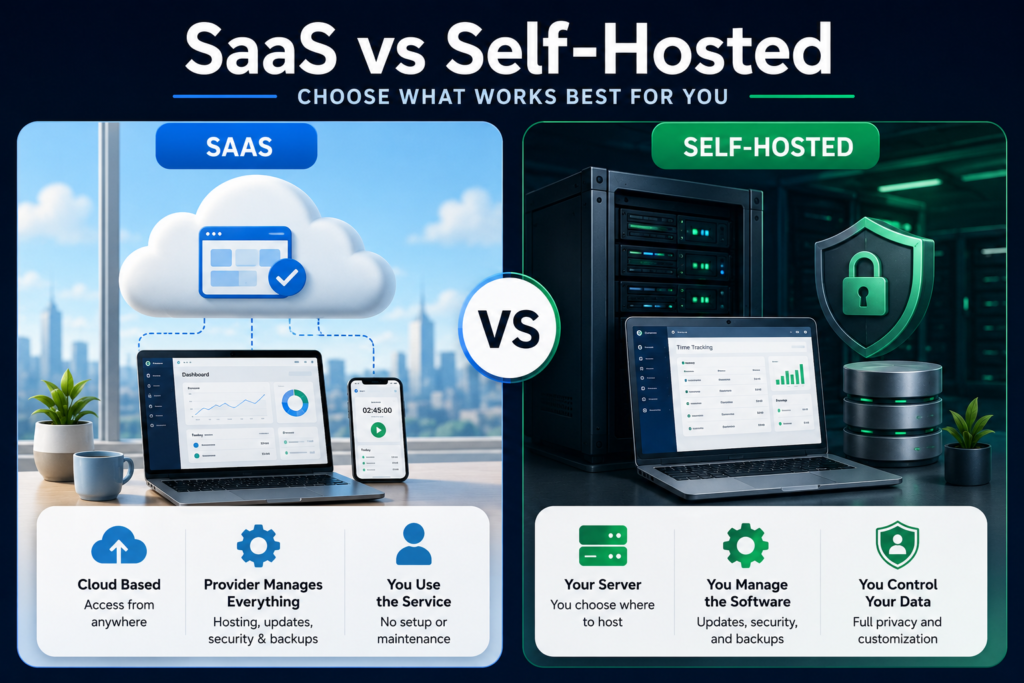
Kimai is the outlier in this comparison. Instead of being another traditional SaaS time tracker, it is an open-source time tracking platform that can either be self-hosted or used through Kimai Cloud.
That makes it particularly interesting if you care about data ownership or don’t want your time-tracking information tied permanently to one commercial platform. Kimai says its self-hosted version is 100% open source and can be deployed using Docker or a manual installation.
It isn’t necessarily the easiest option for a freelancer who just wants to create an account and start a timer, but for someone comfortable with hosting software, the level of control is difficult to ignore.
Key Features
Project and Client Time Tracking
Kimai lets you organize time around customers, projects and activities, making it suitable for freelancers who need detailed records of billable work.
Reporting and Data Export
The platform provides reports based on users, customers, projects, activities and time periods. Recorded times can also be exported in formats including XLSX, PDF, CSV and HTML.
Invoicing
Kimai includes configurable invoicing features, including invoice templates, invoice numbers and multiple output formats.
Open Source and Self-Hosting
This is Kimai’s biggest difference.
With self-hosting, your time-tracking data remains on infrastructure that you control. Kimai also supports Docker deployments, making installation easier for people who already have experience managing servers.
Free Plan
Kimai’s situation is different from the other tools in this article.
Self-hosted Kimai is free and open source, while Kimai Cloud is a paid hosted service with a free starting option.
The trade-off is that self-hosting means you are responsible for the server, updates, security and maintenance. Kimai itself notes that installation can be challenging for users who aren’t familiar with server systems.
So the software may be free, but running it isn’t necessarily maintenance-free.
Who Should Choose Kimai?
Kimai is a strong choice if you:
- Want open-source software
- Prefer to control your own data
- Are comfortable with self-hosting
- Need detailed project and customer tracking
- Want built-in reporting and invoicing
- Don’t want to depend entirely on a commercial SaaS platform
For someone who simply wants a quick, polished time tracking app, Kimai’s setup may be more work than it’s worth.
Our Verdict
Kimai is the best choice in this comparison for freelancers who value open-source software and data control over convenience.
It isn’t the easiest option for everyone, but its combination of self-hosting, project tracking, reporting, invoicing and extensibility makes it a genuinely different alternative to mainstream cloud time trackers.
Overall Score: ⭐⭐⭐⭐⭐ 4.6/5
Official external link
Kimai: Official Kimai website
Which Free Time Tracking Software Is Right for You?
After looking at all six tools, the biggest takeaway is that the best time tracking software for freelancers depends on what you actually need from it.
You don’t necessarily need the most powerful platform. In fact, adding features you never use can make your daily workflow harder rather than easier.
Choose Toggl Track for simplicity
If you’re a solo freelancer and your main goal is to track your hours without thinking too much about the software, Toggl Track is the easiest recommendation.
It’s particularly suitable for writers, designers, developers, consultants and other independent professionals who want a clean way to organize time by client and project.
Choose Jibble if you’re working with a team
Jibble makes more sense when your freelance business has started growing beyond just you.
Its combination of time tracking, attendance, timesheets and workforce features makes it better suited to freelancers managing contractors or small remote teams.
Choose TimeCamp if you forget to track your time
If your biggest problem is remembering to start the timer, TimeCamp deserves serious consideration.
Its automatic tracking approach can capture activity in the background and reduce the amount of manual time entry you need to do.
Choose Clockify for broad free tracking
Clockify is a strong option if you want a flexible tracker with timers, timesheets, reports and multiple ways to record your work.
It’s particularly attractive to freelancers who want to start without paying and may eventually need more advanced project-management functionality.
Choose Harvest if invoicing is your priority
If your workflow revolves around billable hours and client invoices, Harvest stands out.
The ability to connect tracked time, expenses, project budgets and invoices makes it more useful for freelancers who want time tracking to feed directly into their billing process.
Choose Kimai if you want control over your data
Kimai is the specialist choice.
If you’re technically comfortable with self-hosting and care about open-source software and control over your data, it offers something the mainstream SaaS tools don’t.
If you simply want to download an app and start tracking today, however, one of the cloud-based options will probably be easier.
Our Final Ranking
For this comparison, our overall ranking is:
| Rank | Tool | Best for |
| 1 | Toggl Track | Best overall for solo freelancers |
| 2 | Clockify | Broad free time tracking |
| 3 | TimeCamp | Automatic time tracking |
| 4 | Jibble | Teams and structured tracking |
| 5 | Harvest | Time tracking and invoicing |
| 6 | Kimai | Open-source and self-hosting |
This ranking isn’t meant to suggest that the sixth tool is “bad.” Kimai, for example, may actually be the best choice for a technically experienced freelancer who wants self-hosting.
The ranking simply reflects what will work for the largest number of freelancers looking for a free, practical time tracker.
Frequently Asked Questions
What is the best free time tracking software for freelancers?
For most solo freelancers, Toggl Track is our best overall choice because it combines straightforward time tracking, client and project organization, reporting and multiple ways to record time.
However, the best option depends on your workflow. Clockify is attractive for broad free tracking, TimeCamp for automation, Harvest for invoicing, Jibble for teams, and Kimai for self-hosting.
Is free time tracking software really free?
Some platforms offer genuinely useful free plans, but the limits vary considerably.
A free plan may restrict the number of users, projects, reports or advanced features. Always check the current pricing page before choosing a tool, especially if your business is growing.
Should freelancers track billable and non-billable hours?
Yes. Separating billable hours from non-billable time gives you a much clearer picture of your business.
Client work may be billable, while emails, proposals, administration, marketing and learning may not be. Tracking both helps you understand how much of your working week is actually generating revenue.
Is automatic time tracking better than using a timer?
Not necessarily.
Automatic tracking is useful if you frequently forget to start a timer. A traditional timer can be better if you want complete control over exactly what gets recorded.
The best system is the one you’re comfortable using consistently.
Can time tracking software help freelancers charge more?
It can help you price your work more intelligently.
If you track several projects and discover that similar jobs consistently take longer than expected, you have real data to use when estimating future projects.
Time tracking doesn’t automatically increase your rates, but it can help you stop guessing.
Is Kimai better than cloud-based time trackers?
Not for everyone.
Kimai is particularly attractive if you want open-source software and self-hosting. Cloud tools such as Toggl Track and Clockify are generally easier to set up and use immediately.
The choice is really between convenience and control.
Conclusion
The right time tracking software for freelancers should make your work easier, not create another task you have to remember every day.
For most solo freelancers, Toggl Track is the easiest place to start. If you want broader free tracking, Clockify is worth considering. TimeCamp is particularly useful if automatic tracking appeals to you, while Jibble becomes more interesting when you’re managing a team.
If your biggest concern is connecting time tracking with billing, Harvest has a clear advantage. And if you care strongly about open-source software and controlling your own data, Kimai offers an alternative that the mainstream platforms don’t.
Before choosing, think about your actual working day rather than the feature list.
Do you simply need to know how long you worked? Do you need to invoice clients? Do you regularly forget to track time? Are you managing other people? Or do you want complete control over your data?
Once you answer that, choosing the right free time tracker for freelancers becomes much easier.