Table of Contents
Introduction
Meetings are supposed to move projects forward—but for many professionals, they become a source of frustration. Important decisions get buried in long conversations, action items are forgotten, and someone always has to spend valuable time writing meeting notes afterward.
This is where an AI meeting notes generator changes the way teams work.
Instead of manually documenting discussions, modern AI meeting assistants automatically record conversations, generate accurate transcripts, summarize key points, identify action items, and even organize follow-up tasks. Whether you’re a freelancer attending client calls, a student taking lecture notes, or a business managing dozens of meetings every week, these tools can save hours of repetitive work.
However, not every AI meeting notes generator works the same way.
Some tools join your meetings as virtual participants (meeting bots), while others record locally without appearing in the meeting at all. Some focus on transcription accuracy, while others are designed for productivity workflows with integrations into Notion, Slack, HubSpot, or Salesforce.
Choosing the wrong tool can lead to privacy concerns, poor transcripts, or paying for features you’ll never use.
In this comprehensive guide, we’ve compared the best AI meeting notes generators available in 2026. Instead of simply listing features, we’ll help you understand which tool is the right choice for your workflow, budget, privacy requirements, and meeting platform. By the end of this article, you’ll know exactly which AI meeting assistant deserves your time—and which ones you can safely skip.
Why You Can Trust This Guide
There are hundreds of articles comparing AI meeting tools, but most follow the same pattern:
- They repeat marketing claims.
- They copy feature lists from official websites.
- They rarely explain who each tool is actually for.
Our approach is different.
Instead of asking “Which tool has the most features?”, we ask:
- Which tool is best for freelancers?
- Which tool works without meeting bots?
- Which one has the best free plan?
- Which one protects your privacy?
- Which one offers the best value for businesses?
This guide is written to help you make a practical decision based on your real-world needs—not marketing hype.
What Is an AI Meeting Notes Generator?
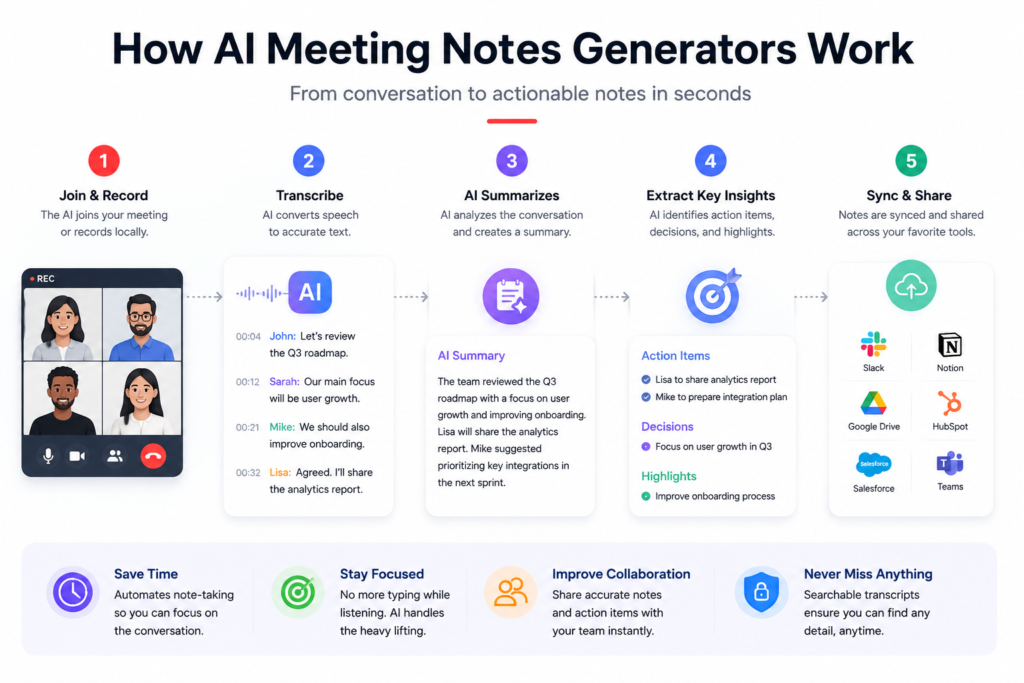
An AI meeting notes generator is software that automatically captures conversations during meetings and transforms them into organized, searchable notes.
Unlike traditional voice recorders, these tools use artificial intelligence to:
- Convert speech into text.
- Identify different speakers.
- Generate concise meeting summaries.
- Highlight key decisions.
- Detect action items and follow-up tasks.
- Allow you to search previous meetings instantly.
Instead of reviewing a one-hour recording to find a single decision, you can ask the AI for a summary and locate the information within seconds.
Modern AI meeting assistants also integrate with productivity software, making it easy to send meeting notes directly to project management tools, CRMs, documentation systems, or team collaboration platforms.
How Do AI Meeting Assistants Work?
Although different platforms use different technologies, most AI meeting note generators follow the same workflow.
Step 1 – Capture the Meeting
The tool records your meeting in one of two ways:
- Joining as a virtual meeting participant (meeting bot).
- Recording audio locally from your device.
Step 2 – Speech-to-Text Transcription
Artificial intelligence converts spoken conversations into written text while identifying different speakers whenever possible.
Step 3 – AI Analysis
The software processes the transcript to identify:
- important discussion points,
- decisions,
- deadlines,
- assigned tasks,
- and follow-up actions.
Instead of reading thousands of words, you receive a structured summary.
Step 4 – Organization
Most AI meeting assistants allow you to:
- search old meetings,
- filter conversations,
- organize notes,
- share summaries,
- and export information to productivity apps.
This turns meeting recordings into a searchable knowledge base rather than a collection of forgotten audio files.
Why More Professionals Are Using AI Meeting Notes
Remote work and hybrid teams have dramatically increased the number of online meetings.
According to industry trends, professionals now spend a significant portion of their workweek in meetings, making documentation one of the biggest hidden productivity costs.
Using an AI meeting notes generator offers several benefits:
- Saves time by eliminating manual note-taking.
- Allows participants to focus on conversations instead of typing.
- Reduces the risk of missing important decisions.
- Improves accountability by automatically tracking action items.
- Creates searchable records for future reference.
- Makes collaboration easier across distributed teams.
For many organizations, AI meeting assistants are no longer considered productivity extras—they’re becoming an essential part of everyday workflows.
Bot-Based vs Bot-Free AI Meeting Notes Generators
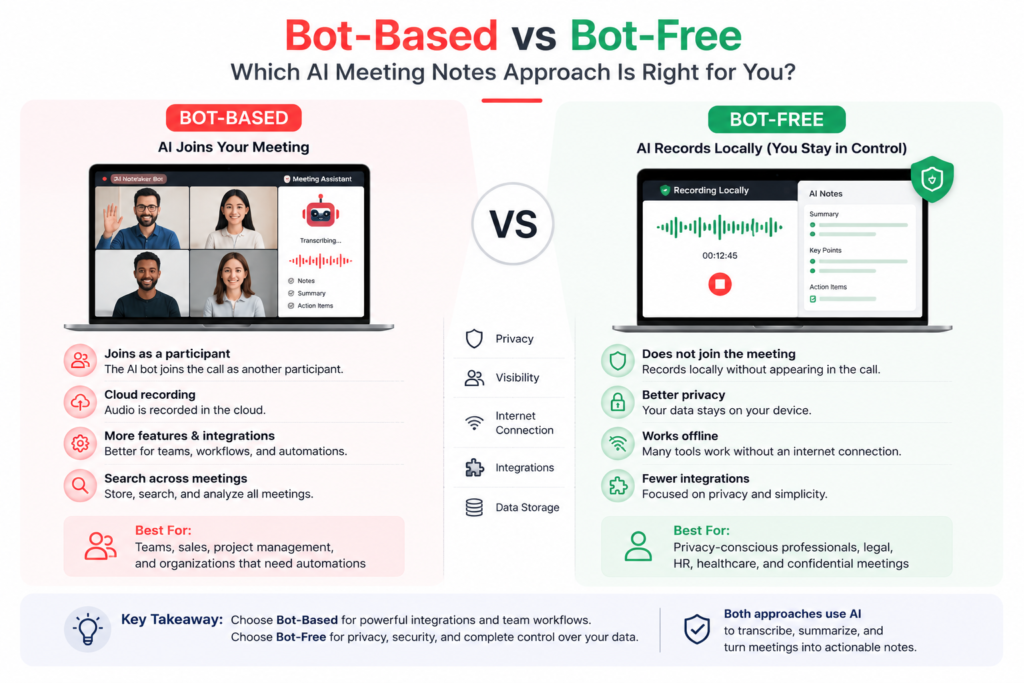
One of the biggest mistakes people make when choosing an AI meeting notes generator is assuming that all tools record meetings in the same way.
They don’t.
In fact, one of the most important differences between modern AI meeting assistants is how they capture your meetings.
Understanding this difference before choosing a tool can save you from privacy concerns, company policy issues, and frustrating user experiences.
There are two primary approaches.
Bot-Based AI Meeting Assistants
Bot-based meeting assistants join your meeting as another participant.
If you’ve ever seen someone named Fireflies.ai, Otter Assistant, or Fathom join a Zoom or Google Meet call, you’ve already encountered this technology.
The AI bot enters the meeting with permission, records the conversation, and processes everything afterward.
Advantages of Bot-Based Meeting Assistants
Automatic Recording
Once connected, the bot automatically joins scheduled meetings without requiring additional steps.
For teams that conduct dozens of meetings every week, this saves a significant amount of time.
Excellent Integration
Because the assistant is connected to your calendar, it can automatically organize meetings, attendees, recordings, and notes.
Many bot-based tools integrate directly with:
- Google Calendar
- Microsoft Outlook
- Zoom
- Google Meet
- Microsoft Teams
- Slack
- Notion
- HubSpot
- Salesforce
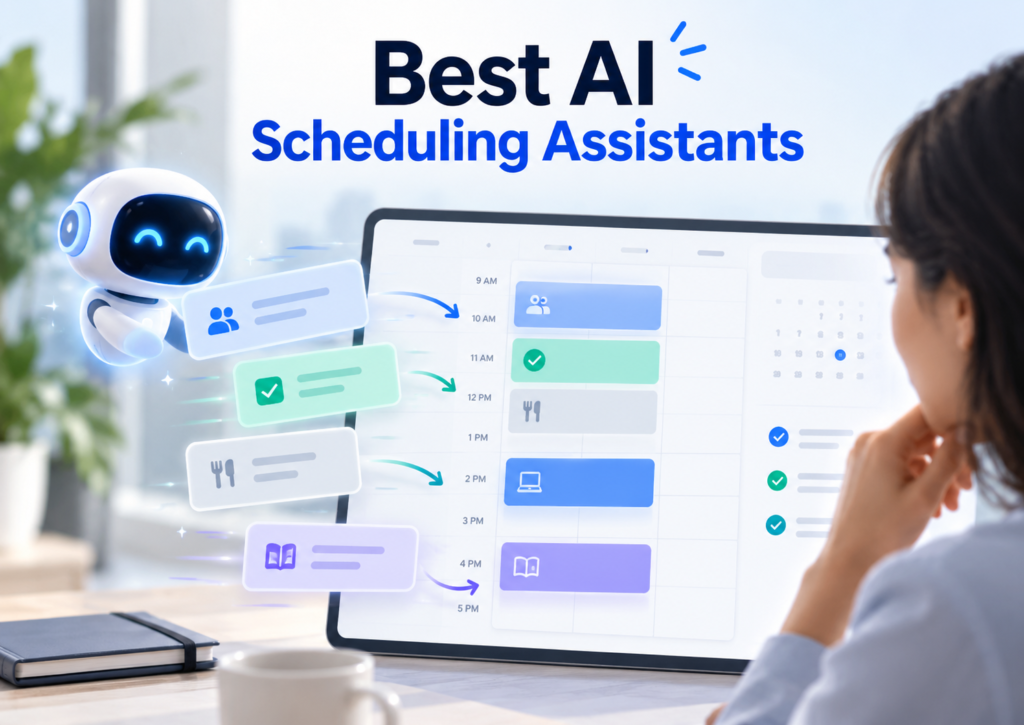
AI meeting assistants help once a meeting is scheduled, but they do not necessarily solve the problem of finding time for your actual work. If tasks and focus time keep getting displaced by meetings, compare our best AI scheduling assistants to see which tools can suggest, optimize, or automatically rebuild your calendar.
Better Team Collaboration
These tools are designed with businesses in mind.
Meeting summaries can automatically be shared with teammates, managers, or clients without manually sending files.
Disadvantages of Bot-Based Meeting Assistants
Privacy Concerns
Many organizations have strict security policies regarding external meeting participants.
Some companies simply don’t allow AI bots inside confidential meetings.
Even when permitted, some attendees feel uncomfortable knowing another participant is recording the discussion.
Client Perception
Imagine joining an important sales meeting and seeing an unfamiliar participant named “AI Assistant” enter the room.
Some clients won’t mind.
Others may immediately ask:
“Who’s this?”
While this may seem like a small issue, first impressions matter.
Permission Requirements
Certain meeting platforms require hosts to manually admit bots before they can begin recording.
If the host forgets, the meeting won’t be captured.
Bot-Free AI Meeting Assistants
Bot-free AI meeting notes generators work very differently.
Instead of joining your meeting as another participant, these tools record audio directly from your computer.
To everyone else in the meeting, it appears as though no recording assistant exists.
Popular examples include:
- Jamie AI
- Granola
Advantages of Bot-Free AI Meeting Assistants
Better Privacy
Since no external participant joins the meeting, many users feel more comfortable using these tools.
This approach is particularly attractive for professionals working with confidential information.
Cleaner Meeting Experience
Your meeting attendee list remains unchanged.
There’s no AI participant to explain to clients or colleagues.
The conversation feels completely natural.
Works Across Platforms
Many bot-free solutions work regardless of whether you’re using:
- Zoom
- Microsoft Teams
- Google Meet
- Webex
Because they capture local audio rather than relying on platform integrations.
Disadvantages of Bot-Free AI Meeting Assistants
Desktop Software Required
Most bot-free assistants require installing desktop applications.
Unlike browser-based solutions, they usually can’t operate entirely online.
Smaller Integration Ecosystem
Since these products focus primarily on note-taking rather than enterprise workflows, they may offer fewer integrations with CRM systems and project management software.
Which Recording Method Is Better?
The answer depends entirely on your workflow.
Choose a bot-based AI meeting assistant if:
- You work with a team.
- You need CRM integrations.
- Automatic recording is important.
- Your organization allows meeting bots.
Choose a bot-free AI meeting assistant if:
- Privacy is your top priority.
- Your company restricts meeting bots.
- You frequently meet with external clients.
- You want the most natural meeting experience possible.
Neither approach is universally better.
The right choice depends on how and where you work.
How We Evaluated These AI Meeting Notes Generators
There are dozens of AI meeting assistants available today, but simply comparing feature lists doesn’t tell the full story.
For this guide, we evaluated every tool using the criteria that matter most to real users.
1. Transcription Accuracy
An AI meeting assistant is only as useful as its transcription.
We looked for tools that accurately recognize conversations, minimize errors, and handle different accents and multiple speakers effectively.
2. AI Summaries
Some tools simply shorten transcripts.
Others generate structured meeting summaries that clearly identify:
- key decisions,
- discussion points,
- action items,
- and next steps.
We gave preference to tools that produce summaries requiring minimal editing.
3. Speaker Recognition
Accurately identifying who said what is essential for productive meetings.
Poor speaker detection quickly reduces the value of AI-generated notes.
4. Privacy
We considered whether each platform uses:
- meeting bots,
- local recording,
- or both.
Privacy has become one of the biggest deciding factors for professionals choosing AI meeting assistants.
5. Ease of Use
The best AI meeting notes generator should simplify your workflow—not complicate it.
We evaluated how quickly new users can begin using each tool without extensive setup.
6. Integrations
We examined compatibility with popular platforms, including:
- Zoom
- Google Meet
- Microsoft Teams
- Notion
- Slack
- HubSpot
- Salesforce
The more seamlessly a tool fits into existing workflows, the more valuable it becomes.
7. Pricing & Value
Rather than simply comparing subscription costs, we evaluated whether each pricing tier delivers meaningful value.
A slightly more expensive platform may still be the better investment if it saves hours of manual work every week.
The 5 Best AI Meeting Notes Generators (2026)
1. Fireflies.ai
Best For: Businesses, remote teams, sales professionals, customer success teams, and organizations that conduct frequent online meetings.
⭐⭐⭐⭐⭐ Overall Rating: 4.9/5
Overview
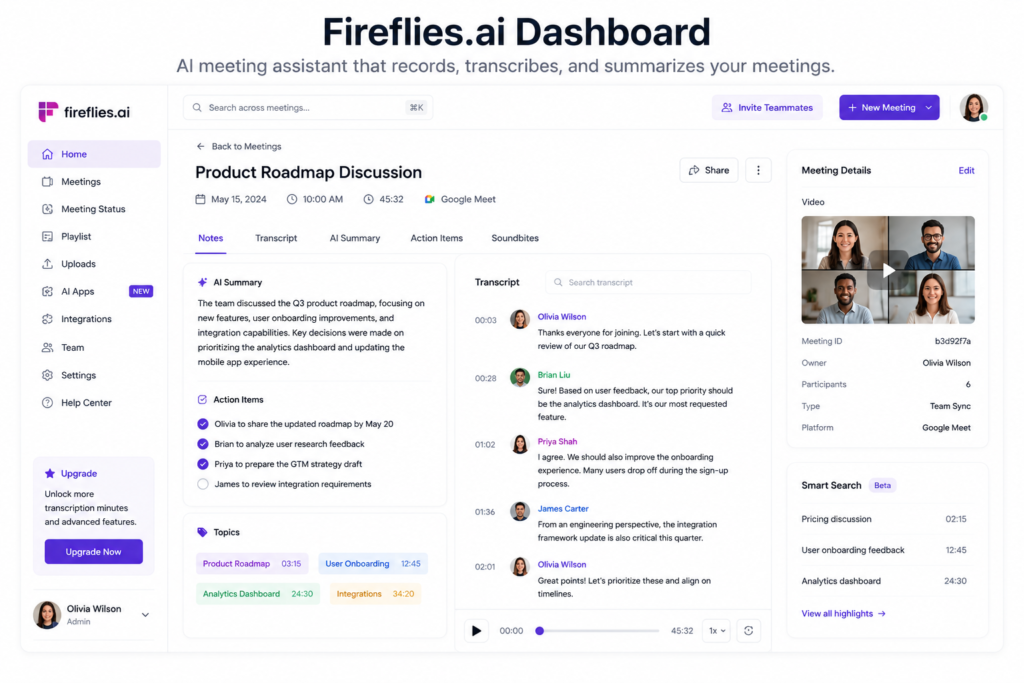
Fireflies.ai is one of the most popular AI meeting notes generators available today, and for good reason. It combines accurate meeting transcription, intelligent AI summaries, searchable meeting history, and powerful business integrations into a single platform.
Unlike basic transcription software, Fireflies.ai is designed to become your team’s meeting memory. Instead of simply recording conversations, it automatically organizes discussions, extracts action items, identifies important decisions, and makes every meeting searchable.
If your company spends hours every week documenting client calls, sales meetings, project discussions, or internal standups, Fireflies.ai can significantly reduce administrative work.
Fireflies has also expanded beyond meeting documentation with an email assistant that can organize Gmail or Outlook messages and prepare follow-up drafts using available meeting context. See how it compares with other options in our best AI email assistants for Gmail and Outlook guide.
Key Features
AI-Powered Meeting Transcription
Fireflies automatically converts conversations into searchable text with impressive accuracy.
It supports meetings hosted on:
- Zoom
- Microsoft Teams
- Google Meet
- Webex
- Dialers
- Uploaded audio files
Instead of replaying recordings, users can search specific words or topics inside meeting transcripts.
Intelligent AI Summaries
One of Fireflies’ biggest strengths is its AI-generated meeting summaries.
Rather than producing a simple transcript, it automatically organizes information into sections such as:
- Key discussion points
- Decisions made
- Action items
- Next steps
- Questions raised
This makes it much easier for team members who missed the meeting to catch up in just a few minutes.
Search Across Every Meeting
Imagine trying to remember a conversation from three months ago.
Instead of opening dozens of recordings, Fireflies allows you to search your entire meeting history using keywords.
For example:
“Show every meeting where the client discussed pricing.”
or
“Find meetings mentioning Product X.”
This feature alone can save businesses countless hours.
CRM & Productivity Integrations
Fireflies integrates with many popular business tools, including:
- Slack
- Notion
- Salesforce
- HubSpot
- Zapier
- Asana
- Monday.com
- ClickUp
These integrations allow meeting notes and action items to flow directly into your existing workflow without manual copying.
Real-World Example
Imagine you’re a freelance web designer.
You finish a one-hour discovery call with a client discussing:
- project goals,
- budget,
- deadlines,
- design preferences,
- and future revisions.
Instead of writing notes afterward, Fireflies automatically creates:
✔ Meeting transcript
✔ Summary
✔ Action items
✔ Client requirements
✔ Follow-up reminders
Everything is searchable later.
Pros
✅ Excellent AI summaries
✅ Accurate transcription
✅ Powerful integrations
✅ Search every meeting instantly
✅ Great collaboration features
✅ Works across multiple meeting platforms
Cons
❌ Meeting bot joins your calls
❌ Advanced AI features require paid plans
❌ Some organizations don’t allow external meeting bots
Pricing
Fireflies offers a free plan that is suitable for individuals who want to test the platform.
Paid plans unlock additional AI summaries, storage, analytics, integrations, and collaboration features for growing teams.
Since pricing changes over time, it’s always best to verify current plans on the official Fireflies website.
Official Fireflies.ai: https://fireflies.ai/
Who Should Choose Fireflies.ai?
Fireflies is an excellent choice if you:
- run a business,
- manage remote teams,
- conduct sales calls,
- attend multiple client meetings every week,
- need CRM integration,
- or want a searchable knowledge base of every meeting.
However, if privacy is your highest priority and your organization restricts meeting bots, you may prefer one of the bot-free alternatives later in this guide.
Our Verdict
Fireflies.ai remains one of the most complete AI meeting notes generators available today.
Its combination of accurate transcription, AI-powered summaries, workflow automation, and deep business integrations makes it one of the strongest all-around solutions for professionals and organizations.
For businesses looking to automate meeting documentation and improve collaboration, Fireflies.ai is one of the easiest recommendations we can make.
Overall Score: ⭐⭐⭐⭐⭐ 4.9/5
2. Fathom
Best For: Freelancers, consultants, startups, and professionals looking for the best free AI meeting notes generator.
⭐⭐⭐⭐⭐ Overall Rating: 4.8/5
Overview
If Fireflies is built for businesses, Fathom is built for simplicity.
Fathom has quickly become one of the most recommended AI meeting assistants because it offers an exceptionally generous free plan while still delivering premium-quality AI summaries.
Unlike many competitors that lock advanced features behind expensive subscriptions, Fathom gives new users access to powerful AI-generated meeting notes almost immediately.
For freelancers, consultants, coaches, recruiters, and small businesses, this makes Fathom one of the easiest AI meeting assistants to recommend.
Key Features
Automatic Meeting Recording
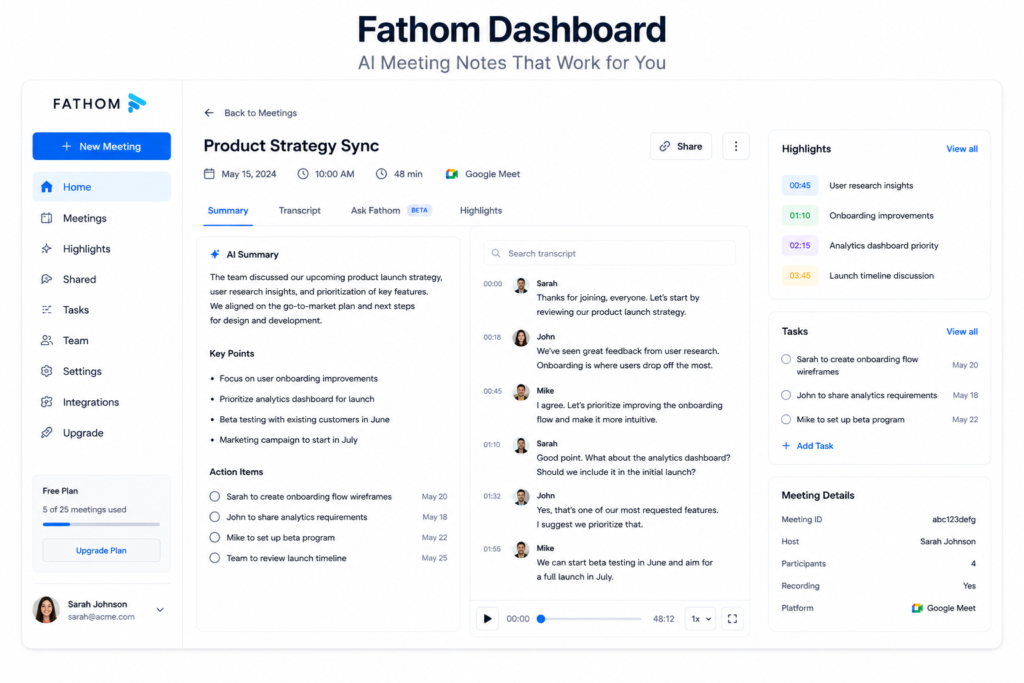
Fathom joins your scheduled meetings and automatically records conversations without requiring manual setup each time.
Once connected to your calendar, it handles the recording process with minimal user input.
Instant AI Meeting Summaries
One of Fathom’s strongest features is the speed of its AI summaries.
Within moments of finishing a meeting, it automatically produces:
- Meeting overview
- Important discussion points
- Action items
- Follow-up recommendations
This makes sharing meeting outcomes with clients or teammates incredibly efficient.
Highlight Important Moments
Rather than searching through an entire transcript, users can create highlights during meetings.
These highlighted sections become especially useful when revisiting client discussions or preparing follow-up emails.
Easy Sharing
Meeting summaries can be shared with teammates using simple links, making collaboration fast and convenient.
Real-World Example
Imagine you’re a freelance marketing consultant attending four discovery calls in one day.
Instead of spending another hour writing meeting notes afterward, Fathom automatically records and transcribes the calls and produces summaries and action items.
Later, you can return to the relevant meeting when preparing a proposal or following up with the client.
Pros
✅ Very generous free plan
✅ Unlimited recordings and storage
✅ Unlimited transcription
✅ Strong AI summaries
✅ Useful integrations
✅ Easy to use
Cons
❌ Advanced AI features have Free-plan limits
❌ Some advanced business features require paid plans
❌ Meeting recording may require participant consent depending on circumstances
Pricing
Fathom currently offers a Free plan for individual users, including unlimited recordings, storage and transcription. Advanced AI features and additional business functionality are available through paid plans. (help.fathom.video)
Official Fathom: https://fathom.video/
Who Should Choose Fathom?
Fathom is a strong choice if you:
- Attend frequent client meetings
- Work as a freelancer or consultant
- Want unlimited basic transcription
- Need quick AI meeting summaries
- Don’t want to pay for basic meeting recording
If you’re looking for a highly customizable business meeting system with extensive workflow automation, Fireflies may be the better fit.
Our Verdict
Fathom is one of the best free AI meeting notes generators for individual professionals.
Its combination of unlimited basic recording and transcription, useful AI summaries, and a simple workflow makes it particularly attractive to freelancers, consultants and small businesses.
Overall Score: ⭐⭐⭐⭐⭐ 4.8/5
3. Otter.ai
Best For: Students, educators, journalists, researchers, interviewers, and professionals who prioritize transcription accuracy.
⭐⭐⭐⭐☆ Overall Rating: 4.7/5
Overview
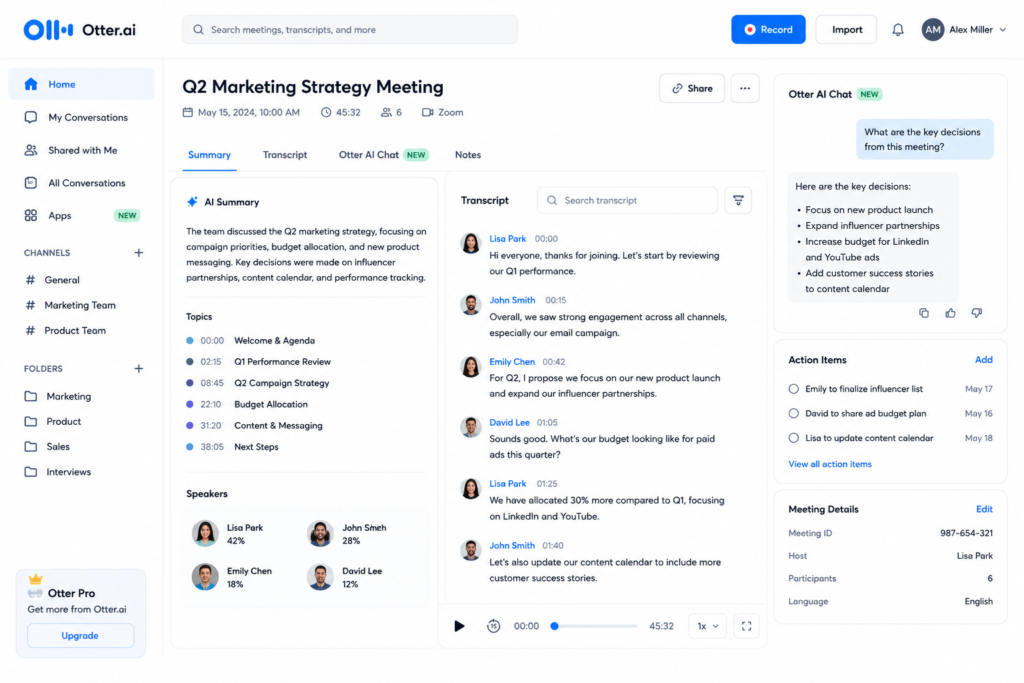
Long before AI meeting assistants became mainstream, Otter.ai established itself as one of the most trusted transcription platforms. While newer competitors have expanded into workflow automation and business intelligence, Otter continues to excel at what it does best—accurate speech-to-text transcription.
If your primary goal is to create highly accurate transcripts from lectures, interviews, webinars, podcasts, or meetings, Otter.ai remains one of the strongest options available.
Unlike some AI meeting assistants that focus heavily on project management and CRM integrations, Otter is designed to capture conversations as accurately as possible and make them easy to search later.
Key Features
High-Accuracy Transcription
Otter.ai delivers some of the most reliable AI-generated transcripts available today.
It performs particularly well during:
- University lectures
- Interviews
- Business meetings
- Podcasts
- Research discussions
- Online webinars
Although no transcription software is perfect, Otter consistently handles clear conversations with impressive accuracy
Live Transcription
One feature that makes Otter especially useful is real-time transcription.
Instead of waiting until a meeting ends, users can watch the transcript being generated live as people speak.
This is valuable for:
- Students taking lectures
- Journalists conducting interviews
- Professionals attending conferences
- Accessibility purposes
Speaker Identification
Meetings often involve several participants.
Otter automatically separates speakers, making long discussions much easier to follow than traditional voice recordings.
Searchable Notes
Every transcript becomes searchable.
Instead of replaying a one-hour lecture, users can simply search for:
- project name
- client’s name
- technical terms
- decisions
and jump directly to the relevant section.
Real-World Example
Imagine you’re interviewing five candidates for a job.
Instead of writing notes during every interview, Otter records everything, generates a transcript, and allows you to search exactly what each candidate said.
This lets you focus on the conversation rather than constantly typing.
Pros
✅ Excellent transcription accuracy
✅ Live captions
✅ Reliable speaker recognition
✅ Great for education
✅ Mobile support
✅ Easy search functionality
Cons
❌ AI summaries are less advanced than some competitors
❌ Fewer workflow automation features
❌ Limited CRM integrations
Pricing
Otter offers a useful free plan with monthly transcription limits.
Premium plans increase transcription minutes, collaboration features, exports, and advanced AI capabilities.
Official Otter.ai: https://otter.ai/
Who Should Choose Otter.ai?
Otter is an excellent choice if you:
- attend lectures,
- conduct interviews,
- create podcasts,
- perform research,
- or simply want extremely accurate meeting transcripts.
However, businesses looking for advanced workflow automation may find Fireflies or Fathom more suitable.
Our Verdict
Otter.ai remains one of the best AI transcription platforms available.
Although newer AI meeting assistants offer more automation, Otter continues to set the standard for accurate transcription and remains a favorite among students, researchers, and journalists.
Overall Score: ⭐⭐⭐⭐☆ 4.7/5
4. Jamie AI
Best For: Privacy-conscious professionals, executives, consultants, and organizations that prohibit meeting bots.
⭐⭐⭐⭐⭐ Overall Rating: 4.8/5
Overview
One of the biggest frustrations with traditional AI meeting assistants is the meeting bot that joins every call.
Many organizations simply don’t allow external participants in confidential meetings.
Jamie AI solves this problem differently.
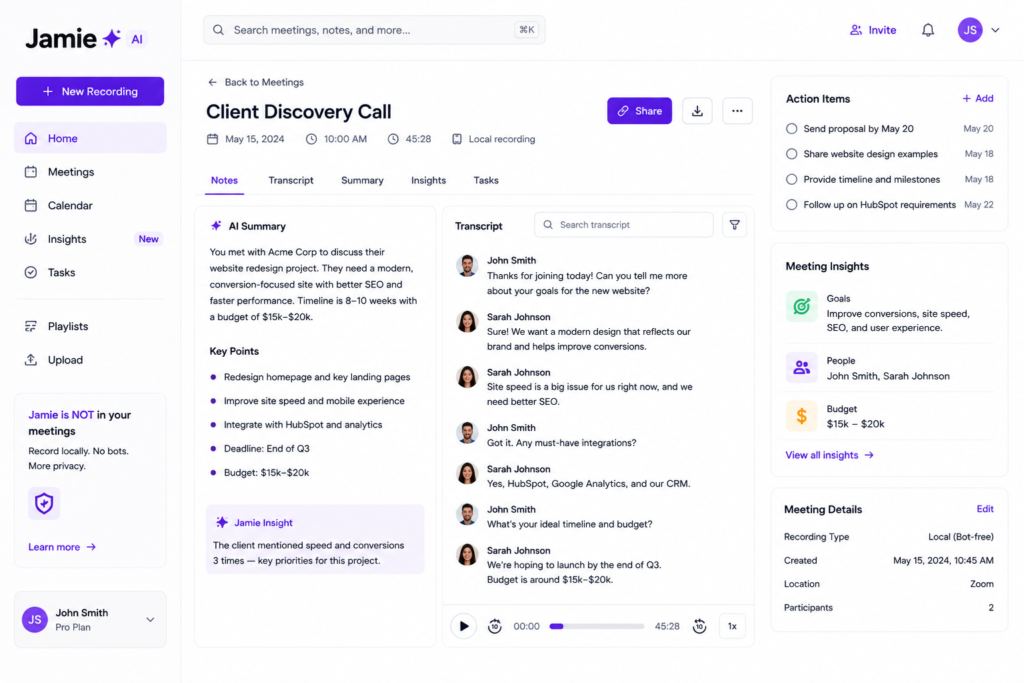
Instead of joining your meeting as another participant, Jamie records locally from your computer, making it one of the leading bot-free AI meeting notes generators available today.
For professionals working with sensitive client information, legal discussions, HR conversations, or executive meetings, this approach can make a significant difference.
Key Features
Bot-Free Recording
Jamie’s biggest advantage is also its biggest differentiator.
No AI participant joins your meeting.
To everyone else, your meeting appears completely normal.
AI Meeting Summaries
Jamie automatically creates:
- concise meeting summaries,
- action items,
- discussion highlights,
- follow-up tasks.
These summaries are easy to review immediately after meetings.
Cross-Platform Support
Since Jamie records locally, it works across multiple meeting platforms without requiring dedicated integrations.
Whether you use Zoom, Microsoft Teams, or Google Meet, the workflow remains consistent.
Real-World Example
Imagine you’re discussing confidential financial information with a client.
Instead of asking permission to admit a third-party AI bot, Jamie records the conversation locally and generates professional meeting notes afterward.
This creates a much smoother client experience.
Pros
✅ No meeting bot
✅ Excellent privacy
✅ Clean workflow
✅ Strong AI summaries
✅ Simple interface
Cons
❌ Desktop software required
❌ Smaller integration ecosystem
❌ Fewer enterprise features
Who Should Choose Jamie AI?
Jamie is ideal for:
- consultants,
- lawyers,
- financial advisors,
- executives,
- HR professionals,
- privacy-focused businesses.
Our Verdict
Jamie AI successfully addresses one of the biggest concerns surrounding AI meeting assistants—privacy.
If your organization restricts meeting bots or your clients value discretion, Jamie is one of the strongest solutions currently available.
Overall Score: ⭐⭐⭐⭐⭐ 4.8/5
Official Jamie: https://www.meetjamie.ai/
5. Granola
Best For: Professionals who attend multiple meetings every day and value speed and simplicity.
⭐⭐⭐⭐☆ Overall Rating: 4.7/5
Overview
Granola approaches AI meeting notes differently.
Instead of overwhelming users with dozens of enterprise features, it focuses on delivering an elegant note-taking experience.
Its philosophy is simple:
Capture conversations.
Generate useful notes.
Stay out of your way.
This minimalist approach has quickly made Granola popular among professionals who spend much of their day in meetings.
Key Features
Bot-Free Recording
Like Jamie AI, Granola avoids adding bots to your meetings.
This creates a cleaner, less intrusive experience.
Clean Interface
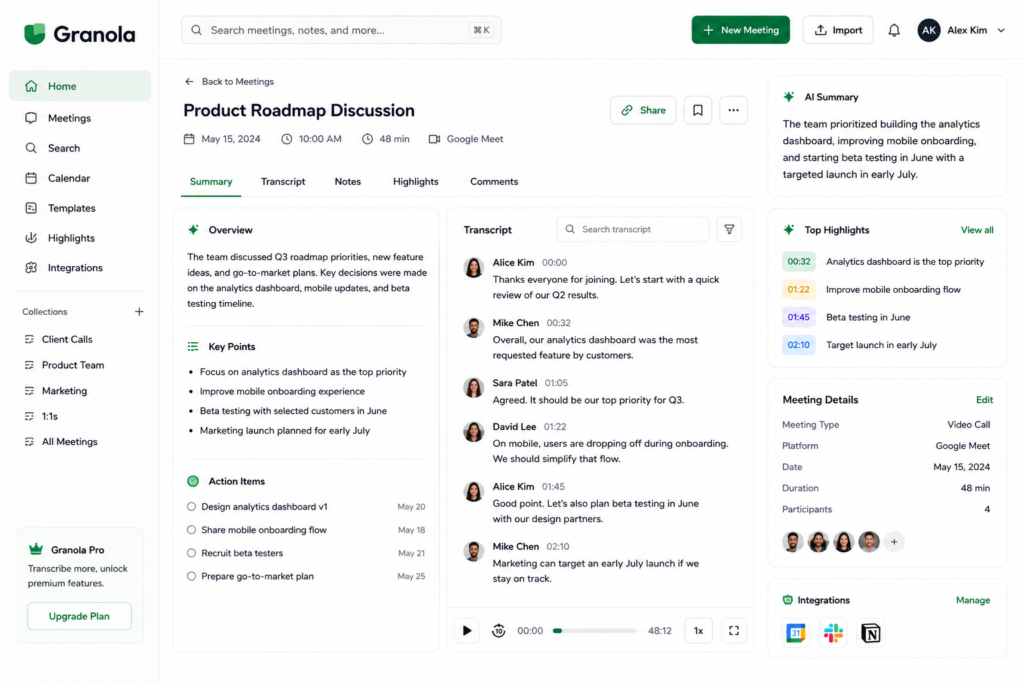
Granola’s user interface is one of the simplest in this category.
Everything feels organized without unnecessary menus or complex workflows.
AI-Powered Organization
Meeting notes are automatically transformed into structured summaries with action items and important discussion points.
Fast Workflow
Granola emphasizes speed.
Users can quickly access previous meetings, review summaries, and continue working without navigating complicated dashboards.
Real-World Example
Imagine attending six internal meetings every day.
Granola quietly records each discussion, organizes the notes, and presents them in an easy-to-read format without requiring extensive setup.
Pros
✅ Beautiful interface
✅ Bot-free recording
✅ Fast note organization
✅ Minimal learning curve
Cons
❌ Limited enterprise integrations
❌ Newer platform
❌ Smaller ecosystem
Who Should Choose Granola?
Granola is best suited for:
- managers,
- founders,
- consultants,
- freelancers,
- professionals with heavy meeting schedules.
Our Verdict
Granola proves that productivity software doesn’t need to be complicated.
If your priority is quickly capturing and organizing meeting notes while maintaining a clean user experience, Granola is an outstanding choice.
Overall Score: ⭐⭐⭐⭐☆ 4.7/5
Official Granola: https://www.granola.ai/
AI Meeting Notes Generator Comparison Table (2026)
🔥 Fireflies.ai
✅ Fathom
🎙️ Otter.ai
🔒 Jamie AI
✨ Granola
Quick Recommendations
Don’t have time to read the full review?
Here’s our recommendation based on your situation.
Choose Fireflies.ai if…
- You manage a remote team.
- You attend client meetings daily.
- You need CRM integrations.
- You want the most complete AI meeting assistant.
Choose Fathom if…
- You are a freelancer.
- You want the best free AI meeting notes generator.
- You don’t need advanced enterprise features.
- You mainly attend client discovery calls.
Choose Otter.ai if…
- You are a student.
- You conduct interviews.
- You attend lectures or webinars.
- Accurate transcription matters more than automation.
Choose Jamie AI if…
- Your company blocks meeting bots.
- Privacy is your biggest concern.
- You regularly discuss confidential information.
- You prefer local recording.
Choose Granola if…
- You attend meetings all day.
- You want a clean interface.
- You don’t need complicated enterprise software.
- You simply want organized AI meeting notes.
Which AI Meeting Notes Generator Is Best For Different Users?
One of the biggest mistakes people make is choosing the most popular tool instead of the one that fits their workflow.
Let’s break it down.
Best for Small Businesses
🏆 Fireflies.ai
Small businesses often need:
- searchable meeting history,
- automatic action items,
- CRM integration,
- client collaboration.
Fireflies offers all of these in one platform.
Best for Freelancers
🏆 Fathom
Freelancers rarely need expensive enterprise software.
Instead, they need:
- reliable summaries,
- simple sharing,
- and an excellent free plan.
That’s exactly where Fathom shines.
Best for Students
🏆 Otter.ai
Students benefit from:
- live transcription,
- searchable lecture notes,
- speaker recognition,
- accurate recordings.
Otter continues to be one of the strongest choices in education.
Best for Privacy
🏆 Jamie AI
If your organization prohibits bots joining meetings, Jamie is one of the easiest recommendations.
Its local recording approach offers a much cleaner and more private workflow.
Best for Simplicity
🏆 Granola
Granola isn’t trying to replace your entire productivity stack.
Instead, it focuses on helping you capture, organize, and revisit meetings with minimal effort.
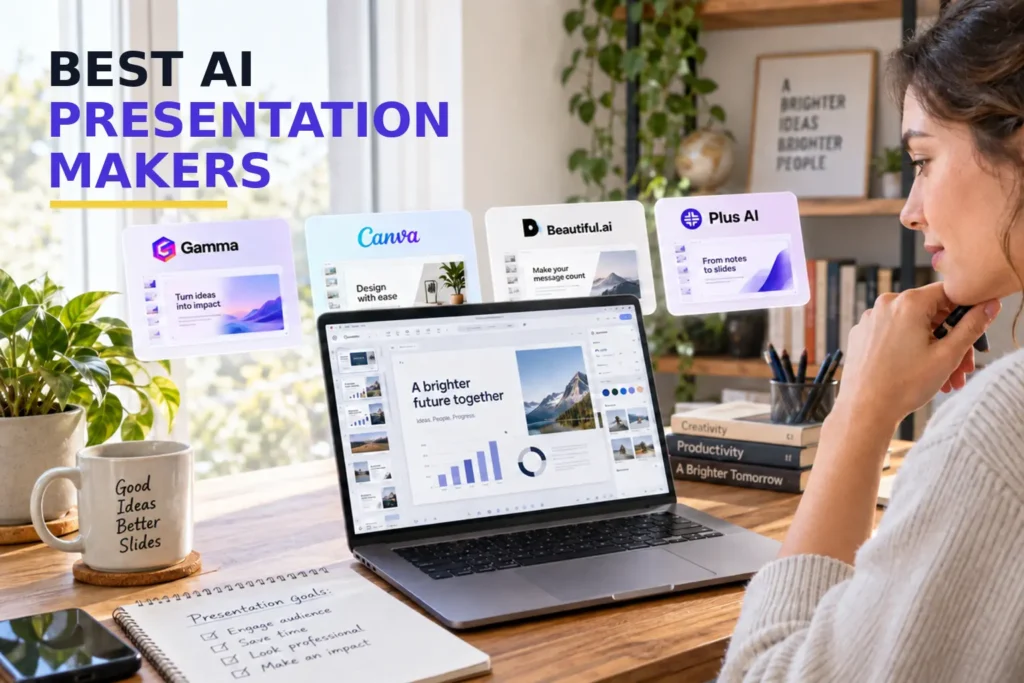
Meeting summaries can also become the source material for a client update, project report or internal presentation. See our comparison of the best AI presentation makers to choose the right tool for converting those notes into slides.
Common Mistakes When Choosing an AI Meeting Assistant
Many people choose the wrong tool because they only compare feature lists.
Here are the most common mistakes to avoid.
❌ Choosing Based Only on Price
The cheapest option isn’t always the best.
If a tool saves several hours every week, paying a monthly subscription may actually reduce costs in the long run.
❌ Ignoring Privacy Policies
Before choosing any AI meeting notes generator, check whether your organization allows meeting bots.
Many companies have strict security policies.
❌ Forgetting Integrations
If your team already uses:
- Notion
- Slack
- HubSpot
- Salesforce
make sure your AI meeting assistant integrates with those platforms.
Otherwise, you’ll still spend time copying information manually.
❌ Paying for Features You’ll Never Use
Enterprise software often includes features designed for large organizations.
If you’re a freelancer attending two meetings a week, you probably don’t need advanced analytics or CRM automation.
Choose the tool that matches your actual workflow.
Buying Advice
If you’re completely new to AI meeting assistants, start with a tool that offers a generous free plan.
Use it for two or three weeks.
Ask yourself:
- Does it save me time?
- Are the summaries accurate?
- Do I actually review my meeting notes?
- Does it fit naturally into my workflow?
Only then consider upgrading to a paid plan.
Choosing the right AI meeting notes generator isn’t about finding the platform with the most features—it’s about finding the one you’ll actually use consistently.
If you’re looking to automate even more of your daily work, don’t miss our guide to the Best AI Productivity Tools (2026), where we compare AI software for writing, scheduling, research, presentations, and workflow automation.
Frequently Asked Questions (FAQ)
What is the best AI meeting notes generator in 2026?
There isn’t a single best tool for everyone.
- Fireflies.ai is ideal for businesses and teams that need CRM integrations, searchable meeting history, and workflow automation.
- Fathom is one of the best choices for freelancers thanks to its generous free plan.
- Otter.ai remains an excellent option for students, educators, and researchers who prioritize transcription accuracy.
- Jamie AI is perfect for privacy-conscious professionals because it records meetings without joining as a bot.
- Granola is designed for professionals who want a clean, distraction-free note-taking experience.
The best AI meeting notes generator is the one that matches your workflow, privacy requirements, and budget.
Can ChatGPT generate meeting notes?
Yes—but with limitations.
ChatGPT can summarize a meeting transcript if you paste the transcript into the chat. However, it cannot automatically join Zoom, Google Meet, or Microsoft Teams meetings to record conversations.
Dedicated AI meeting assistants like Fireflies.ai, Fathom, and Jamie AI automate the entire process—from recording to transcription and AI-generated summaries.
Are AI meeting notes accurate?
Modern AI meeting notes generators are surprisingly accurate, especially when participants have clear audio and minimal background noise.
However, no AI tool is perfect. Accents, overlapping conversations, technical terminology, and poor microphone quality can still reduce transcription accuracy.
For important legal or contractual discussions, it’s always a good idea to review AI-generated notes before sharing them.
Which AI meeting notes generator doesn’t use a bot?
If you don’t want an AI assistant appearing as another participant in your meetings, consider bot-free options such as Jamie AI and Granola.
These tools record locally instead of joining your meeting, making them popular choices for organizations with strict privacy or compliance policies.
Is it safe to use AI meeting assistants?
Most reputable AI meeting assistants encrypt meeting data and provide privacy controls. However, before using any AI meeting software, you should:
- Review the provider’s privacy policy.
- Confirm where your meeting recordings are stored.
- Check whether recordings are encrypted.
- Ensure the software complies with your organization’s security requirements.
If privacy is your highest priority, bot-free solutions may be a better choice.
Do AI meeting assistants work with Microsoft Teams and Google Meet?
Yes. Most leading AI meeting notes generators support:
- Microsoft Teams
- Google Meet
- Zoom
Some also support Webex, uploaded recordings, phone calls, and other meeting platforms.
Always verify platform compatibility before subscribing.
Are free AI meeting notes generators worth using?
Absolutely.
Several platforms offer generous free plans that are suitable for freelancers, students, and small teams.
If you attend only a few meetings each week, a free plan may provide everything you need. As your workload grows, you can upgrade to unlock additional transcription minutes, storage, integrations, and collaboration features.
Final Verdict
Artificial intelligence has transformed meeting productivity. Instead of spending valuable time writing notes, reviewing recordings, or manually assigning tasks, today’s AI meeting assistants can handle much of that work automatically.
The right AI meeting notes generator doesn’t just save time—it helps you stay organized, improve collaboration, and ensure that important decisions never get lost.
After comparing the leading tools, here’s our overall recommendation:
🥇 Best Overall: Fireflies.ai – Ideal for businesses and teams that need automation and integrations.
💰 Best Free Option: Fathom – Excellent value for freelancers and small businesses.
🎓 Best for Students & Researchers: Otter.ai – Outstanding transcription accuracy.
🔒 Best for Privacy: Jamie AI – Bot-free recording for professionals and organizations with strict privacy requirements.
⚡ Best for Simplicity: Granola – Clean, fast, and easy to use.
Whichever tool you choose, the most important step is actually using it consistently. A meeting assistant only delivers value if it becomes part of your daily workflow.