Researching a topic used to mean opening a search engine, trying different keywords, opening dozens of tabs, saving papers, reading abstracts, following citations and eventually trying to make sense of everything you found.
AI research tools have changed parts of that process.
But there is a problem with the way most “best AI research tools” lists approach the subject.
They put seven or ten tools next to each other and tell you that one is “best for academic research,” another is “best for students,” and another is “best for deep research.”
That doesn’t tell you much.
The more useful question is:
What are you actually trying to do?
Are you trying to find academic papers? Build a literature review? Understand whether research agrees on a question? Trace how a paper has been cited? Discover related studies? Research something that happened last week? Or turn a large collection of sources into a coherent research report?
Those are different jobs.
And the best tool for one can be a poor choice for another.
That’s why this guide takes a different approach. Instead of treating AI research tools as interchangeable chatbots, we’ll compare them according to where they fit in a real research workflow.
For 2026, our seven picks are:
- Elicit — best for structured academic literature research
- Consensus — best for evidence-based research questions
- Scite — best for checking citation context and disputed findings
- Semantic Scholar — best for academic paper discovery
- ResearchRabbit — best for exploring connected literature
- Perplexity — best for current web research
- Gemini Deep Research — best for broad multi-source research
There isn’t one universal winner.
In fact, for serious research, you may get better results by using two or three complementary tools rather than trying to force one platform to do everything.
Table of Contents
Quick comparison of the best AI research tools
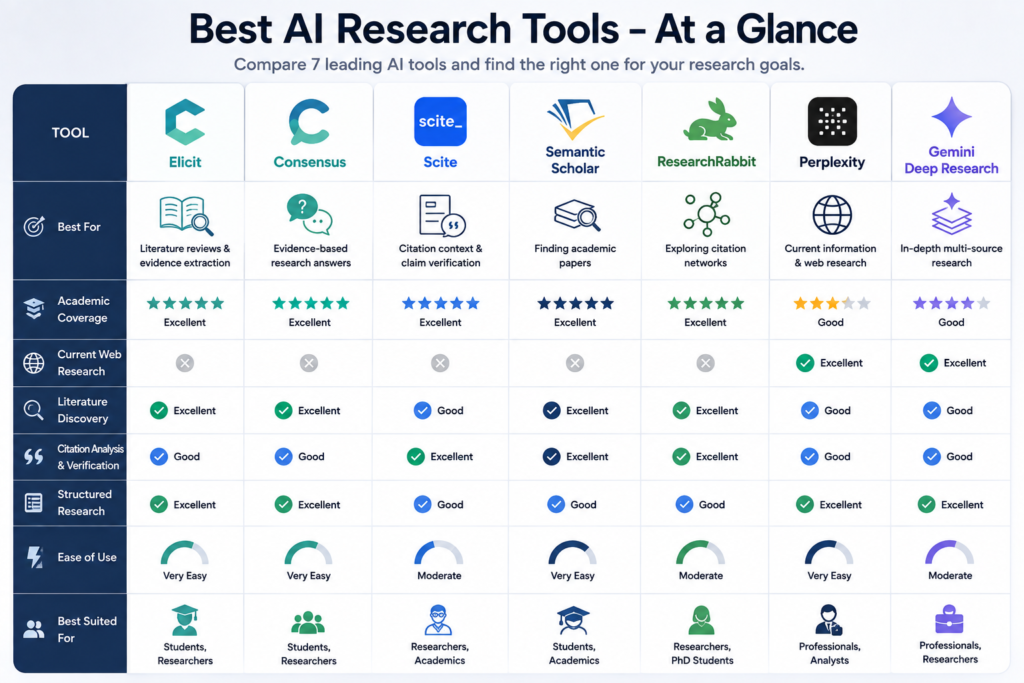
The table is a starting point, not a substitute for the explanations below.
The biggest distinction is between academic-first tools and web-first research agents.
Elicit, Consensus, Scite, Semantic Scholar and ResearchRabbit are much more useful when your evidence base is primarily scientific or academic literature.
Perplexity and Gemini Deep Research become more useful when the research question depends on current information from the wider web.
What makes an AI research tool actually useful?
An AI research tool should do more than produce a polished answer.
For serious research, several things matter.
Source coverage
Where does the information come from?
An academic search engine and a general web research agent don’t have the same source universe.
Source traceability
Can you move from an AI-generated statement back to the underlying source?
This matters because an AI answer can sound confident even when its interpretation is wrong.
Discovery
Can the tool help you find research you didn’t already know existed?
This is one of the areas where citation networks and semantic search become particularly valuable.
Research organization
Can you screen, compare, save and organize sources rather than simply reading one AI response?
Fit for the research stage
This is the criterion most generic comparison articles miss.
A tool can be excellent and still be the wrong tool for your current task.
For example, Scite is extremely useful when you want to investigate how a paper has been cited. But if you don’t have a research question or any useful papers yet, it isn’t necessarily the first place to start.
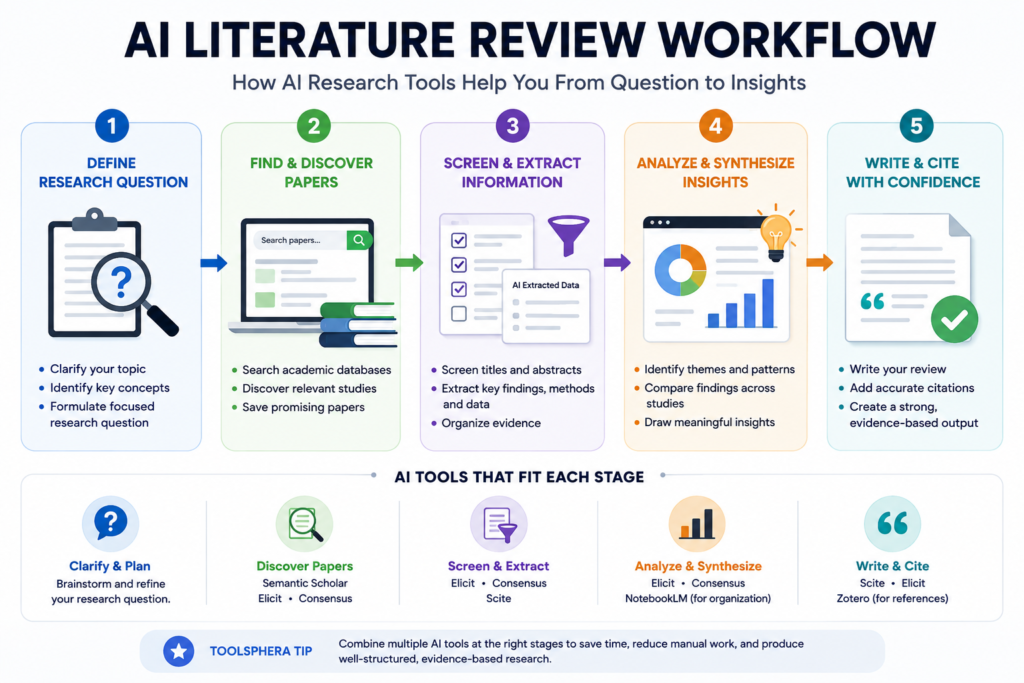
1. Elicit — Best AI research tool for literature reviews
Best for: Literature reviews, academic paper discovery, screening and structured evidence extraction.
Elicit is our strongest recommendation when your research starts with a question and the answer is likely to be buried across academic papers.
Its current platform searches more than 138 million academic papers and conference proceedings, along with more than 545,000 clinical trials. Elicit has also expanded its research agent and systematic-review capabilities during 2026.
That’s important because Elicit is no longer simply an academic search box with an AI summary attached.
Its current product is much closer to a research workflow.
What Elicit does particularly well
Suppose you’re researching:
“What does recent research say about the effect of remote work on employee productivity?”
You don’t just want seven search results.
You may eventually want to know:
- which studies investigated the question
- what populations they studied
- what methods they used
- what outcomes they measured
- whether the findings agree
- what limitations they reported
Elicit is designed to help organize that kind of information.
Its literature-review workflow can search academic papers, screen research and extract structured information. Elicit also says its AI-generated claims can include sentence-level citations pointing back to the underlying paper.
During 2026, Elicit also introduced or expanded systematic-review features aligned with PRISMA 2020 and reported evaluations of search, screening and extraction performance against Cochrane reviews. Those are useful signals about the direction of the product, although they should not be interpreted as proof that AI can independently conduct a complete systematic review without researcher oversight.
Where Elicit fits in the workflow
Think of Elicit as:
Question → papers → screening → structured evidence → synthesis
That makes it particularly valuable for students writing dissertations, researchers conducting literature reviews and professionals who need to understand an evidence base.
What Elicit isn’t
Elicit isn’t the best answer to every research problem.
If you are researching the latest product announcement, a new software feature or something that happened yesterday, an academic database isn’t necessarily where you should begin.
That’s where web research tools become more useful.
Who should use Elicit?
Best for:
- university students
- graduate students
- academic researchers
- literature reviews
- evidence synthesis
- structured paper comparison
Less useful for:
- purely current-news research
- casual web research
- product shopping research
- questions with little academic literature
ToolSphera verdict
Best academic starting point when your end goal is a literature review.
If you need to understand a field rather than simply find one article, Elicit is one of the first tools we’d try.
2. Consensus — Best AI research tool for evidence-based questions
Best for: Asking focused questions about what peer-reviewed research says.
Consensus overlaps with Elicit, but its workflow feels different.
A useful way to think about the distinction is:
Elicit: “Help me investigate and organize the literature.”
Consensus: “What does the research say about this question?”
Consensus says its research library is built on 200M+ research papers, and its current Consensus Meter analyzes relevant papers to show whether findings lean toward Yes, No, Possibly or Mixed.
Why Consensus is useful
Imagine you’re investigating:
“Does exercise improve sleep quality?”
You don’t necessarily want to read 50 abstracts before you even understand the direction of the evidence.
Consensus can give you an initial evidence-oriented view.
Its Consensus Meter currently looks at relevant results and categorizes findings into positions such as Yes, No, Possibly and Mixed. It also provides additional context around factors such as recency and study methods.
That makes it particularly useful for hypothesis exploration and evidence orientation.
But don’t confuse “consensus” with scientific certainty
This is important.
A visual meter is useful for orientation.
It isn’t a substitute for reading the studies.
Consensus itself warns that AI summaries can miss nuances, limitations and important caveats and recommends reading the original abstract and paper before citing research.
That’s exactly how we recommend using it.
Use the tool to help you see the landscape.
Then investigate the evidence behind the landscape.
Who should use Consensus?
Best for:
- students
- researchers
- evidence-based questions
- hypothesis exploration
- quickly comparing research findings
ToolSphera verdict
Best when your first question is “What does the research currently suggest?”
It is particularly useful before you invest hours reading deeply into a topic.
3. Scite — Best for checking whether research supports or challenges a claim
Best for: Citation context, evidence verification and understanding how later studies treated earlier research.
Scite addresses a problem that ordinary citation counts don’t solve.
Imagine you find a paper with 2,000 citations.
That number tells you that many researchers referenced the paper.
It doesn’t tell you why.
Were those researchers supporting the finding?
Challenging it?
Using its methodology?
Mentioning it only as background?
Scite’s Smart Citations are designed to provide that missing context.
Scite currently says it provides access to more than 280 million full-text, peer-reviewed articles and more than 1.6 billion citation statements. Its Smart Citations can indicate whether later research supports or contradicts a finding.
Why this matters
Suppose an article repeatedly claims:
“Research proves X.”
You find the original study.
Instead of stopping there, you can investigate how subsequent research treated that finding.
That can reveal a very different picture.
A finding that looked established from its citation count may turn out to be contested.
Or the opposite may happen: later research may repeatedly support the original result.
Where Scite fits in the workflow
Important paper → citation context → supporting/contrasting evidence → verification
This is why we don’t recommend Scite as the first tool for everyone.
It’s more valuable once you have something important to verify.
Who should use Scite?
Best for:
- researchers
- graduate students
- academic writers
- literature reviews
- claim verification
- citation analysis
ToolSphera verdict
Best tool in this list for asking “What happened to this finding after the original paper was published?”
That’s a much more useful question than simply counting citations.
4. Semantic Scholar — Best for finding academic papers
Best for: Academic search, paper discovery and citation exploration.
Sometimes you don’t need an AI agent to conduct an entire research project.
You need a really good place to find papers.
That’s where Semantic Scholar remains one of the most useful options.
Its current product page says users can search more than 214 million papers across scientific fields. It also offers filters, AI-generated TLDR summaries, influential-citation information, citation exports, libraries and research feeds.
Why Semantic Scholar stands out
Its strength is discovery.
You can:
- search academic literature
- filter results
- scan paper summaries
- inspect citations
- identify influential citations
- save papers
- organize them into folders
- create research feeds
- receive alerts for new papers and citations
That makes it particularly useful as a research starting point.
Semantic Scholar vs Elicit
This is an important distinction.
If your immediate goal is:
“Find papers about this topic.”
Semantic Scholar is an excellent place to begin.
If your goal is:
“Compare dozens of papers and extract structured evidence for my literature review.”
Elicit may be the better next step.
You don’t necessarily have to choose one.
You can use them together.
Who should use Semantic Scholar?
Best for:
- students
- researchers
- paper discovery
- citation exploration
- building reading lists
- free academic research
ToolSphera verdict
Best free academic discovery tool in this comparison.
It is one of the tools we’d recommend having in your research toolkit even if you later use specialized AI research platforms.
5. ResearchRabbit — Best for discovering connected research
Best for: Citation networks, related papers and visual literature exploration.
ResearchRabbit becomes especially interesting after you’ve already found a few good papers.
Instead of giving you another list of search results, it helps you explore how papers connect.
Its current workflow allows researchers to use one to three relevant papers as “seed” papers and then explore a visual citation network. The platform currently describes a database of around 310 million articles in its getting-started documentation.
Why citation mapping matters
Imagine you’ve found an excellent paper.
You can move in two directions.
Backward: What did this paper cite?
Forward: Who cited this paper afterward?
Backward citations can expose foundational research.
Forward citations can expose newer research, follow-up studies and challenges to the original work.
ResearchRabbit visualizes those relationships so you can explore them rather than manually opening reference lists one by one.
ResearchRabbit is not a replacement for structured searching
This distinction matters for serious research.
ResearchRabbit itself recommends using citation mapping as a complement to keyword searching, not as a complete replacement.
That’s exactly how we’d use it.
Start with a structured search.
Then use citation mapping to expand the edges of your literature.
Who should use ResearchRabbit?
Best for:
- literature reviews
- dissertations
- researchers exploring unfamiliar fields
- citation chasing
- finding connected research
- identifying research clusters
ToolSphera verdict
Best for answering “What else should I read?” after you’ve found your first good papers.
6. Perplexity — Best for current web research
Best for: Current information, web research, technology, markets and topics that change quickly.
Academic research isn’t always enough.
Suppose you’re researching:
“What AI research tools are available in 2026, what do they currently offer, and how have their features changed?”
Academic papers won’t give you the whole answer.
You need:
- official product pages
- documentation
- announcements
- current pricing
- recent industry coverage
- current feature information
That’s where Perplexity becomes useful.
Its current Research mode performs iterative searches, reads many sources and builds a report from the material it evaluates. Perplexity says Research mode can perform dozens of searches and read hundreds of sources before synthesizing the result.
Where Perplexity fits
Current question → web search → multiple sources → synthesis → cited report
This is fundamentally different from a literature-review workflow.
When Perplexity is the better choice
Use it when you’re researching things such as:
- current technology
- software
- companies
- markets
- regulations
- current events
- product comparisons
- industry developments
Where you should be careful
Citations make verification easier.
They don’t make verification optional.
If Perplexity says a company introduced a feature, open the source.
If it says a study found something, check the study.
If it gives you a number, verify the original source.
The same rule applies to every AI research tool in this article.
Who should use Perplexity?
Best for:
- professionals
- marketers
- students doing current research
- technology research
- product research
- market research
ToolSphera verdict
Best web-first research option in this comparison.
7. Gemini Deep Research — Best for broad multi-source research
Best for: Large research tasks involving web information and multiple source types.
Gemini Deep Research is another category entirely.
Google’s current documentation says Deep Research can conduct in-depth, real-time research and uses Google Search as a source by default. Users can also add sources such as Gmail and Drive, upload files and add NotebookLM notebooks to the research.
That makes it particularly interesting if your research involves both:
public information + your own information
Where Gemini Deep Research fits
A typical workflow could look like:
Research question → research plan → web sources → connected sources → report
Gemini creates a research plan before generating the report, and users can edit that plan before starting the research. Google’s current documentation says reports generally take around five to ten minutes, depending on complexity.
Why this matters
Consider a professional researching a market.
They may need:
- current web information
- company information
- internal documents
- previous research
- files stored in Drive
A tool that can combine those source types can be more useful than an academic-only research platform.
Who should use Gemini Deep Research?
Best for:
- professionals
- broad research projects
- Google Workspace users
- multi-source research
- current web research
ToolSphera verdict
Best choice when your research isn’t confined to academic literature and you want to combine web research with your own source material.
The real comparison: which AI research tool should you use?
This is where we believe most comparison articles become less useful.
They ask:
“Which tool is #1?”
We think that’s the wrong question.
Instead, choose according to the job.
| If you need to… | Start with… | Then consider… |
|---|---|---|
| Find academic papers | Semantic Scholar | Elicit |
| Build a literature review | Elicit | ResearchRabbit + Scite |
| Ask what research says | Consensus | Scite |
| Check a research claim | Scite | Original papers |
| Find connected papers | ResearchRabbit | Semantic Scholar |
| Research current information | Perplexity | Gemini Deep Research |
| Produce a broad research report | Gemini Deep Research | Perplexity |
| Combine academic + web research | Elicit + Perplexity | Gemini Deep Research |
This is the core difference between ToolSphera’s approach and a generic “7 best tools” list.
You don’t need seven subscriptions.
You need the right research stack for the problem in front of you.
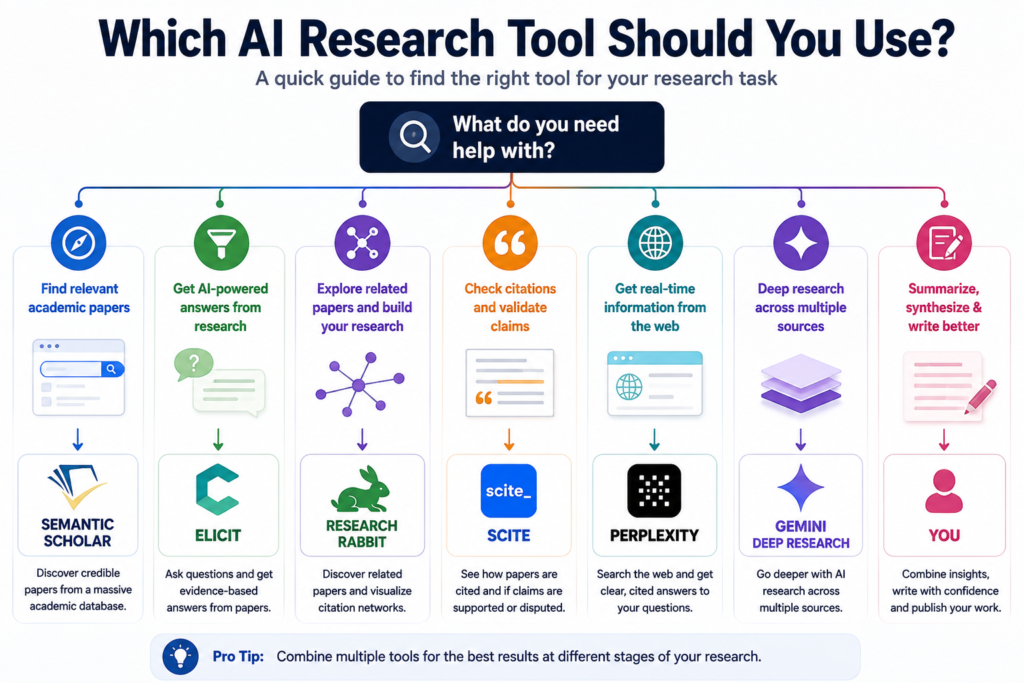
ToolSphera’s recommended AI research workflow
If we were starting a serious research project today, we wouldn’t open all seven tools at once.
We’d use them in stages.
Stage 1 — Define the question
Start with a precise research question.
Instead of:
“Remote work research”
try:
“What does recent peer-reviewed research say about the effect of fully remote work on productivity among software employees?”
The second question gives the research tools something meaningful to work with.
Stage 2 — Find your first papers
Start with Semantic Scholar.
Look for a small number of strong, relevant papers.
Don’t save everything.
You’re looking for your first reliable seeds.
Stage 3 — Expand and structure the literature
Move those papers into Elicit.
Use it to explore the literature and organize information across studies.
If the project becomes a serious literature review, this is where structured screening and extraction become increasingly important.
Stage 4 — Expand the edges
Take your strongest papers into ResearchRabbit.
Explore:
- backward citations
- forward citations
- related papers
- authors
- research clusters
This helps you discover literature that may not have appeared in your first keyword search.
Stage 5 — Check important claims
Use Scite when you encounter a paper or finding that matters to your final conclusion.
Don’t ask only:
“How many times has this been cited?”
Ask:
“How is this finding being treated by the research that came after it?”
Stage 6 — Investigate current developments
If your research involves anything that changes quickly, move to Perplexity or Gemini Deep Research.
That’s where you look for current information outside the academic literature.
Stage 7 — Verify
Finally, return to the original sources.
Read the important papers.
Check methodology.
Check sample sizes.
Check limitations.
Check whether the AI interpretation matches what the source actually says.
That last stage cannot be outsourced.
For a source-by-source process after collecting material, follow our NotebookLM research workflow, including the citation checks to complete before publishing a claim.
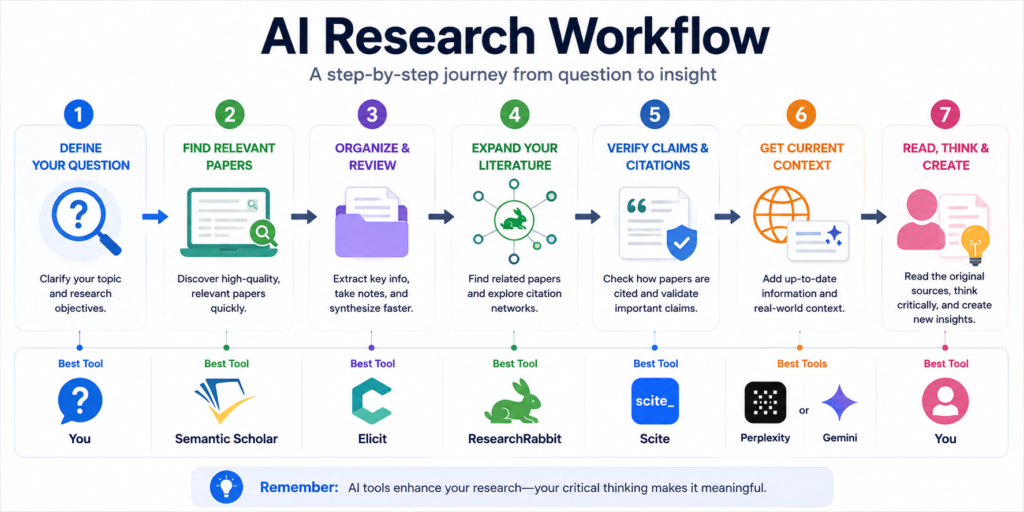
AI research tools should accelerate research, not replace researchers
This is worth saying clearly because “AI research assistant” can create the wrong expectation.
AI can help with:
- finding candidates
- screening information
- summarizing
- organizing
- comparing
- discovering connections
- generating research plans
But researchers still need to decide:
- what question matters
- which evidence is credible
- whether a study is methodologically sound
- whether contradictory evidence changes the conclusion
- whether an AI-generated interpretation is accurate
A 2026 rapid review of AI-assisted research competencies found that domain expertise, oversight, source verification and researcher accountability remain central to using AI responsibly in research.
Another 2026 study comparing AI-assisted literature searches with expert research projects found surprisingly little overlap between the references selected by humans and those selected by AI systems in its test setting. The authors also found substantial metadata errors in the AI-generated references they examined.
That doesn’t mean AI research tools are useless.
It means you should use them as research accelerators rather than unquestioned authorities.
Common mistakes when using AI research tools
Using one tool for everything
A literature database, citation-analysis platform and web research agent solve different problems.
Don’t force one tool to do all three.
Treating AI summaries as the original source
If the claim matters, open the source.
Searching only once
A good research process usually involves discovery, expansion and verification.
Ignoring contradictory evidence
Finding evidence that agrees with your original assumption isn’t research.
Finding evidence that challenges it is often more valuable.
Confusing citation count with evidence quality
A highly cited paper isn’t automatically correct.
Citation context matters.
Letting AI decide what is important without oversight
AI can surface possibilities.
You still decide which evidence deserves weight.
Best AI research tools for students
Students generally don’t need every tool on this list.
A practical starting stack is:
Semantic Scholar → Elicit → ResearchRabbit
Use Semantic Scholar to find papers.
Use Elicit to investigate and organize them.
Use ResearchRabbit to discover related literature.
Add Consensus when you need a quick evidence-oriented answer to a focused research question.
Add Scite when a particular citation or finding becomes important.
If the assignment involves current information rather than academic literature, use Perplexity or Gemini Deep Research as well.
And if your research material is mostly PDFs, our AI PDF summarizers guide is the better place to start for the document-reading part of the workflow.
Best AI research tools for professional researchers
Professionals often have a different problem.
They may need to combine:
- academic research
- company information
- market information
- current news
- industry reports
- internal documents
In that situation, a combination such as:
Elicit/Semantic Scholar → Scite → Perplexity/Gemini Deep Research
can make more sense.
Academic tools establish the evidence base.
Scite helps investigate important claims.
Web research tools fill in current context.
Do you need more than one AI research tool?
For serious research, often yes.
But that doesn’t mean you need seven paid subscriptions.
The point of the workflow is to avoid paying for multiple tools that perform essentially the same task.
A student might be perfectly well served by:
Semantic Scholar + Elicit
A researcher conducting a complex literature review may benefit from:
Semantic Scholar + Elicit + ResearchRabbit + Scite
A professional researching a current market may prefer:
Perplexity + Gemini Deep Research
The best stack depends on the work.
Are free AI research tools good enough?
For many users, yes.
Semantic Scholar provides free academic search and research-management features. ResearchRabbit says its core functionality is available for free as well.
Free tiers can be enough for:
- finding papers
- exploring a topic
- learning how a research tool works
- occasional research projects
Paid plans become more interesting when you regularly need:
- larger research workloads
- advanced screening
- higher usage limits
- deeper analysis
- additional research features
Don’t subscribe simply because a comparison article says a tool is “premium.”
Subscribe when the limitation is actually slowing down your work.
Once your research is organized and verified, the next step may be turning it into a client or classroom presentation. Our guide to the best AI presentation makers compares the tools that can generate, design and export the final deck.
Which AI research tool is best overall?
If you absolutely want one answer, we’d divide it by research type rather than name one universal winner.
For academic literature: Elicit.
For evidence-based questions: Consensus.
For citation verification: Scite.
For academic discovery: Semantic Scholar.
For connected literature: ResearchRabbit.
For current web research: Perplexity.
For broad multi-source research: Gemini Deep Research.
But the more useful answer is:
The best AI research tool is the one that matches the stage of research you’re currently doing.
That’s why ToolSphera recommends a workflow rather than a winner.
Frequently asked questions
What is the best AI research tool?
There isn’t one universal winner. Elicit is particularly strong for literature reviews, Consensus for evidence-based questions, Scite for citation analysis, Semantic Scholar for academic discovery, ResearchRabbit for citation networks, Perplexity for current web research and Gemini Deep Research for broad multi-source research.
What is the best AI research tool for students?
Semantic Scholar is a strong free starting point for academic paper discovery. Elicit is particularly useful when a student needs to organize and compare literature for a larger project.
What is the best AI tool for literature reviews?
Elicit is one of the strongest choices because it is specifically designed around academic paper discovery, screening and structured evidence extraction. Its 2026 product updates have expanded its systematic-review capabilities.
What is the best AI tool for finding research papers?
Semantic Scholar is an excellent starting point, with search across more than 214 million papers and tools for filtering, citation exploration and research feeds.
What AI tool can show whether research supports or contradicts a claim?
Scite is specifically designed for this through its Smart Citations, which provide context around how later research treats cited findings.
Is Perplexity good for research?
Yes, particularly for current web research. Its Research mode performs iterative searches, reads many sources and synthesizes them into a report.
Is Gemini Deep Research good for research?
It can be useful for broad, current research because it can use Google Search and, depending on the user’s setup, other sources such as Gmail, Drive, uploaded files and NotebookLM notebooks.
Can AI replace academic research databases?
No. AI research tools can accelerate discovery and analysis, but researchers should still use appropriate databases and inspect important primary sources.
Can AI research tools replace reading research papers?
No. AI summaries can help you decide which papers deserve attention, but important conclusions should be checked against the original research.
Should I use multiple AI research tools?
For serious research, using complementary tools can be more effective than relying on one platform. The goal isn’t to use as many tools as possible; it is to use the right tool at each stage.
Final verdict
The AI research market has matured enough that the question is no longer simply:
“Which AI tool can research something for me?”
The better question is:
“Which part of my research process am I trying to improve?”
If you’re discovering academic literature, start with Semantic Scholar.
If you’re turning a research question into a structured literature review, look at Elicit.
If you want to understand what published research says about a focused question, try Consensus.
If an important claim needs citation-level scrutiny, use Scite.
If you’ve found good papers and want to discover the research connected to them, use ResearchRabbit.
If your question depends on current web information, use Perplexity.
And if you need a broad report built from multiple sources, particularly within the Google ecosystem, Gemini Deep Research is worth considering.
The important part is what happens after the AI gives you an answer.
Check the sources.
Read the important papers.
Look for contradictory findings.
Question the methodology.
And use AI to make that process faster—not to remove the human judgment that makes research trustworthy.
That is the approach we recommend at ToolSphera.