Freelancers do not need the invoicing app with the longest feature list. They need the one that fits how they charge, how clients prefer to pay, and how much admin they want to handle.
For most solo freelancers, Zoho Invoice is the strongest free starting point. Wave is more attractive if you are in the US or Canada and want bookkeeping beside invoicing. FreshBooks is the strongest paid option here when accounting matters. Bonsai makes more sense when proposals and contracts need to sit beside invoices. Harvest is built around hourly billing, Invoice Ninja favors flexibility, and Square Invoices is easiest to justify if you already use Square.
The catch is that “free” and “cheap” can be misleading. A $0 plan can still carry payment-processing costs, while a low paid tier can become expensive the moment you hit a client or project limit.
Prices, plan limits, and payment details in this guide were checked against official US-facing sources.
Table of Contents
Quick Answer: Which Invoicing Software Is Best for Freelancers?
⭐ Zoho Invoice — Best free overall
✅ Wave — Best free invoicing + bookkeeping
💼 FreshBooks — Best paid invoicing + accounting
🧩 Bonsai — Best all-in-one freelancer workflow
⏱️ Harvest — Best for hourly billing
🛠️ Invoice Ninja — Best for flexibility and control
💳 Square Invoices — Best if you already use Square
Before choosing, answer three questions:
- Do you bill hourly, by project, or on a retainer?
- Do clients pay through the invoice, or do you mainly use bank transfer or another method?
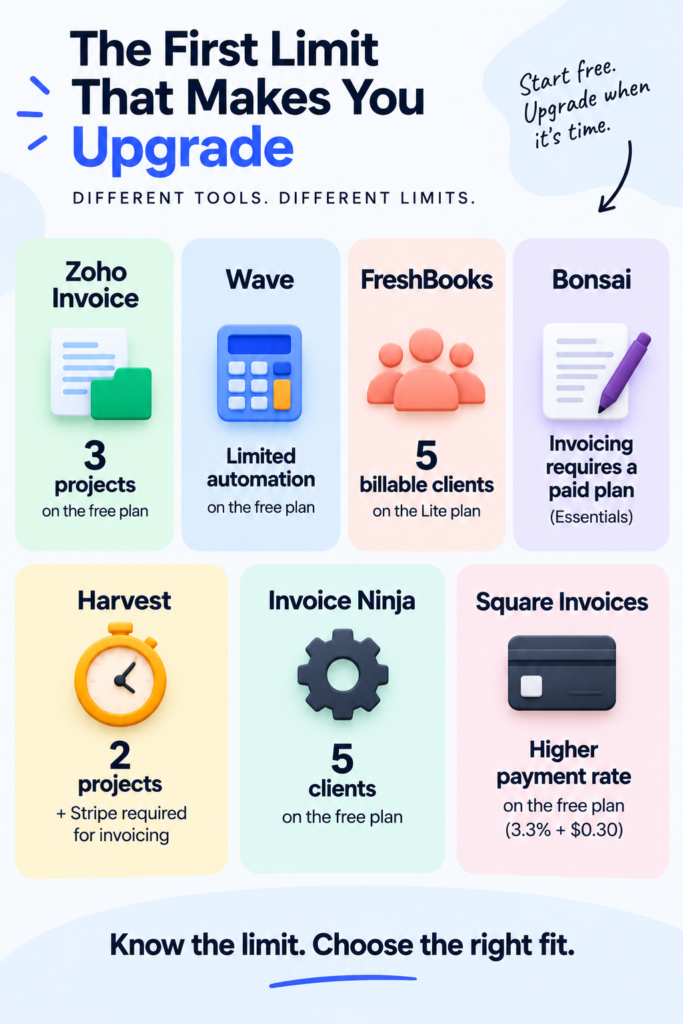
- What is the first limit that would actually force you to upgrade?
Those three answers matter more than the number of features on a pricing page.
How Tool Sphera Evaluated These Invoicing Tools
This is a research-based comparison. We did not pretend to personally test every product for months.
We checked current official pricing pages, help documentation, payment-fee information, plan limits, and the workflows that matter to freelancers.
We compared:
✅ subscription cost
✅ client, project, and invoice limits
✅ recurring invoices and reminders
✅ time-to-invoice workflow
✅ payment-processing costs
✅ bookkeeping and accounting depth
✅ proposals, contracts, and client-facing features
✅ the first reason a freelancer is likely to need a paid upgrade
That last point is important.
Freelancers do not all need accounting suites. Some simply want a clean invoice and an easy way to track whether it has been paid. Others want time tracking, contracts, bookkeeping, or recurring billing connected to the invoice.
The “best” tool changes with that workflow.
Choose Invoicing Software by the Way You Bill
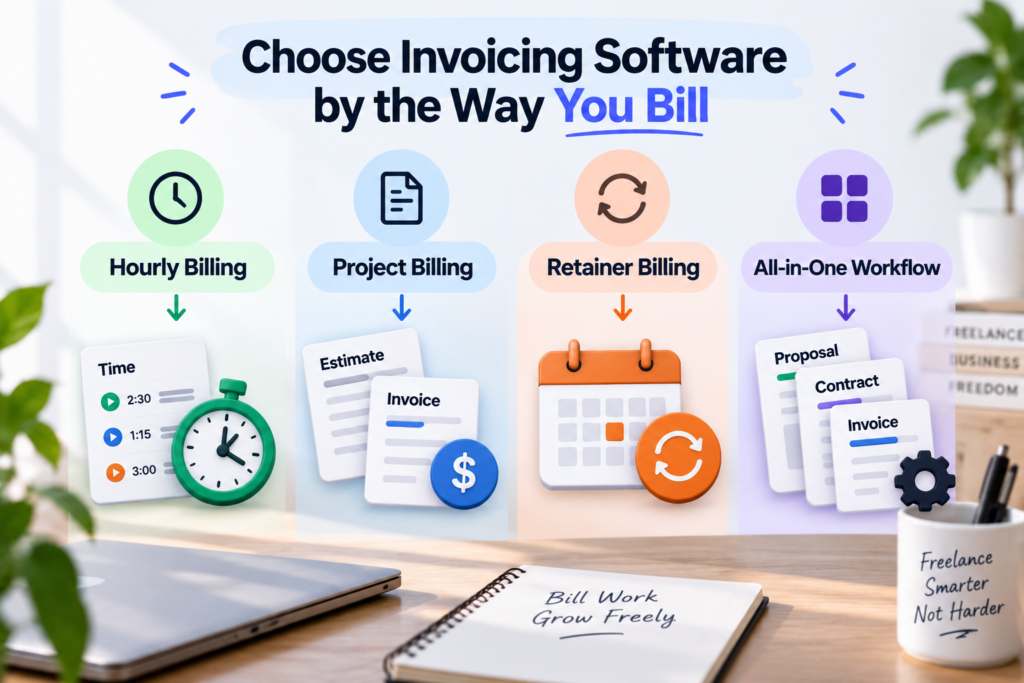
If you bill by the hour
Start with Harvest or Zoho Invoice.
Harvest is the more time-centric choice: the workflow begins with recorded hours and ends with the invoice. Zoho Invoice gives you a broader free invoicing toolkit while still supporting projects and time tracking.
If time tracking is still the bigger problem, compare Tool Sphera’s best free time tracking apps for freelancers before deciding whether your time tracker should also handle billing.
If you charge fixed project fees
Start with Zoho Invoice or Wave if you want to minimize monthly software cost.
FreshBooks becomes more attractive when you also need expenses and accounting. Bonsai becomes more attractive when proposals, contracts, and client administration need to sit beside the invoice.
If you are still deciding what the project should cost, use our guide on how much a beginner freelancer should charge before choosing the software that will bill it.
If you work on monthly retainers
Prioritize recurring invoices, reliable reminders, clear payment status, and a low-friction way for clients to pay.
You do not need the most elaborate platform. You need a system that can repeat the billing cycle without forcing you to rebuild the same invoice every month.
Before invoicing, the work itself still needs a repeatable structure. If that is the messy part of your business, our best project management software for freelancers comparison covers the project side of the workflow.
1. Zoho Invoice — Best Free Overall
Zoho Invoice is the strongest free default in this shortlist because its $0 product is not limited to creating a basic PDF.
It supports recurring invoices, reminders, quotes, expenses, time and project tracking, and a customer portal. Its current US limits are up to two users, three projects, and 500 invoices per year.
Where it fits best
Choose Zoho Invoice if you are a solo freelancer who wants a real billing workflow without immediately paying for software.
It works particularly well when you need more than one-off invoices but are not yet ready for a full accounting suite.
⚠️ What could make you outgrow it?
The three-project limit may matter before the 500-invoice annual limit if you use project tracking heavily.
If you simply send invoices and do not manage many active projects inside Zoho Invoice, that restriction may barely affect you.
Verdict: ⭐ Best free overall for most solo freelancers.
2. Wave — Best Free Invoicing + Bookkeeping
Wave Starter costs $0 and currently includes unlimited estimates, invoices, bills, and bookkeeping records. Wave Pro costs $19/month in the US or $190/year.
That makes Wave different from Zoho Invoice: its attraction is not project time tracking. It is the connection between invoicing and basic financial records.
Where it fits best
Wave suits a US or Canadian freelancer who mainly bills fixed-price projects or retainers and wants invoicing plus bookkeeping without a monthly subscription.
Wave’s current support model is focused on the United States and Canada, so it should not be treated as a universal recommendation for international freelancers.
⚠️ What does “free” cost when clients pay online?
On Starter, standard Visa, Mastercard, and Discover payments currently cost 2.9% + $0.60. ACH costs 1% with a $1 minimum.
That does not make Wave expensive by itself.
It means you should separate the cost of the invoicing software from the cost of the payment method.
Verdict: ✅ Best free invoicing + bookkeeping option for eligible US and Canadian freelancers.
3. FreshBooks — Best Paid Invoicing + Accounting
FreshBooks is the strongest paid option in this shortlist when you want invoicing to sit inside a fuller accounting workflow.
Its current pricing page is running a steep introductory promotion, but long-term comparisons should use the normal prices displayed behind that offer:
Lite — $23/month
Plus — $43/month
Premium — $70/month
The limit that matters most
Lite supports only five billable clients.
That can be perfectly adequate for a consultant with a small retainer roster and frustratingly restrictive for a freelancer who completes many smaller jobs.
The realistic FreshBooks price is therefore not always the cheapest advertised tier.
It is the first tier that supports the number of clients you actually expect to bill.
Payment costs
According to FreshBooks Payments, standard US consumer credit and debit cards currently cost 2.9% + $0.30, while ACH costs 1%. Some commercial and premium cards carry higher rates.
Verdict: 💼 Best paid option here when invoicing, expenses, time, and accounting need to live together.
4. Bonsai — Best All-in-One Freelancer Workflow
Bonsai is not the cheapest way to send an invoice—and that is the wrong way to judge it.
Its cheaper Basic plan does not include invoicing.
The relevant starting tier is Essentials at $25/user/month, or $19/user/month billed annually. Essentials connects invoices and payments with proposals, contracts, forms, scheduling, a client portal, expenses, and income tracking.
Where it fits best
Bonsai makes sense when you are already juggling several client-admin tools.
If your current process is proposal in one app, contract in another, scheduling somewhere else, and invoices in a fourth system, consolidation may be worth more than finding the cheapest invoice generator.
If you have not reached that stage yet, our guide on how to get your first freelance client with no experience is the more useful next step.
Payment costs
Bonsai Payments currently lists standard cards at 2.9% + $0.30 and ACH at 1% with a $1 minimum.
In locations where Bonsai Payments is available, using certain third-party processors can also add an additional platform fee.
Verdict: 🧩 Best when you want to consolidate the wider freelancer client workflow.
5. Harvest — Best for Hourly Freelancers
Harvest is built around a different starting point: time.
Its Free plan currently includes one seat, two projects, time tracking, invoicing, and expense tracking.
Teams starts at $11/seat monthly or $9/seat/month when billed annually.
Why hourly freelancers may prefer it
The attraction is the path from recorded work to billing.
Instead of tracking hours in one place and manually recreating them on an invoice, Harvest can keep those steps closer together.
⚠️ The Free-plan catch
This is important.
Harvest’s Stripe documentation says Free accounts must connect Stripe if they want to send invoices or record payments.
Harvest also applies an additional charge to Stripe-paid invoices on accounts below its higher tiers, on top of the payment processor’s fee; the applicable charge is shown during invoice setup.
So:
“Harvest Free includes invoicing”
is true—but it is not the same as an unrestricted, gateway-independent free invoicing workflow.
Verdict: ⏱️ Best when tracked hours are the foundation of the invoice.
6. Invoice Ninja — Best for Flexibility and Control
Invoice Ninja has a hosted Free plan supporting up to five clients with unlimited invoicing.
It also includes recurring billing, online payment gateways, projects, billable time, expenses, deposits, partial payments, and a client-side invoice portal.
Ninja Pro currently costs $14/month or $140/year and removes the five-client limit.
Where it fits best
Invoice Ninja is attractive if you want to choose among payment gateways or value the option to self-host.
That flexibility is particularly useful for technical freelancers who do not want their invoicing app to dictate the entire payment stack.
⚠️ The trade-off
Flexibility creates more decisions.
If you invoice three clients a month and only want a clean, low-maintenance workflow, you may prefer the simplicity of Zoho Invoice or Wave.
Verdict: 🛠️ Best for freelancers who prioritize gateway choice, customization, or technical control.
7. Square Invoices — Best if You Already Use Square
Square Invoices is easiest to justify when Square is already part of how you collect money.
Square’s current invoicing plans include Free at $0 per location and Plus at $49/month per location. Unlimited invoices and recurring invoices are available across the current plan structure.
The number to watch
For online or invoice card payments:
Square Free — 3.3% + $0.30
Square Plus — 2.9% + $0.30
On a $1,000 card-paid invoice:
Square Free: $33.30
Square Plus: $29.30
Difference:
$4
Paying $49/month only to save $4 per $1,000 of invoice-card volume would not make sense at low volume.
Plus becomes easier to justify when you also need its broader features or process enough qualifying payments for the economics to change.
Verdict: 💳 Best when you already use the Square ecosystem.
The Cheapest Invoicing Software Is Not Always the Cheapest Workflow
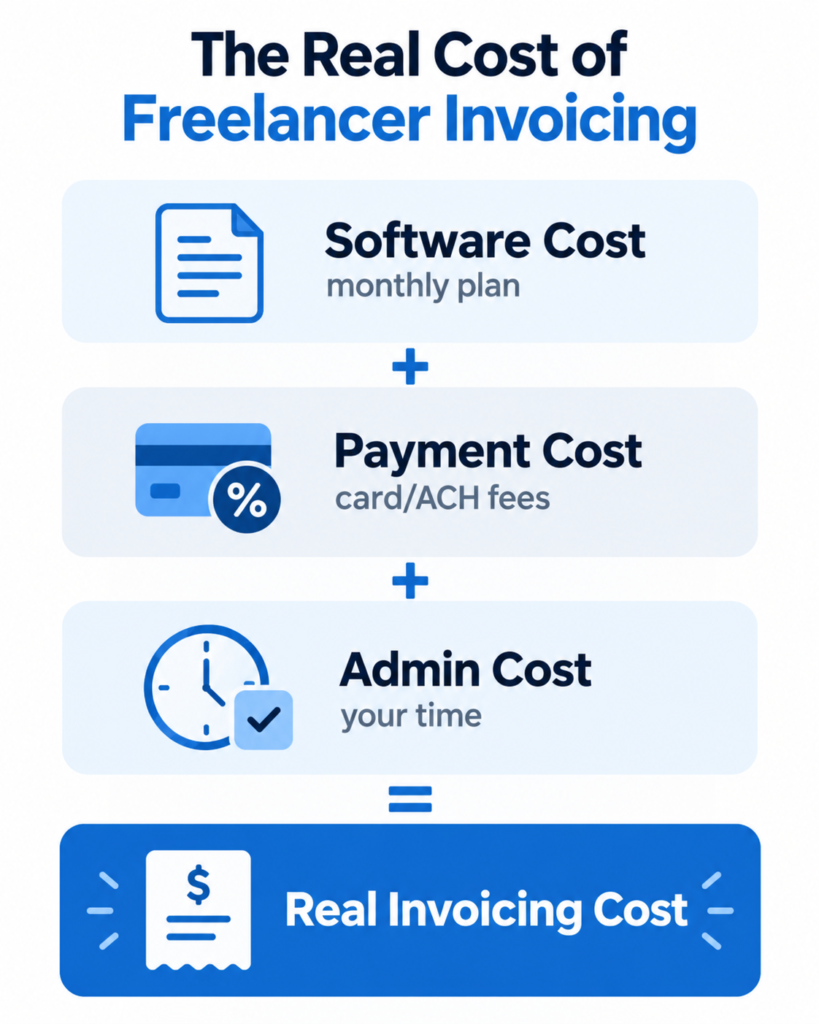
A better comparison uses three costs.
1. Software cost
This is the obvious one:
$0, $14, $19, $23, $25—or another monthly amount.
But it is only the first layer.
2. Payment cost
If clients pay through an integrated card or bank-payment system, processing fees can exceed the monthly software price.
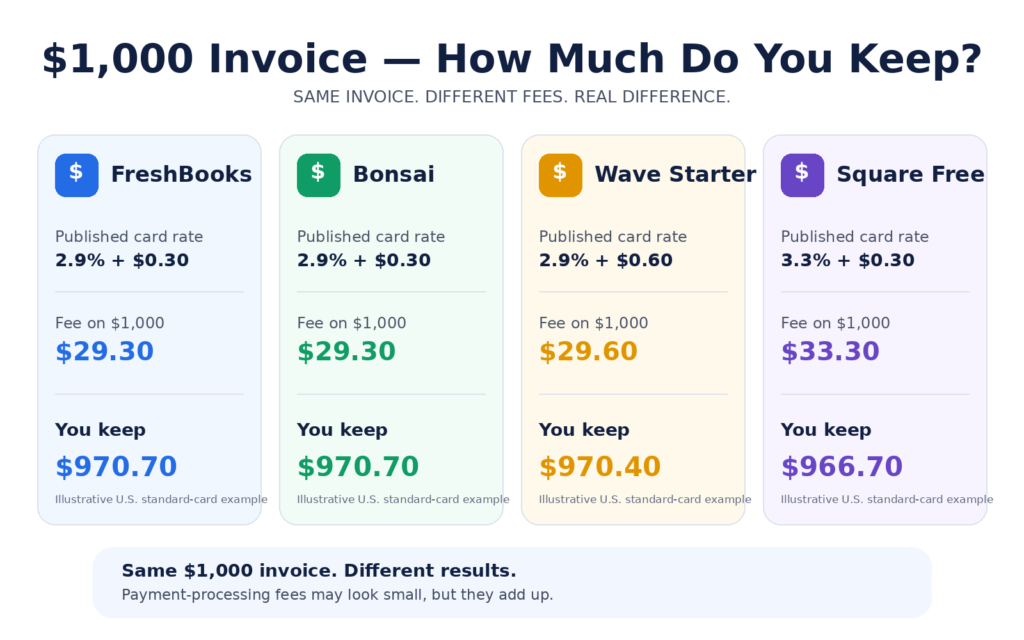
For a $1,000 standard US card payment, published rates currently work out to approximately:
FreshBooks — $29.30
Bonsai — $29.30
Wave Starter — $29.60
Square Free — $33.30
These are examples, not universal rates. Card type, country, payment method, currency conversion, instant payouts, disputes, and other conditions can change the final cost.
3. Admin cost
This is the cost comparison articles cannot put neatly into a pricing box.
If a cheaper system forces you to copy time entries manually, recreate recurring invoices, chase late payments, or update several separate apps, the subscription savings can disappear into your time.
The goal is not to minimize one number.
It is to minimize the total friction between:
Work completed → Invoice sent → Payment received → Record updated
When Should a Freelancer Pay for Invoicing Software?
Stay on a free plan while it handles your real workflow well.
Consider paying when you can name a specific problem the upgrade solves:
✅ You have outgrown a client, project, or invoice limit.
✅ You repeatedly rebuild the same recurring invoices.
✅ You need reminders or automation that the free plan does not provide.
✅ You are copying billable time between tools.
✅ You need accounting that your invoice-only tool cannot provide.
✅ Proposals, contracts, scheduling, and billing are scattered across too many apps.
✅ The paid plan meaningfully lowers total cost at your actual payment volume.
If you cannot identify the problem the upgrade fixes, you probably do not need the upgrade yet.
Frequently Asked Questions
What is the best free invoicing software for freelancers?
Zoho Invoice is the strongest free all-rounder in this comparison. It combines invoicing with recurring billing, reminders, time and project tracking, expenses, quotes, and a customer portal.
Wave is the stronger alternative for eligible US and Canadian freelancers who want bookkeeping beside invoicing.
Is Wave or Zoho Invoice better?
Choose Zoho Invoice if project/time billing, recurring invoices, and a customer portal matter more.
Choose Wave if you are in the US or Canada and want invoicing tied more closely to bookkeeping.
Is FreshBooks worth paying for?
FreshBooks can be worth paying for when invoicing, time tracking, expenses, client billing, and accounting need to live in one system.
It is harder to justify when a free platform already handles your client volume without creating administrative friction.
What is the best invoicing software for hourly freelancers?
Harvest is the most time-centric choice in this shortlist.
Zoho Invoice is a strong free alternative if you want time and project tracking inside a broader free invoicing workflow.
Do free invoicing apps still charge payment fees?
Often, yes.
The software subscription and payment processing are separate costs. A $0 invoicing app can still charge card or bank-processing fees when a client pays through its integrated payment system.
Final Verdict
For most new freelancers, start with Zoho Invoice.
Choose Wave instead if you are in the US or Canada and bookkeeping matters more than project-time billing.
Move toward FreshBooks when you are ready to pay for a fuller invoicing and accounting workflow.
Choose Bonsai when the problem is wider client administration, not invoicing alone.
Choose Harvest when your invoice begins with tracked hours.
Choose Invoice Ninja when flexibility and control matter most.
Choose Square Invoices when Square is already central to how you get paid.
The decision becomes much easier when you stop asking:
“Which app has the most features?”
Ask:
“What does my billing workflow need today, and what is the first limitation I am likely to hit?” That is usually the right place to start.