Your calendar can be full and still leave no time for the work that actually matters.
That is the problem AI scheduling assistants are trying to solve. Instead of leaving every task in a to-do list and forcing you to drag blocks around your calendar, these tools can find open time, protect focus periods, move flexible work when meetings appear, and warn you when your week no longer fits.
But “AI scheduling assistant” now covers very different products.
Motion can take over much of the planning. Reclaim optimizes flexible time around the calendar you already use. Morgen creates a plan and lets you approve it. Sunsama deliberately keeps you more involved.
And tools such as Calendly solve another problem entirely: letting other people book time with you.
So the useful question is not:
“Which AI scheduler has the most features?”
It is:
“How much control do I want the AI to have over my calendar?”
Product details and pricing in this guide were checked against current official sources in September, 2026.
Table of Contents
Quick Answer: Which AI Scheduling Assistant Is Best?
🤖 Motion — Best for full scheduling autopilot
🧠 Reclaim.ai — Best for protecting focus time around your existing calendar
📅 Morgen — Best for AI planning with human approval
⚡ FlowSavvy — Best free/budget automatic scheduler
⚙️ Akiflow — Best for integration-heavy power users
☀️ Sunsama — Best for calm, guided daily planning
🗓️ Trevor AI — Best low-cost AI time-blocking assistant
The simplest comparison is:
Motion = AI decides
Reclaim = AI optimizes
Morgen = AI proposes
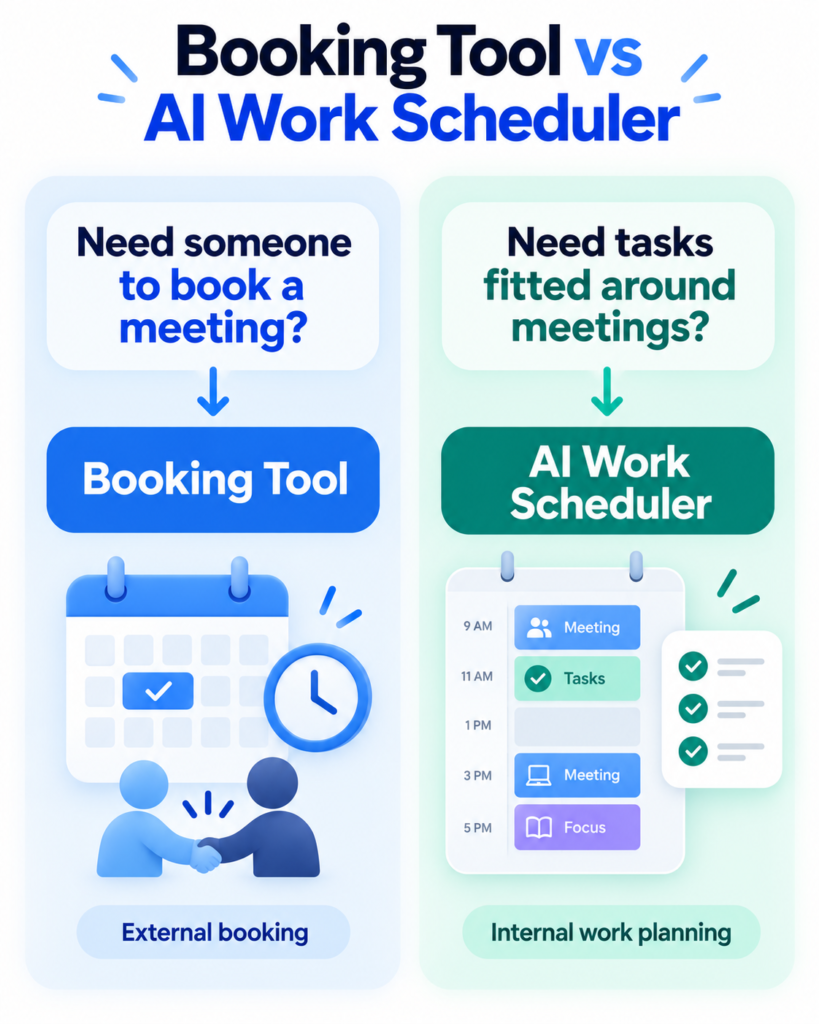
First Decide: Do You Need a Booking Tool or a Work Planner?
A lot of AI scheduling comparisons mix two separate jobs.
If your problem is:
“Clients keep emailing me to find a meeting time.”
You probably need a booking tool.
If your problem is:
“I have six tasks, four meetings and two deadlines, but no idea where the work will fit.”
You need an AI work scheduler.
A booking tool primarily manages other people entering your calendar.
An AI work scheduler manages what should happen in the time between those meetings.
Once a meeting happens, scheduling is no longer the main problem. If you need AI to capture the discussion, decisions and action items afterward, compare our best AI meeting notes generators.
Scheduling can reserve time for focused work, but it cannot stop distracting sites from taking over once that time begins. Our best focus apps and website blockers guide compares free, strict and cross-device ways to protect that scheduled time.
If the scheduling problem begins inside long email conversations, an inbox assistant may be more useful than another calendar tool. Our best AI email assistants for Gmail and Outlook comparison covers tools that summarize threads, suggest meeting times and prepare replies.
How We Researched These AI Scheduling Assistants
This is a research-based comparison, not a fake hands-on test.
We reviewed current vendor pricing, product documentation, scheduling behavior, calendar support, mobile access, integrations and significant 2026 product changes.
We focused on questions that affect the buying decision:
✅ Does the AI suggest a plan or automatically change it?
✅ Can it reschedule tasks when the day changes?
✅ Does it work with the calendar you already use?
✅ Does it require you to replace your current task or project system?
✅ Can you use it properly on mobile?
✅ Is there a useful free plan?
✅ Is the automation valuable enough to justify the subscription?
The Tool Sphera Scheduling Control Map
The easiest way to understand the category is to ask:
Who decides what happens on your calendar?
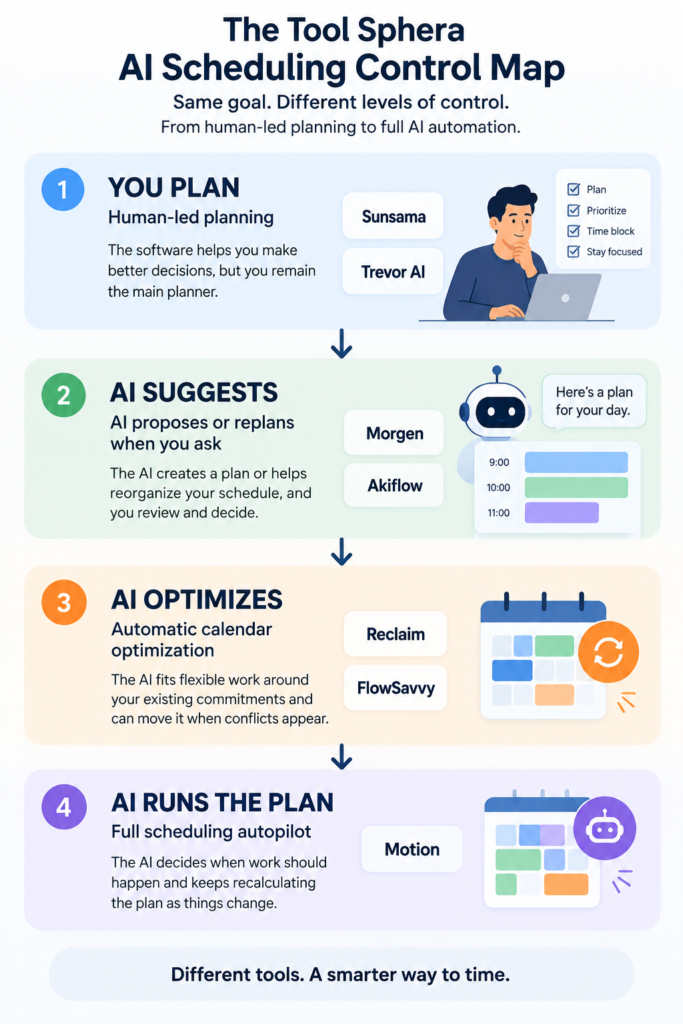
Level 1 — Human-Led Planning
Sunsama and Trevor AI
The software helps with planning, but you remain the main decision-maker.
This is better for people who dislike software moving work around without their involvement.
Level 2 — AI Proposes or Replans When You Ask
Morgen and Akiflow
Morgen creates a proposed plan that you review before saving.
Akiflow can optimize the remaining schedule when plans change, but it remains a more user-directed planning system than a continuously running autopilot.
Level 3 — Automatic Calendar Optimization
Reclaim and FlowSavvy
These tools automatically fit flexible work around existing commitments and move it when conflicts appear.
They are useful when you want less calendar maintenance without replacing your entire productivity stack.
Level 4 — Full Scheduling Autopilot
Motion
Motion goes furthest.
It uses deadlines, priorities, dependencies and availability to decide when work should happen and keeps recalculating the plan as conditions change.
That can be liberating if you want software to make scheduling decisions.
It can feel excessive if all you wanted was help protecting a few focus blocks.
The 7 Best AI Scheduling Assistants
🤖 Motion
🧠 Reclaim.ai
📅 Morgen
⚡ FlowSavvy
⚙️ Akiflow
☀️ Sunsama
🗓️ Trevor AI
1. Motion — Best for Full AI Scheduling Autopilot
Motion is the strongest fit when you want to stop planning the day manually.
Motion official site
Its AI Task Manager schedules work around deadlines, priorities, dependencies and available time, then reshuffles the plan when things change.
Motion also goes far beyond calendar scheduling. Its current Pro AI product includes projects, tasks, calendar, meetings, notes, docs and other work-management features.
That matters because Motion may replace parts of your existing productivity stack rather than simply sitting beside it.
Its Pro AI plan currently starts at $19 per seat/month when billed annually, with a free trial.
Motion pricing
If you already have a project system you like, compare our best project management software for freelancers before paying for another platform that overlaps heavily with it.
✅ Choose Motion if: you genuinely want AI to determine when work should happen and you like the idea of tasks, projects and scheduling living together.
❌ Skip Motion if: you want a free plan, want to approve every scheduling decision, or only need a lightweight calendar helper.
Verdict: 🤖 Best for full scheduling autopilot.
2. Reclaim.ai — Best for Protecting Focus Time Around Your Existing Calendar
Reclaim.ai is more of an intelligent calendar layer.
Reclaim official site
It can schedule and reschedule focus time, habits, tasks, buffers and meetings around the calendar you already use.
That makes it especially useful when your problem is:
“Meetings keep destroying the time I planned to work.”
Reclaim currently supports both Google Calendar and Microsoft Outlook.
Its Lite plan is free forever. Starter currently begins at $10 per seat/month when billed annually.
Reclaim pricing
There is one limitation worth knowing before you sign up:
⚠️ Reclaim still does not have native iOS or Android apps.
It provides a mobile-friendly web experience instead, while scheduled events remain accessible through your normal calendar app.
✅ Choose Reclaim if: you want to keep your existing calendar and productivity tools but want AI to protect and rearrange flexible time.
❌ Skip Reclaim if: a full native mobile app is essential or you want one platform to replace project management too.
Verdict: 🧠 Best calendar-first AI scheduling assistant.
3. Morgen — Best Balance Between AI Planning and Human Control
Morgen is the strongest option here for people who want AI to do the planning work without automatically committing every decision.
Morgen official site
Its AI Planner generates daily or weekly plans using available capacity, task importance, due dates and your preferred work structure.
The important part is Preview Mode.
You see the proposed schedule first. You can move tasks, remove suggestions or change the plan before approving it.
Morgen’s Frames feature also lets you define preferred blocks for things such as deep work, learning or meetings, giving the AI more context about how you want your week structured.
The individual plan currently costs $30 monthly or $15/month when billed annually, with a 14-day trial.
Morgen pricing
✅ Choose Morgen if: you want AI recommendations while keeping final control over your calendar.
❌ Skip Morgen if: you want the cheapest scheduler or completely hands-off automatic replanning.
Verdict: 📅 Best AI planning co-pilot.
4. FlowSavvy — Best Free and Budget Automatic Scheduler
FlowSavvy is simpler than Motion, and that is part of its appeal.
FlowSavvy official site
You give tasks durations, deadlines and scheduling rules. FlowSavvy finds time for them and automatically reschedules flexible tasks as your calendar changes.
Its Basic plan is free forever and currently includes unlimited auto-rescheduling, a two-week scheduling range, Google/Outlook/iCloud sync, and web, iOS and Android apps.
Pro costs $10/month when billed yearly or $14 monthly.
FlowSavvy pricing
✅ Choose FlowSavvy if: you want genuine automatic scheduling without Motion-level pricing or complexity.
❌ Skip FlowSavvy if: you need deep project-management or business-workspace features.
Verdict: ⚡ Best value for straightforward automatic scheduling.
5. Akiflow — Best for Integration-Heavy Power Users
Akiflow is designed for people whose tasks begin in many different apps.
Akiflow official site
It combines tasks, calendar, quick capture, integrations, time blocking, daily planning and its Aki AI assistant.
Its 2026 Schedule Optimizer can reflow the remaining day when tasks run long or plans change. Unlike Motion’s more continuous autopilot approach, Akiflow remains a system where the user is heavily involved in planning and optimization.
Pro currently costs $34 monthly or $19/month billed yearly, with a seven-day trial.
Akiflow pricing
✅ Choose Akiflow if: tasks come from several applications and you want fast capture, integrations and strong control over time blocking.
❌ Skip Akiflow if: you want AI to continuously manage the calendar for you.
Verdict: ⚙️ Best for power users with a connected productivity stack.
6. Sunsama — Best for Calm, Guided Daily Planning
Sunsama takes a deliberately less aggressive approach to automation.
Sunsama official site
Its core experience is guided daily planning:
Review → choose today’s work → estimate it → check workload → timebox it
That makes Sunsama a better fit for someone who believes planning itself is useful rather than something software should completely remove.
Current pricing is $22/month or $17/month billed yearly, following a 14-day free trial.
Sunsama pricing
✅ Choose Sunsama if: deliberate planning helps you avoid overcommitting and you want AI assistance rather than maximum automation.
❌ Skip Sunsama if: you want a free-forever plan or automatic continuous rescheduling.
Verdict: ☀️ Best for calm, human-led daily planning.
7. Trevor AI — Best Low-Cost AI Time-Blocking Assistant
Trevor AI is the lightweight option in this shortlist.
Trevor AI official site
It predicts task duration and shows AI scheduling suggestions inside the calendar.
Those suggestions do not become scheduled items until you accept them, so the final decision stays with you.
Trevor supports Google Calendar, Microsoft Calendar, iCloud and CalDAV-compatible services.
Its Free tier covers core personal use. Pro currently costs $5/month paid annually or $6 monthly.
✅ Choose Trevor AI if: inexpensive AI-assisted time blocking is enough and you prefer suggestions over automatic changes.
❌ Skip Trevor AI if: you need sophisticated project management or fully automatic workload replanning.
Verdict: 🗓️ Best low-cost AI planning assistant.
Motion vs Reclaim vs Morgen: Which One Should You Choose?
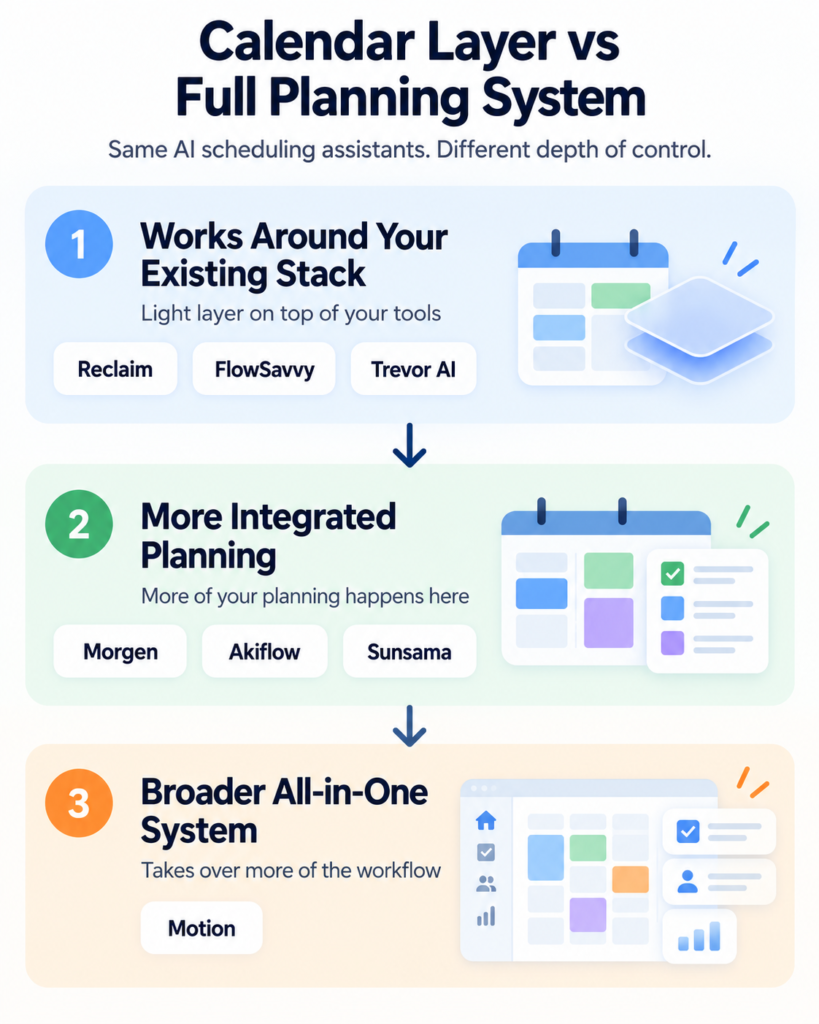
These three products are commonly compared, but they represent three different approaches.
Motion: choose it when you want the system to make scheduling decisions.
Reclaim: choose it when you already like your calendar and want AI to protect and optimize flexible time around it.
Morgen: choose it when you want AI to build the plan but want to review it before committing.
The easiest shorthand is:
Motion = AI decides
Reclaim = AI optimizes
Morgen = AI proposes
Is an AI Scheduling Assistant Worth Paying For?
A paid AI scheduler is not automatically better than Google Calendar.
It becomes valuable when it removes a recurring planning problem.
Paying makes more sense when:
✅ you regularly rearrange tasks after new meetings appear;
✅ deadlines compete for the same hours;
✅ focus time repeatedly disappears;
✅ you manage multiple calendars or task systems;
✅ planning and replanning itself consumes meaningful time.
A basic calendar may still be enough if your week is mostly fixed appointments and a small to-do list.
And scheduling time is different from measuring time.
If the real question is:
“Where did my billable hours go?”
rather than:
“When should I work on this?”
compare our best free time tracking apps for freelancers.
What Happened to Clockwise?
Clockwise should not appear as a current recommendation.
Its service stopped operating on March 27, 2026, when the Clockwise team moved to Salesforce’s Agentforce organization.
Some older 2026 comparisons still include it, which is one reason this category needs frequent revalidation.
For users who primarily used Clockwise to protect focus time around meetings, Reclaim is one of the closest current alternatives.
Frequently Asked Questions
What is the best AI scheduling assistant?
Motion is the strongest option if you want full automatic planning.
Reclaim is better if you want AI to optimize the Google or Outlook calendar you already use.
Morgen is better if you want an AI-generated plan that you approve before it is scheduled.
What is the best free AI scheduling assistant?
Reclaim and FlowSavvy both have useful free-forever plans.
Reclaim is stronger for focus time and calendar optimization.
FlowSavvy is especially attractive for automatic task scheduling and native mobile access.
Trevor AI also has a free tier for lighter AI-assisted time blocking.
Is Motion better than Reclaim?
Motion is more autonomous and more comprehensive. It combines project/task management with automatic calendar planning.
Reclaim is less expensive, has a free plan, and works more naturally as an optimization layer around an existing Google or Outlook calendar.
Is Morgen better than Motion?
Morgen is better when control matters because it lets you review the AI-generated plan first.
Motion is better when you want software to make and continually update scheduling decisions automatically.
Does Reclaim have a mobile app?
Reclaim currently does not have native iOS or Android apps.
Its interface is mobile-friendly, and Reclaim-created calendar events remain visible through Google Calendar or Outlook mobile.
Do I need an AI scheduler if I already use Calendly?
Possibly.
Calendly mainly solves meeting booking.
An AI work scheduler solves internal planning by finding time for tasks, focus work and deadlines around those meetings.
Final Verdict
The best AI scheduling assistant is not necessarily the one with the most automation.
It is the one with the right amount of automation for you.
🤖 Choose Motion if you want full autopilot.
🧠 Choose Reclaim if you want your existing calendar intelligently optimized.
📅 Choose Morgen if you want AI planning with approval.
⚡ Choose FlowSavvy if you want affordable automatic scheduling.
⚙️ Choose Akiflow if your tasks are scattered across multiple tools.
☀️ Choose Sunsama if deliberate planning works better for you than automation.
🗓️ Choose Trevor AI if you want a lightweight, inexpensive assistant.
Before paying, ask:
Do I want AI to suggest my schedule, optimize my schedule, or run the schedule? That answer will eliminate most of the wrong tools immediately.